Webhooks & API
Connect external systems to Wexio with inbound and outbound webhooks
Webhooks are the primary way to connect Wexio to any other system - payment providers, e-commerce platforms, CRMs, no-code tools, and your own backend. Wexio speaks both directions:
- Inbound - external systems POST JSON to a Wexio URL and your flows run in response.
- Outbound - Wexio POSTs JSON to your URL whenever something happens (contact created, message sent, flow reached a custom event).
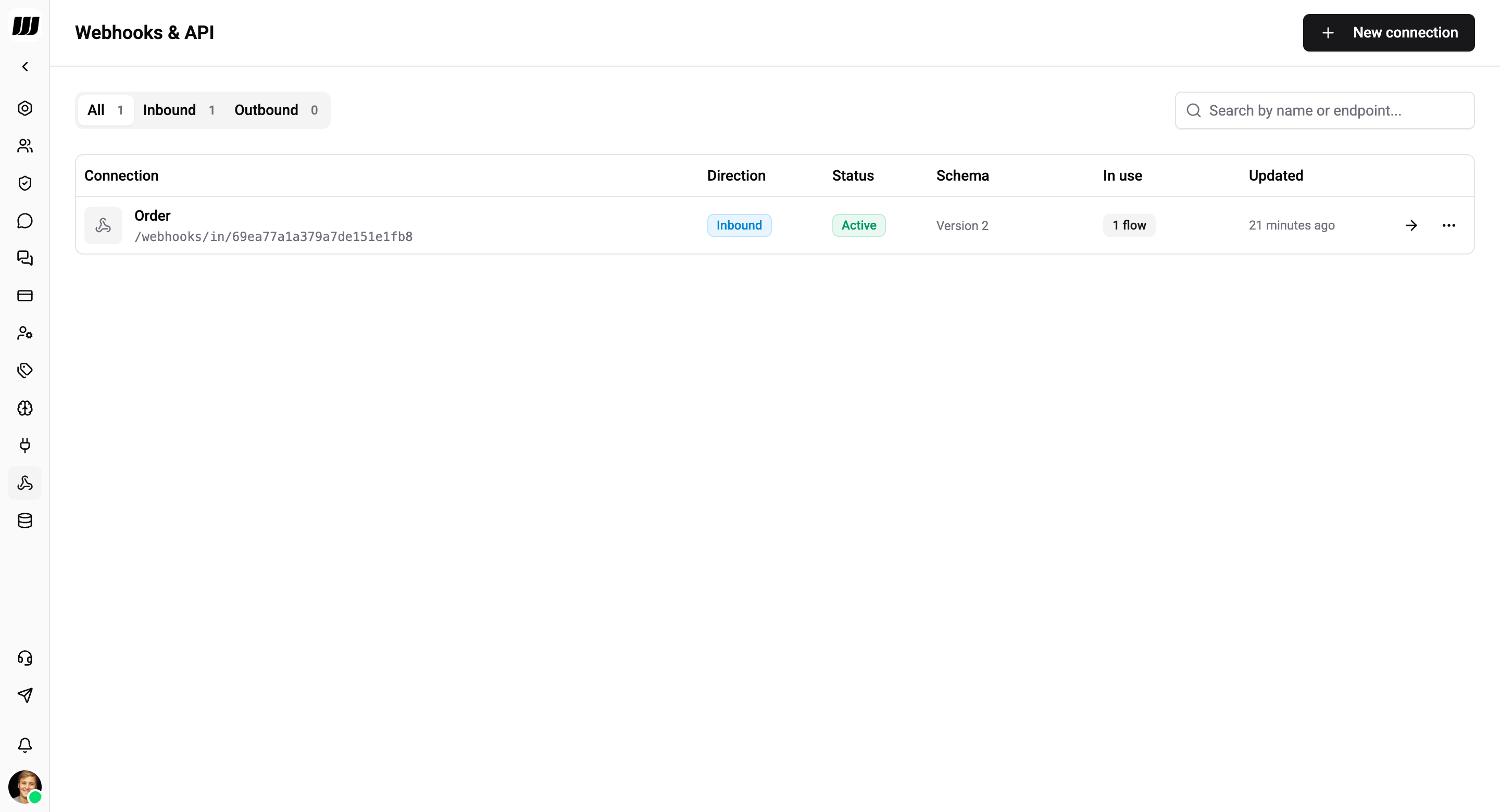
Access the Webhooks Page
The Webhooks & API page lives under Settings → Webhooks & API in the sidebar. It lists every inbound and outbound connection you've created, with status, schema version, and how many flows use each one.
Tap New connection to create one, or click a row to open the connection detail page.
Inbound vs Outbound
| Direction | Triggered by | Used for |
|---|---|---|
| Inbound | An external system hitting a Wexio URL | Start a flow when something happens outside Wexio - new payment, new form submission, a Zap completed, a webhook relay from Make/n8n |
| Outbound | Something happening inside Wexio | Notify external systems of events - contact created, chat opened, message delivered, a flow reaching a custom checkpoint |
You can have as many connections as you want, combine directions freely, and wire the same inbound connection into multiple flows.
The Two Setup Paths
Inbound path
- Create an inbound connection - Wexio generates a unique URL and a signing secret.
- Configure authentication - pick Shared Secret (default), or a provider-specific mode (Stripe, Slack, Svix, Paddle, Revolut, Generic HMAC).
- Configure contact resolution - how to map the incoming payload to a Wexio contact (Chat ID, Phone, Channel User ID, or Email).
- Capture a sample payload - press "Capture schema" and send one test request; Wexio learns the field shape and populates the variable picker.
- Bind a flow trigger - add a Webhook Received trigger on any flow and pick the connection.
See Inbound Webhooks for the full walkthrough.
Outbound path
- Create an outbound connection - paste the URL you want Wexio to POST to.
- Configure authentication - none, Bearer token, Basic auth, or HMAC signing.
- Subscribe to events - pick which domain events (contact.created, message.outbound.created, flow.*) you want delivered.
- Optional - emit custom events from flows - drop an Outbound Webhook Event card into any flow to emit
flow.<your-name>events mid-flow.
See Outbound Webhooks for the full walkthrough.
Platform Integrations
Wexio has native authentication modes for 30+ popular services - no proxy through n8n/Zapier required. Presets prefill the auth fields so you paste your signing secret and go.
Make.com
Bridge Make scenarios to Wexio flows
Zapier
Connect any Zap to Wexio
n8n
Self-hosted automation with Wexio
Stripe
Payments, subscriptions, invoices
Paddle
Paddle Billing v2 notifications
Revolut
Revolut Business webhooks
Slack
Events API, slash commands, interactivity
GitHub
PR events, issues, deploys
Shopify
Orders, carts, products
Clerk & Svix providers
Clerk, Resend, Orb, Knock, Dub, Humanloop
Custom HMAC
Any provider that signs with HMAC-SHA256
Full integration catalog
All supported platforms at a glance
Observability
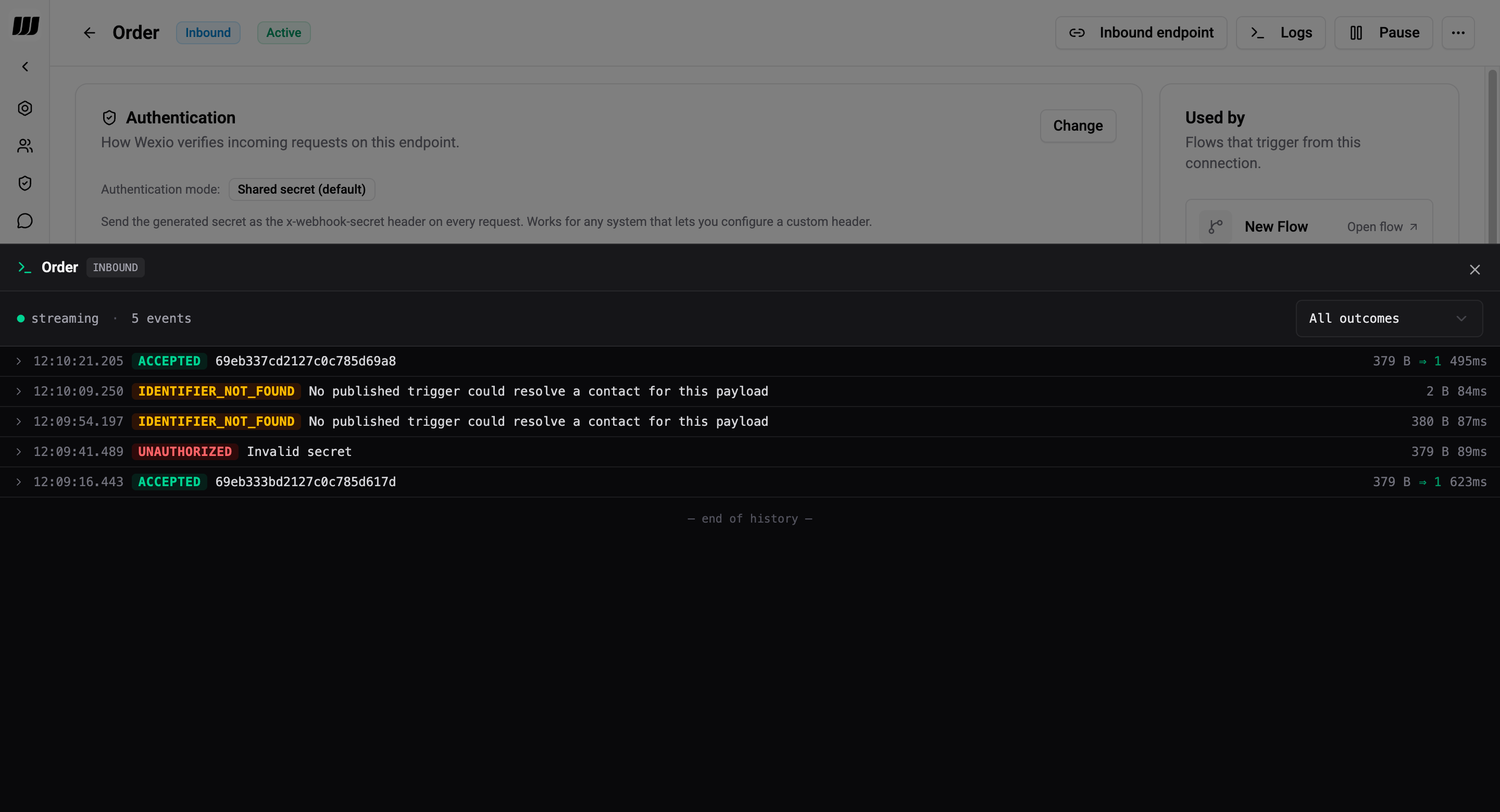
Every inbound request and every outbound delivery attempt is logged for 30 days. See Webhook History - both the browse UI and the live-tail subscription are accessible from the connection detail page.
Limits & Defaults
| Limit | Value |
|---|---|
| Inbound payload size | 100 KB |
| History retention | 30 days (inbound + outbound) |
| Outbound retry attempts | Configurable per environment (default 5, exponential backoff) |
| Outbound delivery logs | One row per attempt |
| Idempotency key window | Value of X-Idempotency-Key is deduplicated within the retention cache |