Ops Usage
Understand how operations are consumed across Wexio
Operations (ops) are the unit of measurement for activity in Wexio. Each action that processes or sends messages consumes ops from your monthly allocation.
What Are Operations?
Your plan includes a monthly ops allocation that resets at the start of each billing cycle. Every message sent or received, every flow card executed, and every CRM sync consumes ops from this allocation.
Message Operations
| Action | Ops Cost |
|---|---|
| Receive a message | 1 |
| Send a message (manual) | 1 |
| Send a message (bot/flow) | 1 |
| Send a message (AI) | 1 |
Flow Card Operations
When a flow executes, each card that sends a message or performs an action consumes ops.
Basic Cards - 1 op each
| Card | Description |
|---|---|
| Text | Send a text message |
| Button | Send a message with buttons |
| Media | Send a photo or video |
| Audio | Send an audio file |
| Document | Send a document |
| Question | Ask a question and wait for response |
| Flow | Trigger another flow |
| Update Contact | Update a contact profile field |
| WhatsApp Template | Send an approved WhatsApp template |
| WhatsApp Catalog | Send a catalog |
| WhatsApp Product | Send a single product |
| WhatsApp List Message | Send a list message |
| Assign Operator | Assign the conversation to an operator |
| Outbound Webhook Event | Emit a custom flow.* webhook event |
| Wait | Pause the flow |
| Reply to Comment | Reply to a social post comment |
Advanced Cards - 2 ops each
| Card | Description |
|---|---|
| Media Button | Message with media + buttons |
| Audio Button | Audio with buttons |
| Document Button | Document with buttons |
| AI Text | AI-generated dynamic content |
| AI Classification | Classify a message into one of your categories |
| AI Agent | Run an autonomous agent step |
| AI Text to Speech | Generate spoken audio |
| Conditional | Branching logic evaluation |
| Fetch | External API request |
| Wait Timeout | Wait for a reply with a timeout branch |
CRM Card - 1 op per field
The CRM Card updates fields in your connected CRM during flow execution. Each field updated costs 1 op.
| Fields Updated | Ops Cost |
|---|---|
| 1 field | 1 |
| 3 fields | 3 |
| 5 fields | 5 |
No-Cost Cards - 0 ops
| Card | Description |
|---|---|
| Note | Internal note (not sent to contact) |
| Ghost | Placeholder for flow structure |
| Order | Order handling - no message is sent |
Cards that send nothing cost nothing. That is the rule behind this table: an internal note, a structural placeholder and an order step consume no ops, while every card that puts a message on a channel costs at least one.
CRM Sync Operations
CRM import and export operations consume ops based on the number of contacts and field mappings.
| Operation | Formula |
|---|---|
| Export to CRM | contacts × (0.2 × fields) |
| Import from CRM | contacts × (0.3 × fields) |
Import costs more than export because it requires validation, deduplication, and field transformation. Only successfully synced contacts are charged - failed records don't consume ops.
Export Examples
| Contacts | Field Mappings | Ops Cost |
|---|---|---|
| 10 | 30 | 60 |
| 100 | 10 | 200 |
| 500 | 5 | 500 |
Import Examples
| Contacts | Field Mappings | Ops Cost |
|---|---|---|
| 100 | 10 | 300 |
| 500 | 20 | 3,000 |
| 1,000 | 30 | 9,000 |
AI Ops
All AI features - both AI Auto-Reply and AI Copilot - use a unified token-based billing model. AI usage is tracked as AI Ops and counted against your plan's AI limit.
How AI Ops Are Calculated
AI ops consumed = tokens used × token cost rateToken cost rates vary by model tier:
| Model Tier | Rate (per token) | 1,000 tokens = | Example Models |
|---|---|---|---|
| Economy | 0.0004 | 0.4 AI ops | GPT-4.1 Mini, GPT-4.1 Nano |
| Standard | 0.0008 | 0.8 AI ops | GPT-4.1, Claude Sonnet |
| Premium | 0.0015 | 1.5 AI ops | GPT-4.5, O1, Claude Opus |
Example Costs Per Action
| Action | Model Tier | ~Tokens | AI Ops |
|---|---|---|---|
| Fix grammar / simplify text | Economy | ~300 | 0.12 |
| Suggest reply with context | Economy | ~800 | 0.32 |
| Suggest reply with context | Standard | ~800 | 0.64 |
| Summarize conversation | Economy | ~1,500 | 0.6 |
| AI auto-reply (with history) | Economy | ~1,200 | 0.48 |
| Custom prompt (long) | Premium | ~2,000 | 3.0 |
AI Limits by Plan
AI limits scale with your plan's ops limit:
| Plan | Ops | AI Limit |
|---|---|---|
| Free | 100 | 0 |
| Standard 10K | 10,000 | 1,000 |
| Standard 80K | 80,000 | 8,000 |
| Pro 10K | 10,000 | 1,000 |
| Pro 1M | 1,000,000 | 100,000 |
| Pro 2M | 2,000,000 | 200,000 |
| Enterprise | Custom | Custom |
What Counts as AI
Both auto-reply and copilot share the same AI ops pool:
- AI Auto-Reply - Bot sends AI-generated responses to contacts
- AI Copilot - Operators use suggest reply, translate, summarize, tone change, etc.
Assistants using your own API key (BYOK) are not counted against your AI limit - you pay the provider directly.
Understanding Ops Consumption
Flow Execution Example
1. Text Card: "Welcome!"             → 1 op
2. Button Card: "Choose an option"   → 1 op
3. Conditional Card: Check selection → 2 ops
4. Text Card: "You selected X"      → 1 op
                              Total: 5 ops
AI Conversation Example
1. Contact sends message  → 1 op (receive)
2. AI generates response  → 1 op (send) + AI ops
                    Total: 2 ops + AI ops
Important Notes
- Ops are charged when messages are sent - if a Question Card is waiting for input, ops are charged when the question is displayed, not when the response is processed.
- Re-processing doesn't double-charge - if a contact provides invalid input and the same question is shown again, it's only charged once per actual message sent.
- Failed operations - if a card fails to execute, ops are not charged for the failure.
Ops Limits by Plan
| Plan | Monthly Ops |
|---|---|
| Free | 100 |
| Standard | 10,000 – 80,000 |
| Pro | 10,000 – 3,000,000 |
| Enterprise | Custom |
What Happens When You Run Out
It depends on your plan.
Free plan - a hard stop.
- Flows stop executing
- AI responses are disabled
- Manual inbox messages still work (with a warning)
- Upgrade, or wait for the cycle to reset
Paid plans - usage credit, if you opt in.
Standard, Pro and Enterprise can switch on overage: instead of stopping when the included ops run out, work continues and the extra is billed as usage credit.
| You set a budget | A spending cap for the period. Work continues until the budget is reached, then stops. |
| Rates follow your plan | The per-unit rate is derived from your plan's price and its included limits - a bigger plan has a cheaper marginal unit. |
| Ops and AI count separately | Each is measured against its own limit, so exceeding one does not spend the other's allowance. |
| Minimum budget | There is a minimum budget, and a small headroom allowance above it. |
Overage is opt-in and only on paid tiers. If you have not enabled it, a paid plan behaves like the hard stop above. Set the budget deliberately - it is the only thing between a runaway flow and a bill.
Do Unused Ops Roll Over?
No - ops reset at the start of each billing cycle.
Monitoring Usage
You can track your ops and AI ops consumption in two places:
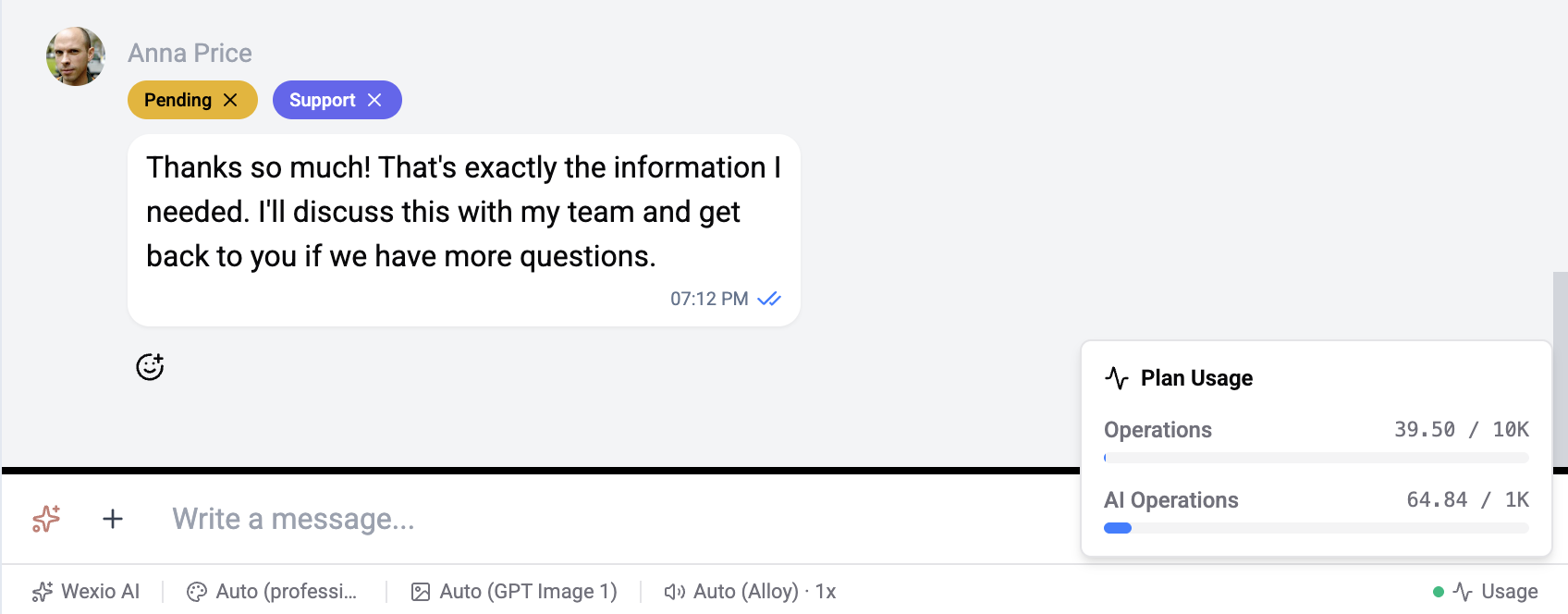
Inbox - Live Usage Widget
Click the Usage button in the bottom-right corner of the inbox to see a live summary of your current usage:
- Operations - current ops used out of your plan limit (e.g. 39.50 / 10K)
- AI Operations - current AI ops used out of your AI limit (e.g. 64.84 / 1K)
This updates in real time as messages are sent and received.
Settings - Billing Page
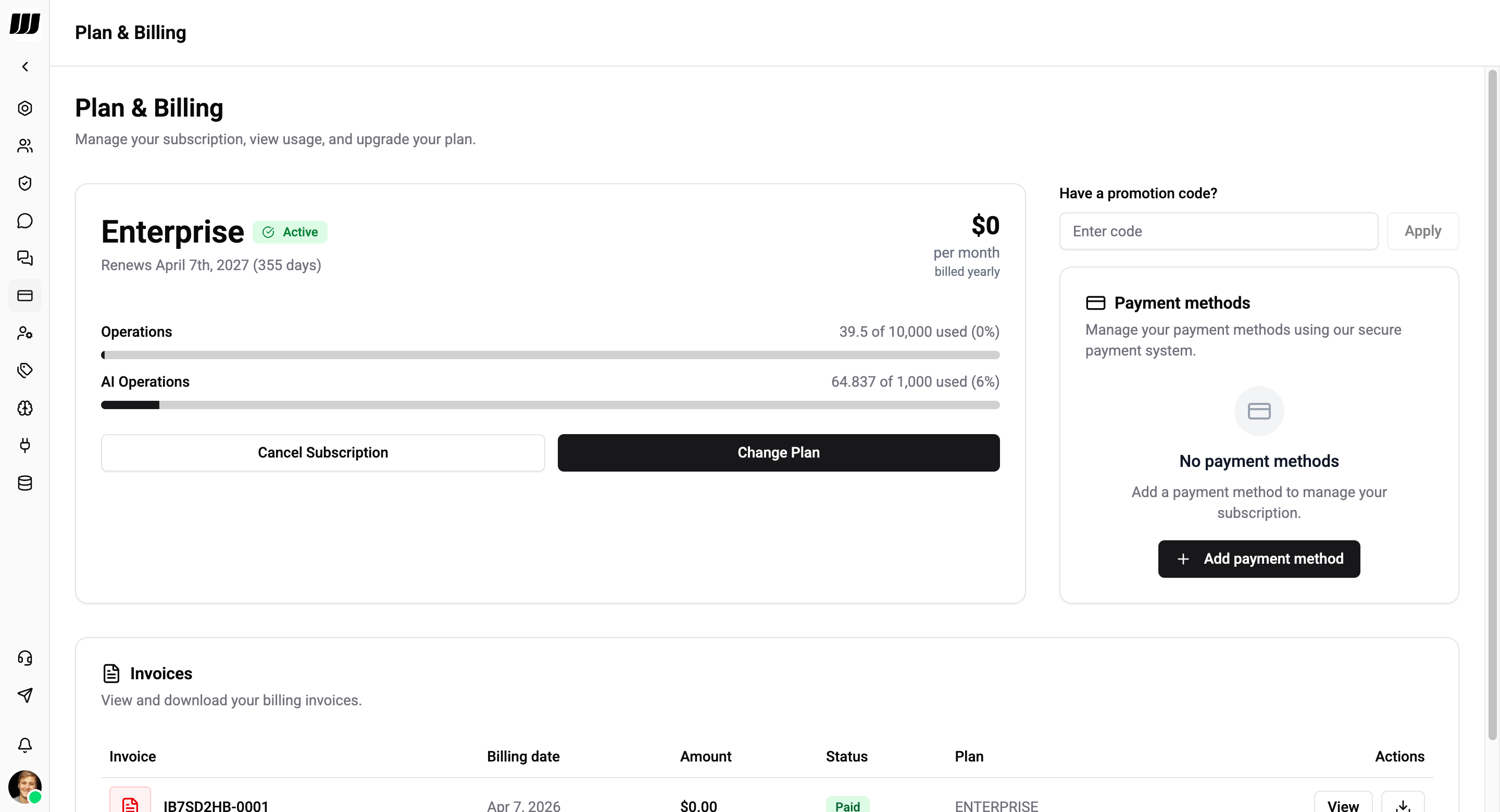
Go to Settings → Billing for a full overview of your subscription and usage:
- Plan name and status (Active)
- Renewal date and days remaining
- Operations progress bar - used vs. allocation with percentage
- AI Operations progress bar - used vs. allocation with percentage
- Change Plan or Cancel Subscription actions
Optimizing Ops Usage
Combine Messages
Use one message with multiple lines instead of multiple Text Cards.
❌ Inefficient (4 ops):
  Text Card → "Hello"
  Text Card → "How can I help?"
  Text Card → "Please choose:"
  Button Card → [Options]

✅ Efficient (1 op):
  Button Card → "Hello! How can I help?\nPlease choose:" + [Options]
Other Tips
- Use conditional logic wisely - place Conditional Cards strategically to avoid unnecessary message sends
- Optimize AI usage - AI responses consume both ops and AI ops; use them where they add the most value
- Choose the right AI model tier - Economy models cost significantly less AI ops than Premium models for routine tasks