Audience Filter
Define who receives a broadcast with a list of profile conditions
The audience is the set of contacts the broadcast will fire for. It is defined by a list of profile conditions ANDed together, edited in Step 1 - Audience of the wizard.
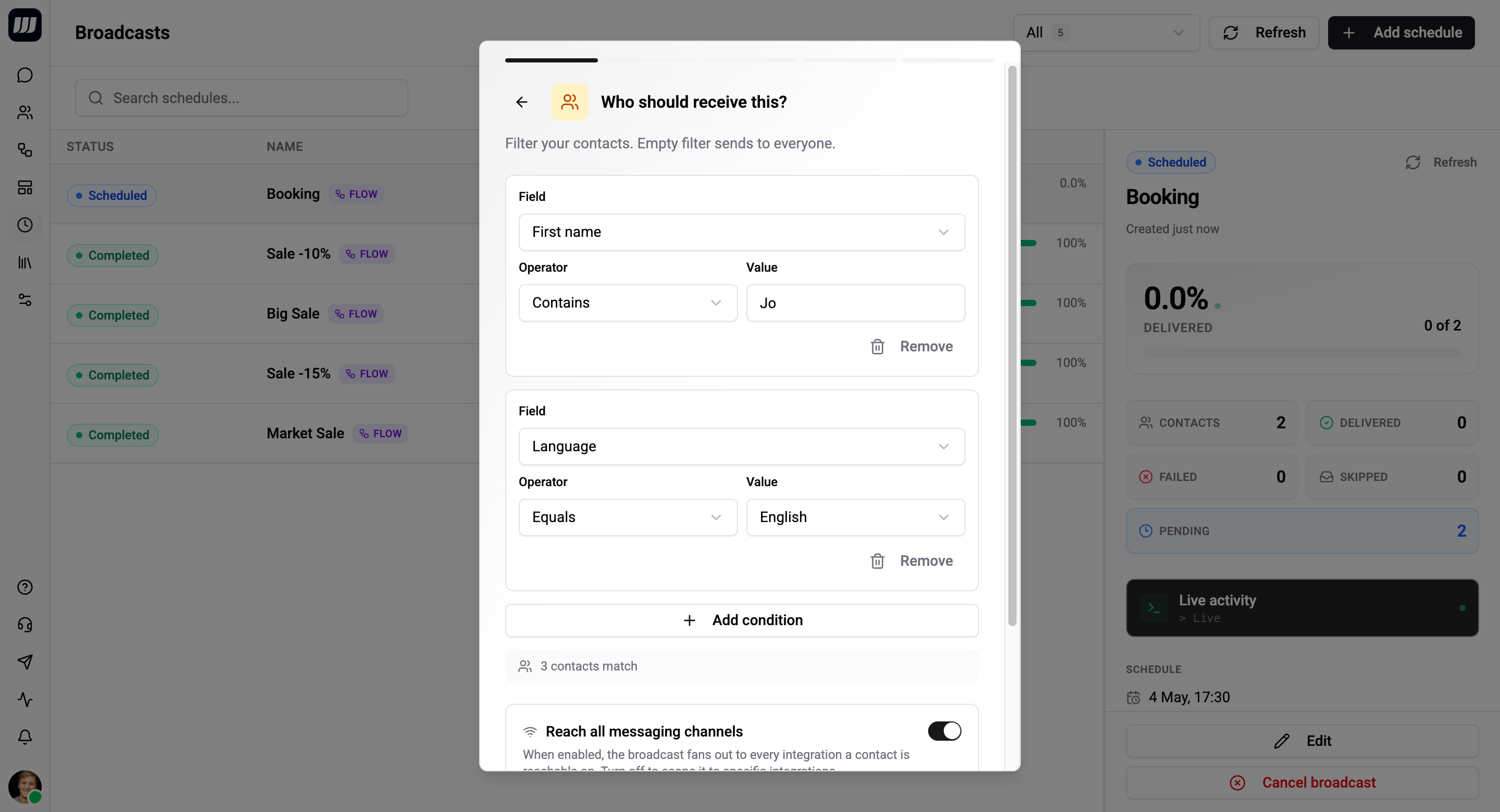
Filter Shape
Each condition is a triplet:
fieldKey operator value- fieldKey - any field on a person: a system field (
tags,country,language,lastSeenAt,firstSeenAt, etc.) or a custom field defined by your org. - operator - see the table below.
- value - the comparison value. Ignored for
IS_EMPTYandIS_NOT_EMPTY.
Conditions are joined with AND - every one must match for a contact to be included.
There is no OR connector in v1. To express OR semantics, create separate broadcasts (one per branch) or restructure the data so the same tag/field is set for all relevant contacts.
Empty filter
If you add no conditions, the audience is every contact in the organisation. This is occasionally what you want (org-wide announcement) - most of the time you'll want at least one condition like optedOut NOT_EQUALS true or language EQUALS en.
Operators
| Operator | Applies to | Notes |
|---|---|---|
EQUALS | Any | Exact match. Strings are case-sensitive. |
NOT_EQUALS | Any | Inverse of EQUALS. |
CONTAINS | String, array | Substring match for strings, membership for arrays (e.g. tags). |
NOT_CONTAINS | String, array | Inverse of CONTAINS. |
STARTS_WITH | String | Prefix match. |
ENDS_WITH | String | Suffix match. |
IN_ARRAY | Any | Field's value is one of the listed values. |
NOT_IN_ARRAY | Any | Field's value is not in the listed values. |
GREATER_THAN | Number, date | Strict >. |
GREATER_THAN_OR_EQUAL | Number, date | >=. |
LESS_THAN | Number, date | Strict <. |
LESS_THAN_OR_EQUAL | Number, date | <=. |
IS_EMPTY | Any | Field is missing, null, empty string, or empty array. No value needed. |
IS_NOT_EMPTY | Any | Field has a non-empty value. No value needed. |
MATCHES_REGEX | String | Full regex match. Use sparingly - slow on large directories. |
Common Field Examples
| Field | Use case | Example |
|---|---|---|
tags | Audience segments | tags CONTAINS "vip" |
language | Localisation | language EQUALS "en" |
country | Geographic targeting | country IN_ARRAY ["ES", "PT"] |
firstSeenAt | Recency cohorts | firstSeenAt GREATER_THAN "2026-04-01" |
lastSeenAt | Re-engagement | lastSeenAt LESS_THAN "2026-03-01" |
| Custom fields | Domain logic | subscriptionTier EQUALS "pro" |
Custom fields are listed alongside system fields in the field picker. Define them in People → Custom Fields.
Live Preview Count
While you edit, the wizard shows a count next to the filter - "≈ 1 284 contacts match".
- The query runs against your current people directory.
- It's debounced (300ms) so it doesn't fire on every keystroke.
- For template-mode broadcasts, the preview accounts for template routes - only contacts whose chat is on one of your route integrations are counted, since the rest can't receive the template anyway.
- It's an estimate, not a guarantee. The actual fan-out is computed at fire time.
The number is also shown on the broadcast detail page as long as the broadcast is SCHEDULED, so you can revisit it without re-opening the wizard.
Estimate vs Actual
The broadcast stores two audience numbers:
| Field | When it's set | What it represents |
|---|---|---|
audienceSizeEstimate | At save time | The live preview count when you confirmed the wizard |
audienceSizeActual | At fire time | The count produced by re-running the filter against the live directory |
After firing, the detail page shows both side-by-side so you can spot drift:
Estimated: 1 284 · Actual: 1 251 (delta −33)
A delta is normal - contacts can be added, removed, or have their fields change between save time and fire time.
Re-evaluation Semantics
The filter runs at fire time, not at save time.
| Change between save and fire | Effect |
|---|---|
| Contact created that matches the filter | Included. |
| Contact deleted or archived | Excluded. |
| Contact's field changed and now matches | Included. |
| Contact's field changed and no longer matches | Excluded. |
This is "everyone currently tagged X on Apr 30" semantics - almost always what you want for marketing-style sends. If you need a frozen audience, capture the contact IDs into a custom field at save time and filter on that.
Capacity
There's no hard limit on audience size - broadcasts of 100 000+ contacts work. The wizard shows a soft warning above ~100k recommending you tighten the filter, but the save still succeeds.
The dispatcher streams the audience in pages (default 500 contacts per page) so memory stays flat regardless of audience size. Per-batch concurrency is bounded so providers don't get overwhelmed; rate-limit responses are absorbed automatically with exponential back-off.
Targeting Specific Contacts (Power-User)
For advanced flows that already know exactly which contacts to target - typically retryFailedContacts or external orchestration - the audience can be a hand-picked list of contact IDs. This bypasses filter resolution entirely. It's used internally by Retry Failed Contacts and is exposed via the API but not via the standard wizard.