Live Collaboration
Two operators on the same chat working together in real time - shared cursors, presence avatars, live co-edited composer, AI and contact typing indicators
Open the same customer chat as a teammate and you'll see each other live. Their avatar appears in the chat header next to yours, a coloured caret with their name floats wherever they're typing, and the composer mirrors your edits in real time. Either of you can hit Send. The other sees the spinner so no one double-replies.
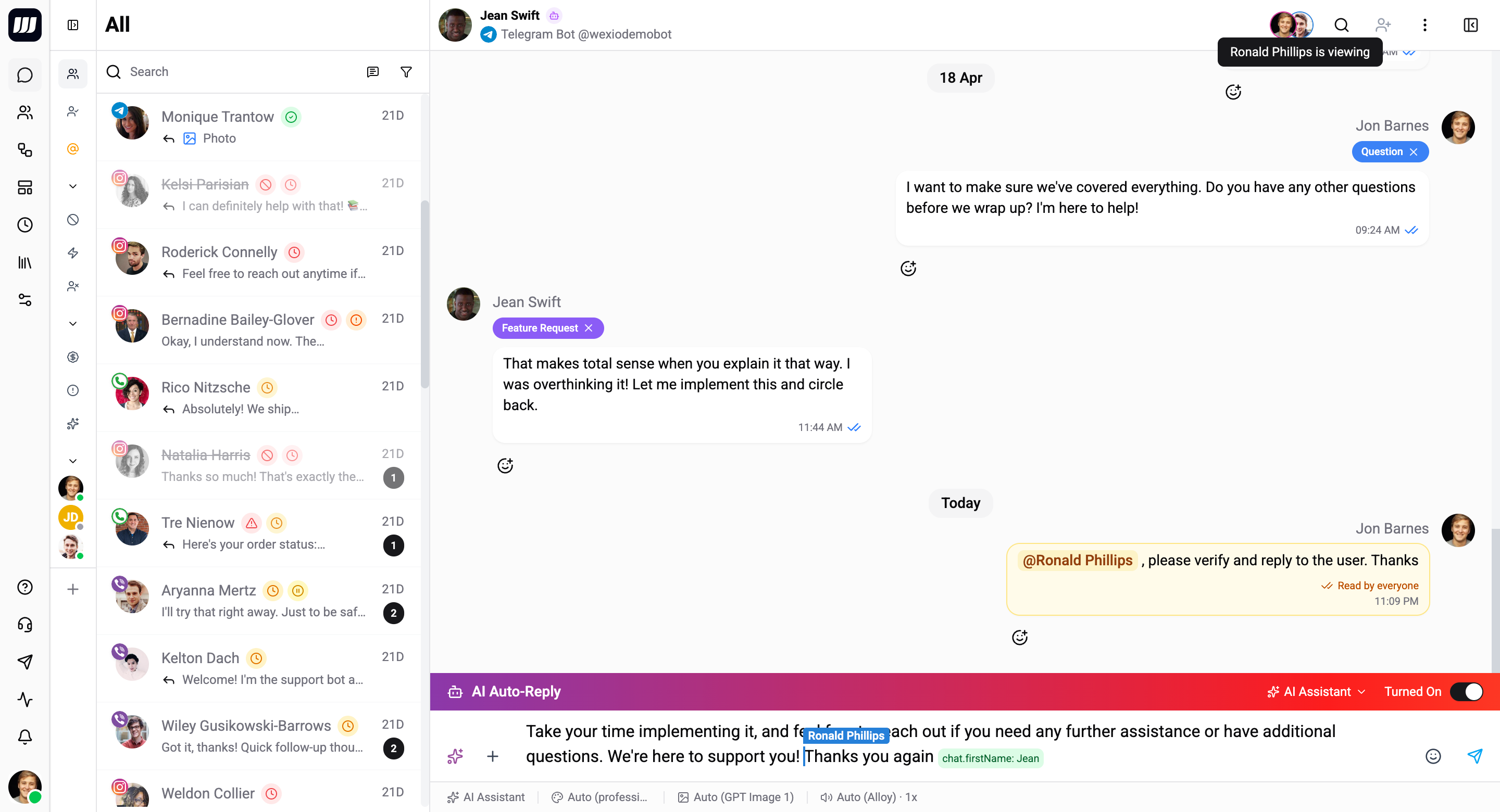
It works the moment a second operator opens the chat. Nothing to enable.
Plan availability. The live co-editor - shared cursors, multiplayer drafts, presence avatars - is on Pro and above. On Free and Standard the composer stays single-user, but every other collaboration signal here (AI typing bubble, contact typing, @mentions and internal notes) works on every plan.
What Gets Shared
| Surface | What syncs |
|---|---|
| Composer text | Both can edit at the same time - keystrokes interleave naturally without conflicts. (Same engine Google Docs uses.) |
| Attachments | Files, images, voice recordings, TTS-generated audio. Add one, both see it. Remove via × on either tab, both clear. |
| Reply / edit context | Clicking Reply to on a customer message sets the context for both operators. Same for editing your own message. |
| AI activity | When one of you runs an AI action - Generate image, Translate, Custom Prompt - the other's composer shows the placeholder ("Generating image…", "Translating…", etc.) so they know to wait. |
| Send / submit state | When one of you submits, both spinners show until the message lands. Prevents double-sends. |
Walkthrough - Two Operators, One Chat
Imagine Alice and Bob both open the conversation with a customer:
- Alice opens the chat. Just her avatar in the header.
- Bob opens the same chat. Both avatars now show in the header. Alice notices Bob has joined.
- Alice starts typing "Hi, here's our refund policy…" - Bob's composer shows the same text, with a small floating label saying "Alice" at the cursor position.
- Bob attaches a screenshot of the customer's order. The attachment appears in Alice's composer too.
- Alice records a voice note. Bob's send button shows "Recording…" so he knows not to interrupt.
- Bob hits Send. Both their send buttons show the spinner. The message goes out once. Both composers clear together.
Whatever one of you does, the other sees instantly.
Presence Avatars in the Chat Header
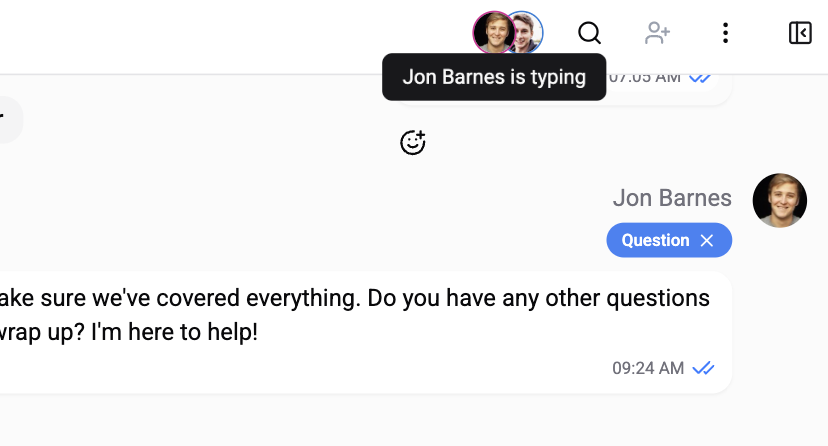
When a teammate opens the same chat, their avatar joins yours in the chat header. When they close the tab or navigate away, the avatar disappears immediately - no 30-second lag where their ghost lingers.
| Behavior | Detail |
|---|---|
| Hover an avatar | Shows the teammate's name and current activity (viewing / typing / recording / running AI). |
| Same operator, two tabs | Wexio dedupes by user ID - you won't see two of yourself in the avatar stack or two cursors with your name. |
| No hard limit | Every operator who has the chat open participates. In practice 2–4 is most common for tricky tickets. |
Shared Cursors and Selections
Inside the composer, each connected operator has a coloured caret with their name. Selections render with the same colour. Cursor position updates in real time as the operator moves around or selects text.
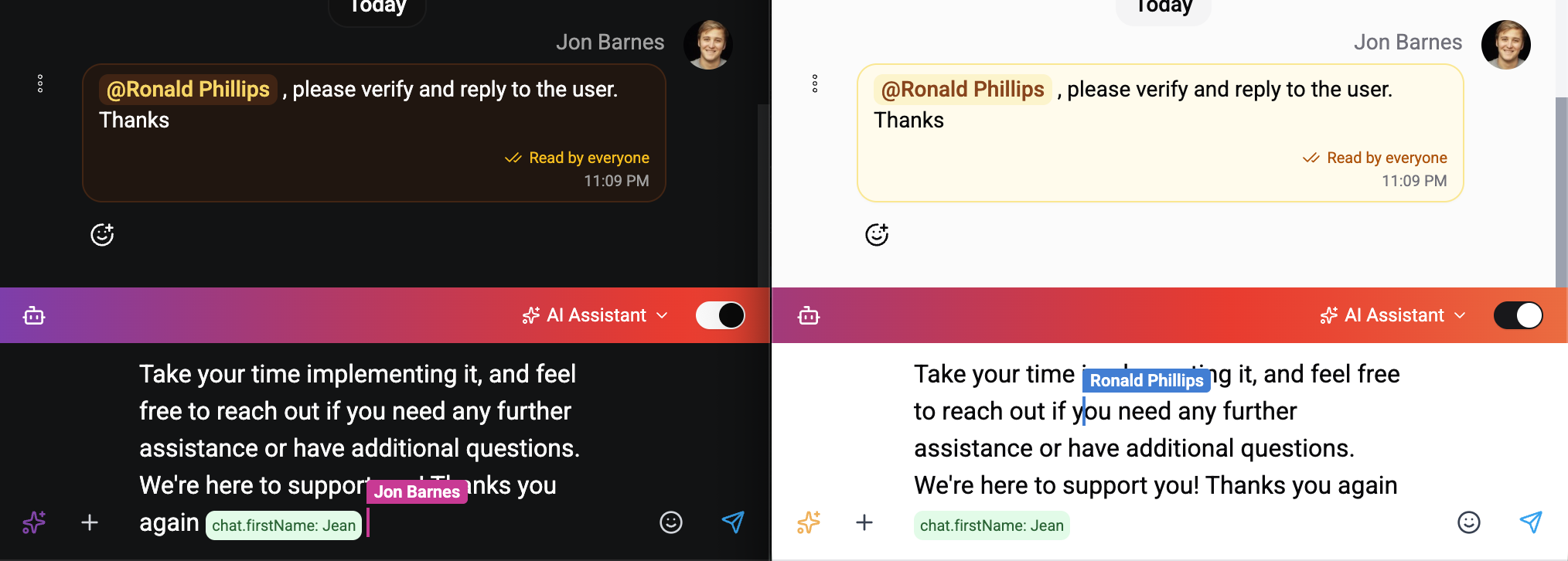
This is the same primitive Google Docs and Linear use - a CRDT-based approach where concurrent edits at different positions interleave correctly, never losing characters or producing surprising merges.
Activity Awareness
The composer surfaces what your teammate is doing right now:
| Activity | What you see |
|---|---|
| Typing | Floating label with their name at their cursor position. |
| Recording audio | Voice-note button shows the live state on both sides. |
| Uploading media | Attachment row shows the upload progress. |
| Running an AI action | The AI placeholder (e.g. "Generating image…") appears for both. |
| Submitting | Both send buttons spin until the message lands. |
You can take over any of these - if your teammate started recording but stepped away, you can stop the recording from your side. The state syncs both ways.
"AI is typing…" Bubble
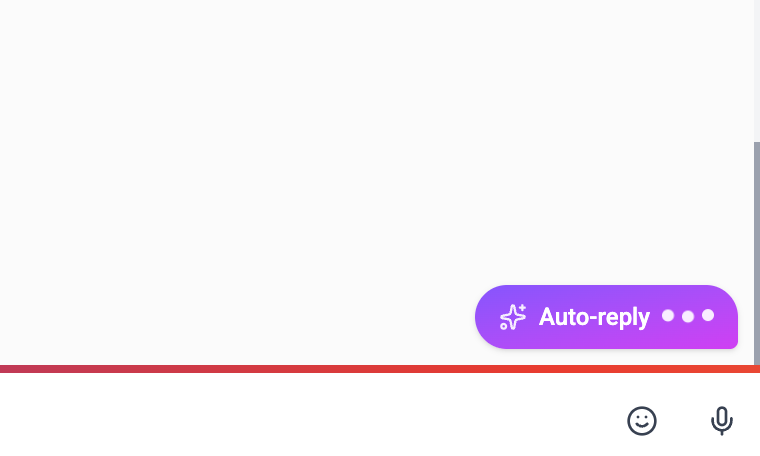
Whenever an AI is generating a response on a chat - auto-reply, AI Agent card, AI Text card, or AI Classification card - every operator viewing sees an "AI is typing…" bubble.
| Detail | Behavior |
|---|---|
| Source | Bubble shows which AI surface is generating (auto-reply, AI Agent, AI Text, AI Classification). |
| Late joiner | If you open the chat while the AI is mid-generation, the bubble appears immediately - Wexio reads the current state, not just live events. |
| Available on every plan | The bubble works for every chat regardless of plan or provider. |
For supported messaging channels, this also propagates outbound to the contact's app - see Provider Typing Relay below.
"Contact is typing…" Bubble
When the contact is actively typing in their messaging app and the provider tells us, a separate "Contact is typing…" bubble would appear in the inbox.
No provider currently delivers typing webhooks for bot integrations. Telegram, WhatsApp Cloud, Instagram, and Viber Bot APIs don't emit them today - so this bubble doesn't surface in production right now. Wexio's infrastructure is wired end-to-end (Redis state, GraphQL query + subscription, late-joiner snapshot recovery), so the day any of these providers ships typing webhooks for bots, hooking them up is a one-liner and the bubble lights up automatically.
Provider Typing Relay
When an AI is generating or you're typing into the composer, Wexio can relay a "… is typing" indicator back to the contact's messaging app for providers that support it:
| Provider | Outbound typing | Detail |
|---|---|---|
| Telegram | ✓ | Native "Bot is typing…" indicator at the top of the contact's chat. Re-tickered every 4 seconds while generation runs. |
| ✓ | Native typing indicator. | |
| WhatsApp Cloud | - | Provider doesn't expose a typing action. The contact sees nothing different; the operator UI still shows everything. |
| Viber | - | Bot API doesn't expose typing actions. Same as WhatsApp Cloud. |
Operator UI is identical regardless of the provider - what changes is whether the contact-side indicator lights up. The relay is throttled per chat (at most once every 5 seconds per chat) so a provider rate limit can never be triggered by typing alone.
Multiple Tabs, Same Operator
If you have the same chat open in two tabs (or two devices), Wexio recognises it's still you. You won't see two of yourself in the presence avatars or two cursors with your name. The dedup is by user ID, so multi-device sessions stay clean.
When a Teammate Closes Their Tab
The moment they close the tab or navigate away:
- Their avatar disappears from the chat header.
- Their cursor disappears from the composer.
- The "Alice is typing…" indicator (if active) clears.
- Their attachments and any text they added remain in the shared draft - you can keep editing or send as-is.
We hook into the browser's pagehide event for an immediate, clean exit - no 30-second lingering "ghost" presence.
Reconnect & Refresh
If your internet drops mid-message:
| Scenario | Recovery |
|---|---|
| Brief disconnect | Local state preserved. On reconnect, the editor catches up automatically - your unsent draft is still there, plus anything your teammate added while you were offline. |
| Browser refresh within ~1 hour | Reconnect reloads the shared draft from the server snapshot. Your text is back, plus any edits from teammates. |
| Refresh after long inactivity (room evicted) | The room expired after 1 hour with no connections. You see an empty draft - start fresh. |
Does the Customer See Anything?
No. All collaboration is invisible to the customer. They only see the final message that gets sent. Typing indicators, cursors, shared drafts - none of that crosses the provider boundary (WhatsApp, Telegram, Instagram, Viber).
The two contact-side surfaces - the outbound provider typing relay and the inbound contact typing bubble - are the only places collaboration overlaps with the messaging provider, and even those are limited to providers that explicitly support typing actions.
Plan Gating Detail
| Surface | Tier |
|---|---|
| Yjs co-editor (shared draft, presence avatars, shared cursors, multi-operator typing) | Pro+ |
| AI typing bubble | All tiers |
| Contact typing bubble (no provider delivers webhooks today; surfaces automatically when one does) | All tiers |
| Provider typing relay (Telegram / Instagram outbound) | All tiers |
| @Mentions and internal notes | All tiers |
What a Free / Standard operator sees: a normal single-user composer, the AI typing bubble, the "Contact is typing…" bubble (when the provider supports it), and full mentions support. They don't see other operators' avatars in the header or shared cursors in the composer.
Upgrading flips on the live co-editor without any configuration - the moment two operators on a Pro+ org open the same chat, presence avatars and shared cursors appear.
FAQ
How many operators can collaborate on one chat at once? There's no hard limit - every operator who has the chat open participates. In practice 2–4 is most common for tricky tickets.
What happens if my internet drops mid-message? Your local state is preserved. When you reconnect, the editor catches up automatically - your unsent draft is still there, plus anything your teammate added while you were offline.
Can I work on a chat solo and ignore the collaboration features? Yes. If no one else has the chat open, the editor behaves exactly like a normal single-user composer. The collaboration UI only surfaces when there's actually a teammate present.
I'm on Free / Standard - what do I see?
The composer falls back to single-user mode. You won't get shared cursors, live drafts, or presence avatars, but @mentions and internal notes still work the same way - type @, pick a teammate, send. They get the notification, click through, and reply on their own. Upgrading to Pro flips on the live multiplayer side without any configuration.
Is this slower than the old single-user editor? No noticeable difference. The collaboration runs over a separate WebSocket from the chat itself, so the message-send latency is unchanged.
Does this work for AI-generated content? Yes. If your teammate runs the AI Copilot to draft a reply, the streaming text appears in your editor too as it's generated. You can edit it together before sending.
Why don't I ever see "Contact is typing…"? None of the messaging providers we support - Telegram, WhatsApp Cloud, Instagram, Viber - currently deliver typing webhooks for bot integrations. Wexio's infrastructure is wired up to surface the bubble; it lights up the moment any provider ships typing for bots.
Why don't WhatsApp contacts see "Bot is typing…"? Because the WhatsApp Cloud API doesn't expose a typing action. Telegram and Instagram do, so contacts on those channels see the native indicator while you or an AI are composing. The operator UI is unchanged regardless.
Related
- Mentions & Internal Notes - tag a teammate when you need them; works on every plan.
- Chat Editor - composer features (text, attachments, audio, AI actions, templates).
- AI Copilot - the in-chat AI bar whose generation drives the typing bubble.