Localization
33 UI locales, locale strategy, runtime language switching, and content fallback
The widget ships 33 UI locales. Your own content (greetings, prechat labels, messenger title) renders as you wrote it. The widget chrome (buttons, system strings) is translated automatically.
Locale Strategy
localeStrategy decides which language a visitor sees by default:
| Strategy | Behaviour |
|---|---|
AUTO (default) | Follow the visitor's navigator.language. |
WEBSITE | Follow the host page's html lang attribute. |
DEFAULT | Pin every visitor to defaultLocale. |
Set it under Languages in the Widget settings, or pass it in the embed config.
Languages Settings
Open Languages in the Content group of the Widget settings.
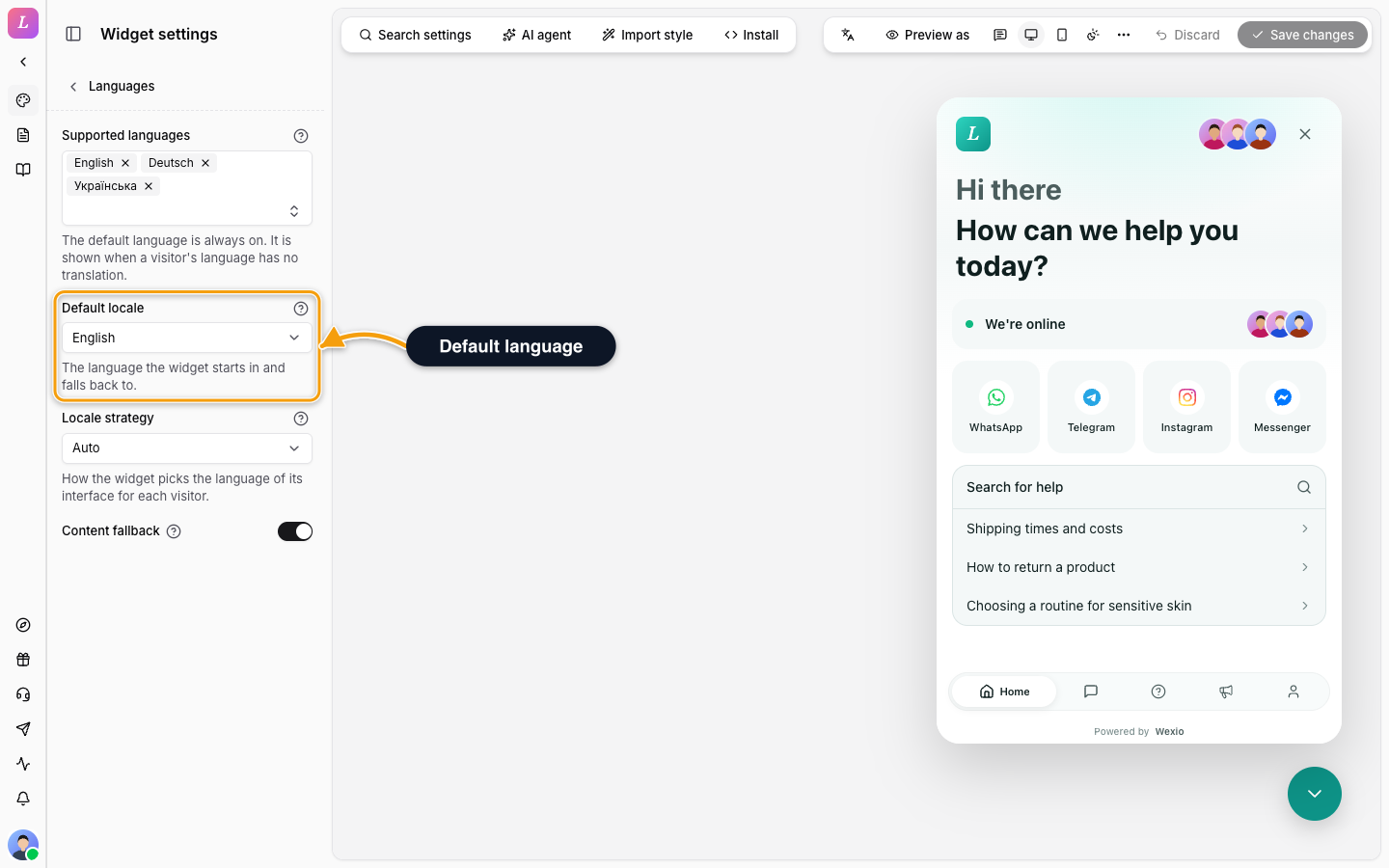
| Setting | What it does |
|---|---|
| Supported languages | The languages the widget speaks. Search and add one at a time. The default language (English for a new widget) is always on and is shown when a visitor's language has no translation. |
| Default locale | The language the widget starts in and falls back to. You pick it from the supported languages. |
| Locale strategy | Auto follows the visitor's browser. Match the website follows the language of the host page. Default language is always the default language. |
| Content fallback | Show untranslated articles and news in the default language instead of hiding them. On for a new widget. Interface texts always fall back. |
With more than one language, an Editing language menu appears in the toolbar above the preview. Every text field then edits that language, and the preview shows it. In the default language you edit the base text. In another language an empty field shows the default text. See Messenger and Home for the texts you can translate.
Effective Locale Resolution
The widget resolves a visitor's active locale in this priority order:
- The visitor's Profile-tab language pick (when the Profile tab is enabled).
- A host pin - Web Component only:
<wexio-widget locale="...">. - A
?lang=URL parameter on the host page. - The
wexio-localecookie, which holds an earlier?lang=or Profile-tab pick. - The operator's
localeStrategy.WEBSITEreads the host pagelang,DEFAULTpinsdefaultLocale. - The visitor's
navigator.language. en.
The result is normalised against the supported list. A region-tagged code (en-US, pt-BR, zh-TW) matches exactly first. Otherwise it falls back to the base language, and finally to en.
navigator.language | Resolves to |
|---|---|
en-US | en-US (exact) |
en-AU | en (base) |
pt-BR | pt-BR (exact) |
pt-PT | pt (base) |
zh-TW | zh-TW (exact) |
xx-YY | en (default) |
Pinning a Locale per Embed
| Embed | How |
|---|---|
| Web Component | <wexio-widget public-key="pk_live_..." locale="pt-BR">. Changing the attribute live re-renders without unmounting. |
| Script loader | No attribute; inject ?lang=… into the host page URL and the loader forwards it. |
| React | No public prop; uses the operator strategy plus the visitor's Profile-tab override. |
Live Language Switching
When a visitor changes their language in the Profile tab, the widget swaps message bundles in place, with no reload and no remount. The choice is written to a cookie. For identified visitors it is also saved to their profile, so it carries across sessions.
Content Fallback
Two settings govern translated content (help articles, news):
| Setting | Effect |
|---|---|
supportedLocales | An allow-list of content languages. Empty means no filtering. |
contentLocaleFallback | When true (default), an untranslated item shows the defaultLocale version. When false, it shows a "not translated" empty state. |
The 33 Supported Locales
en (default), en-US, en-GB, uk, de, es, es-MX, fr, it, nl, pt, pt-BR, sv, da, no, fi, pl, cs, sk, tr, ro, hu, el, ar, he, hi, th, vi, id, ja, ko, zh, zh-TW.
Related
- Web Component - the
localeattribute. - Reference: Configuration - the
localeStrategyand locale fields. - Messenger - write the copy that gets translated.