People
Customer database and contact management
The People section is your customer relationship database - a central place to manage all contacts who interact with your business through any connected channel.
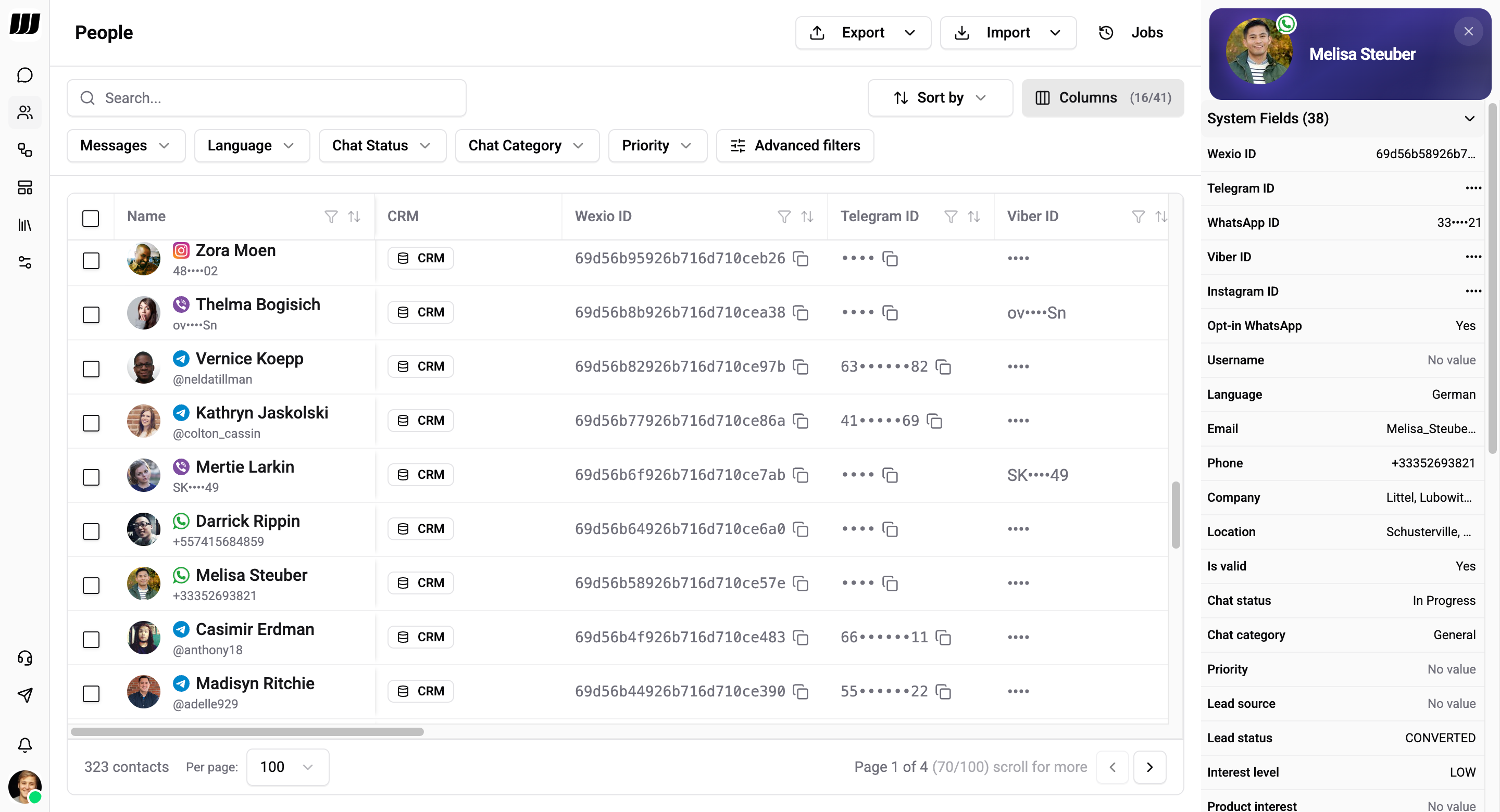
One row is one person. When the same human reaches you on several channels, Wexio can fold those rows into a single contact that keeps every conversation and every field value. A merged row shows the channel identities behind it, and the merge can be undone. See Merging contacts and Splitting contacts.
Table
The People table displays all contacts with powerful data management features.
Columns
Configure which columns are visible via the Columns button:
- Toggle individual column visibility
- Pin columns to left or right (up to 3 per side)
- Name, CRM status, and actions are always visible
- Column preferences are saved per workspace
Search
The search bar performs full-text search across contact fields with instant results.
Filtering
Quick filters appear as dropdowns above the table:
- Messages - Filter by message count
- Language - Contact's preferred language
- Chat Status - Pending, In Progress, Resolved, Closed, Issue
- Chat Category - Support, Sales, Feedback, General, Inquiry
- Priority - Low, Medium, High, Urgent
Advanced filters open a multi-condition filter builder with operators per field type:
| Field type | Operators |
|---|---|
| Text | Equals, Contains, Not contains, Starts with, Ends with, Is empty, Is not empty |
| Number | Equals, Greater than, Less than, Greater or equal, Less or equal, Is empty |
| Date | Equals, Before, After, Between, Is empty, Is not empty |
| Boolean | Equals, Is empty |
| Enum/Array | In, Not in, Is empty, Is not empty |
Sorting
Click any column header to sort ascending or descending. Sort state persists in the URL.
Pagination
- Page sizes: 10, 25, 50, 100
- Virtual scrolling for smooth navigation
System Fields
Every contact has built-in system fields (38 by default). Click a contact row to open the profile sidebar:
Identity
| Field | Description |
|---|---|
| Wexio ID | Unique ID in Wexio (read-only) |
| Telegram ID | Telegram user ID (read-only) |
| WhatsApp ID | WhatsApp phone ID (read-only) |
| Viber ID | Viber user ID (read-only) |
| Instagram ID | Instagram user ID (read-only) |
| Username | Messaging platform username |
| Contact email address | |
| Phone | Phone number |
Profile
| Field | Description |
|---|---|
| Opt-in WhatsApp | Whether contact opted in |
| Language | Preferred language |
| Company | Company name |
| Location | Contact location |
| Is valid | Whether the contact is valid |
| Is blocked | Whether the contact is blocked |
Chat & Classification
| Field | Description |
|---|---|
| Chat status | Pending, In Progress, Resolved, Closed, Issue |
| Chat category | Support, Sales, Feedback, General, Inquiry |
| Priority | Low, Medium, High, Urgent |
| Lead source | Where the lead came from |
| Lead status | Lead lifecycle stage |
| Interest level | Low, Medium, High |
| Product interest | Product or service interest |
Activity Metrics (read-only)
| Field | Description |
|---|---|
| Registration date | When the contact was created |
| Total messages sent | Messages sent by contact |
| Total messages received | Messages received by contact |
| Last message sent at | Timestamp of last outbound message |
| Last message received at | Timestamp of last inbound message |
| Last seen at | When contact was last active |
| First message received at | Timestamp of very first message |
| Total flows started | Number of flows triggered |
| Total flows completed | Number of flows finished |
| Flow completion rate | Percentage of completed flows |
| Last flow completed | When the last flow finished |
| Total AI messages sent | AI-generated messages count |
| Total bot messages sent | Bot messages count |
| Total user messages sent | Operator messages count |
Custom Fields
Beyond system fields, you can define your own fields to track business-specific data. See Custom Fields for details. For CRM field synchronization, see CRM Sync.
Contact Profile Sidebar
Click any contact to open a profile sidebar showing all system fields, custom fields, and values. Fields with ••• are masked for privacy - click to reveal.
Actions
Row Actions
Each contact row has an actions menu (•••) for individual operations.
Bulk Operations
Select multiple contacts with checkboxes to perform bulk actions:
- Bulk delete - Delete selected contacts (requires permission)
See Bulk Operations for export and import.
Export & Import
Export
- Formats: CSV, Excel, JSON
- Modes: Selected contacts, all contacts, or filtered results
- Optional field value inclusion
Import
Contacts can be imported via CRM integrations (HubSpot, Salesforce, BigQuery). Direct file import is not currently supported.
Jobs
The Jobs button opens a dedicated page to track all async operations. See Jobs for details.
CRM Integrations
People integrates with CRM platforms for manual import and export. CRM status appears as a badge per contact in the table.
| Integration | Description |
|---|---|
| HubSpot | Contact sync with OAuth and field mapping |
| Salesforce | Contact synchronization with custom field mapping |
| BigQuery | Export data for analytics and reporting |
CRM integrations require the Pro plan or higher. Configure them in Settings → Integrations.