Version History
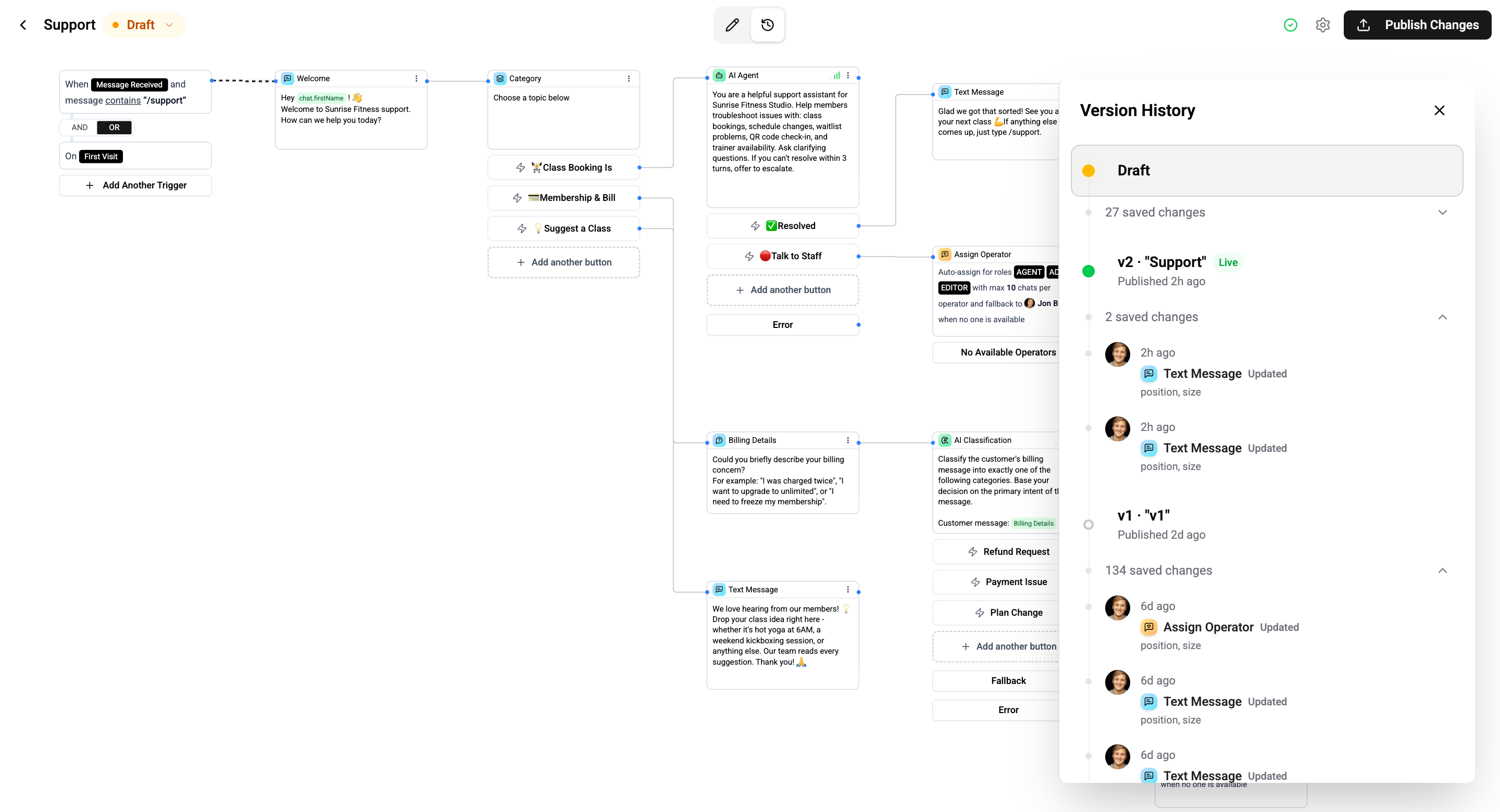
Browse, compare, and restore previous flow versions
Wexio tracks every change to your flow through two complementary systems: versions (published snapshots) and activities (individual edit audit log). Together they provide full history and rollback.
Key Concepts
Versions
- Immutable snapshots created each time you publish
- Contain a full copy of all cards, connections, triggers, and settings
- Each version has a sequential number (v1, v2, v3, …)
- One version can be marked as Live - the one the bot is executing
- You can switch to any version to restore it
Activities
- Immutable audit log entries - one per mutation
- Record: who made the change, what the change was, and when it happened
- Each activity stores a full post-mutation snapshot of the flow
- Activities with
versionNumber: nullare draft edits (not yet published) - When you publish, all draft activities are stamped with the new version number
- You can restore draft to any activity's snapshot
Draft
- The live, editable state where all your changes happen
- The bot never executes the draft - only published versions run
hasUnpublishedChangesistruewhen the draft differs from the live version
Version History Panel
Open the version history panel from the toolbar or header. The panel shows three sections:
Live
The currently published version (if the flow is published). Shows version number, publish date, and who published.
Draft
Current unpublished work. Shows a list of draft activities (recent edits) with options to Reset Draft or Discard Changes.
Previous Versions
A paginated list of all past published versions. Each entry shows:
| Field | Description |
|---|---|
| Version number | e.g., v1, v2, v3 |
| Label | Optional label set at publish time (e.g., "Holiday campaign") |
| Published by | Who published the version |
| Published at | When the version was published |
Publishing
When you click Publish, Wexio:
- Validates the flow (checks for disconnected cards, empty flows, etc.)
- Creates an immutable snapshot of the current draft (all cards, triggers, settings)
- Saves it as a new version with the next version number
- Makes that snapshot the live version - the bot starts executing it immediately
- Stamps all draft activities with the new version number
- Sets
hasUnpublishedChangestofalse
You can optionally add a label and description when publishing to help identify the version later.
After publishing, you can continue editing the draft. Your edits won't affect the live version until you publish again.
Unpublishing
Unpublishing a flow:
- Stops the bot from executing it - no new triggers fire
- Clears the published snapshot
- Does not remove version history - all versions are preserved
- Does not touch the draft - your edits remain intact
- Active conversations are allowed to complete gracefully
Switching to a Previous Version
Click the Restore button on any version to switch to it. This is a combined operation that:
- Replaces the draft - All current cards and triggers are replaced with the version's snapshot
- Makes it live - The version becomes the published snapshot the bot executes
- Discards draft activities - Unpublished draft editing history is removed
Switching to a version replaces your current draft. If you have unpublished changes, you'll see a warning dialog - confirm before proceeding.
Version numbers always increment. Switching to v1 doesn't "go back" - it means "use v1's content as the current state." The next publish after switching to v1 will create v5 (or whatever the next number is).
Restoring Draft from an Activity
You can also restore the draft to the state captured at any specific activity. Unlike version switching, this only changes the draft - the published (live) version remains unchanged.
After restoring from an activity:
- The draft is replaced with the activity's snapshot
hasUnpublishedChangesbecomestrue- The bot continues running the current live version
- You must publish separately to make the restored state live
Activity Log
The activity log records every mutation with a descriptive action:
| Action | Description |
|---|---|
| Card Added | New card added to the flow |
| Card Updated | Card content or settings modified |
| Card Deleted | Card removed from the flow |
| Card Restored | Soft-deleted card restored |
| Cards Bulk Deleted | Multiple cards removed at once |
| Cards Bulk Restored | Multiple soft-deleted cards restored at once |
| Trigger Added | New trigger added |
| Trigger Updated | Trigger configuration changed |
| Trigger Deleted | Trigger removed |
| Flow Settings Updated | Title, description, timeout, or other settings changed |
| Flow Published | New version published |
| Flow Unpublished | Flow deactivated |
| Version Switched | Reverted to a previous version |
Each activity entry includes the actor (user or AI assistant), the action, relevant details (e.g., card title, changed fields), and a timestamp.