Lifecycle & Cancellation
Statuses a broadcast moves through, what's editable when, and how to cancel
A broadcast moves through five statuses from create to terminal. Knowing which status it's in tells you what actions are available and what the engine is doing.
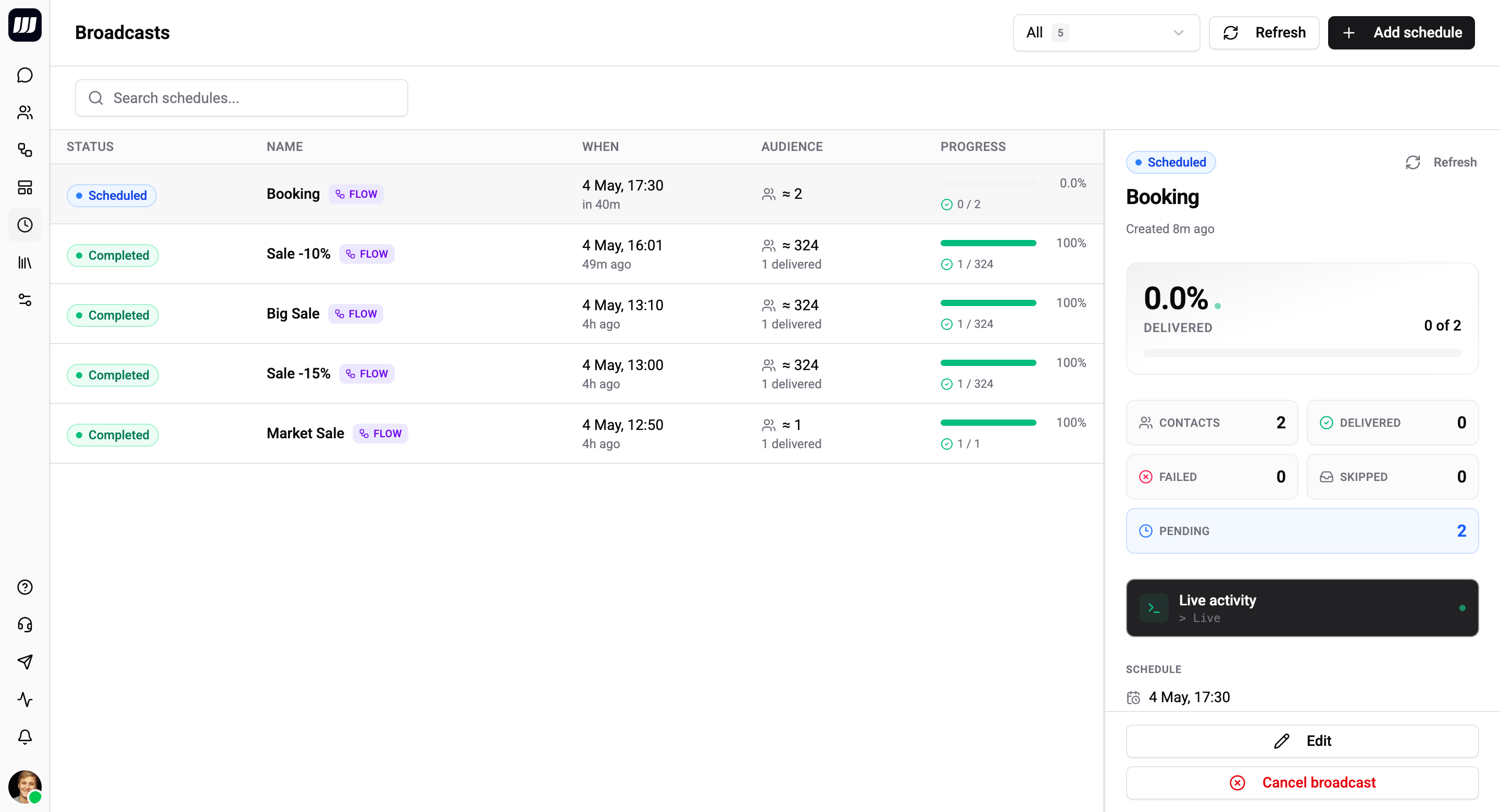
Status Reference
| Status | Meaning | Editable? | Cancellable? |
|---|---|---|---|
SCHEDULED | Persisted, waiting for fire time | ✓ | ✓ |
SENDING | Worker has picked it up; dispatch in flight | - | ✓ (best-effort, see below) |
COMPLETED | All contacts processed; counters finalised | - | - |
CANCELLED | Cancelled before or during firing | - | - |
FAILED | The broadcast itself failed (not individual contacts) | - | - |
       create             firing tick           all contacts done
       ──────▶ SCHEDULED ─────────▶ SENDING ───────────────▶ COMPLETED
                  │                    │
                  │ cancel             │ sweeper rescue / missed-window
                  ▼                    ▼
             CANCELLED              FAILED
SCHEDULED
The broadcast is persisted and counts against your plan quota. The detail page shows the audience preview, scheduled time, and a countdown.
You can edit any field - name, send-kind, schedule, audience, channels, fallback. You cannot switch send-kind from Flow to Template (or vice versa) once saved; that's a different broadcast.
You can cancel any time. Cancellation is immediate and safe.
SENDING
The scheduler tick has fired and the dispatch pipeline is fanning out. The detail page shows live-updating counters (sent, delivered, failed, skipped). The history table prepends rows as contacts are processed.
You cannot edit schedule, audience, or payload - partial dispatch is in flight and edits would produce inconsistent results across the audience.
You can request cancellation, but semantics are best-effort:
- Already-dispatched contacts stay dispatched (they were already sent; we can't unsend).
- Contacts not yet dispatched are skipped at the next contact boundary.
- The processor checks the broadcast's status before claiming each contact, so cancellation propagates within seconds.
This is the right semantics for push-style delivery - there's no "rollback" once a message is at the provider. Cancellation just means "stop dispatching new messages."
COMPLETED
All contacts have been processed (every audience member ended up in one of DELIVERED, FAILED, or SKIPPED).
The detail page shows final counters and the full history table. There's nothing to edit, cancel, or retry at the broadcast level - but you can retry just the failed contacts into a new broadcast.
CANCELLED
Terminal state. Set when the user cancelled either before fire time (SCHEDULED → CANCELLED) or during dispatch (SENDING → CANCELLED).
If cancelled during SENDING, partial counters are preserved - already-dispatched contacts stay in their outcome (DELIVERED / FAILED), and remaining contacts are recorded as SKIPPED. Per-contact rows show whether each one made it before cancellation took effect.
FAILED
Terminal state. Set when something goes wrong with the broadcast as a whole, not with individual contacts. The failureReason field explains which:
failureReason | When | What to do |
|---|---|---|
MISSED_WINDOW | Worker picked up the broadcast more than 5 minutes after scheduledAt. The broadcast did not fire. | Use the Retry button to reschedule with the same audience and payload. |
WORKER_STALLED | Worker crashed mid-dispatch and the sweeper rescued the broadcast with zero successful sends. | Investigate worker health (logs, alerts). Retry to re-attempt. |
ALL_BATCHES_FAILED | Every batch the worker tried to dispatch errored out (provider down, all integrations invalid, etc.). | Check integration health and re-run after fixing. |
Per-contact failures (FAILED outcome on individual rows) do not put the broadcast into FAILED. The broadcast can COMPLETE with every contact failed - that's a successful broadcast that produced bad outcomes, which is what Retry Failed Contacts is designed to redrive.
Cancellation
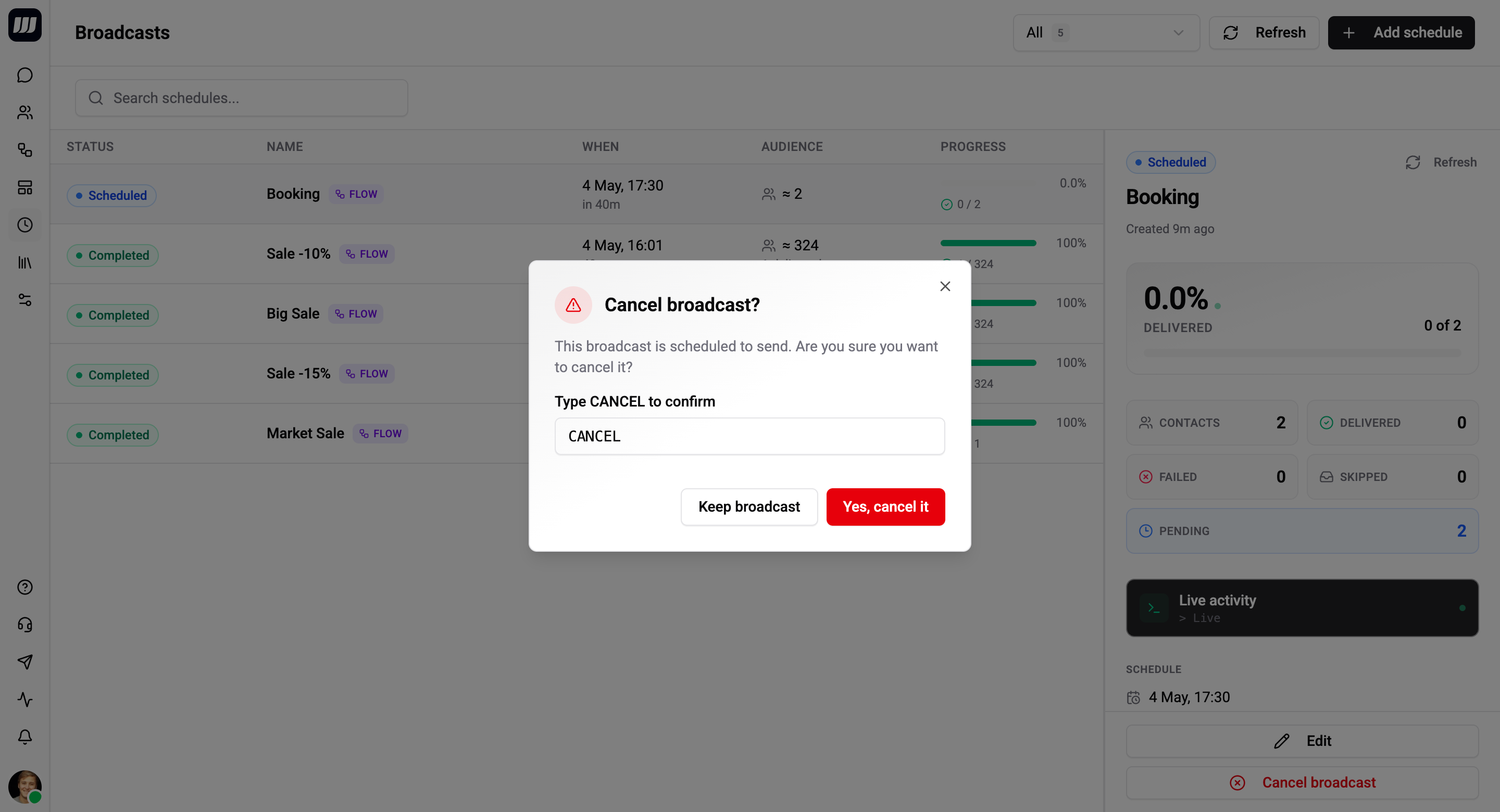
The cancel button is on the detail page header. The confirm dialog tells you exactly what will happen given the current status:
- From
SCHEDULED→ "Cancel this broadcast? It won't fire." - From
SENDING→ "Cancel this broadcast? Already-dispatched contacts will keep their outcome; remaining contacts will be skipped." - Disabled in
COMPLETED/CANCELLED/FAILED→ terminal, nothing to cancel.
Cancellation is recorded in the audit log along with who triggered it and when.
Stuck-Broadcast Sweeper
A worker process can crash mid-fan-out, leaving a broadcast pinned in SENDING with no worker coming back for it. A periodic sweeper (every 2 minutes) handles this with two passes:
Repair pass
For every SENDING broadcast, re-aggregate per-contact outcomes from the dispatch ledger and patch counter drift. If every contact is accounted for (processed >= audienceSizeActual), flip the broadcast to COMPLETED.
This catches counter rollups that silently dropped - the source-of-truth is the per-contact dispatch rows, and the sweeper makes sure the rolled-up counters on the broadcast match.
Rescue pass
For broadcasts stuck >10 minutes AND with no new dispatches written in the last 5 minutes (the dispatch-quiet window), apply this rule:
- If at least one contact ended in
DELIVERED,FAILED, orSKIPPED→ transition toCOMPLETED(partial success - already processed what it could). - Otherwise → transition to
FAILEDwithfailureReason = WORKER_STALLED.
The 10-minute timeout is the upper bound for "the worker should have made some progress by now." Combined with the 5-minute dispatch-quiet check, it's both faster and safer than naïve "kill anything stuck for N minutes" - it won't kill an in-progress fan-out.
You don't interact with the sweeper directly. It's mentioned here so the timing model is transparent: if a broadcast goes silent for 10+ minutes, the system is going to make a final disposition rather than leaving it hanging.
What's Locked, What's Editable
Quick reference of what you can change in each status:
| Field | SCHEDULED | SENDING | Terminal |
|---|---|---|---|
| Name | ✓ | - | - |
| Send-kind | - | - | - |
| Flow / template picker | ✓ | - | - |
| Template fallbacks / routes | ✓ | - | - |
| Audience filter | ✓ | - | - |
| Schedule | ✓ | - | - |
| Cancel button | ✓ | ✓ (best-effort) | - |
| Retry failed contacts | - | - | ✓ (when COMPLETED or CANCELLED with FAILED rows) |
Send-kind is locked in every status because changing kinds is effectively a different broadcast - clone the broadcast as a new one if you need that.
Audit Trail
Every state transition is recorded with timestamp and (when applicable) the user who triggered it. The detail page's activity sidebar shows:
- Created at - by user.
- Edited at - by user (one entry per edit).
- Started at - when the worker picked it up.
- Completed at / Cancelled at / Failed at - terminal transition.
This is enough to reconstruct what happened to any broadcast even weeks later. Per-contact dispatch rows have their own retention (30 days by default) and link to the broadcast.