Fallbacks & Template Routes
How a broadcast reaches contacts when the primary path can't be used, and how template routes pick the right WhatsApp number per contact
The picker step (Step 3 - Pick a Flow or Pick a Template) has a small but important second half:
- Flow mode lets you attach a list of WhatsApp template fallbacks for contacts the flow can't reach.
- Template mode lets you configure one or more template routes so a single broadcast can cover several WhatsApp numbers.
Both exist because of WhatsApp's 24-hour customer-service window - Meta rejects freeform messages to contacts whose window is closed, and a one-size-fits-all primary doesn't always cover every contact.
WhatsApp Window - The Underlying Rule
| Window state | Meaning |
|---|---|
| Open | The contact has sent your org a WhatsApp message in the last 24 hours. Freeform messages are accepted. |
| Closed | More than 24h since the contact's last inbound. Only pre-approved templates can be sent. |
Templates are window-safe by definition: they always go through, regardless of the window. Freeform text, media, and AI-generated cards are not.
Flow Mode - Template Fallbacks
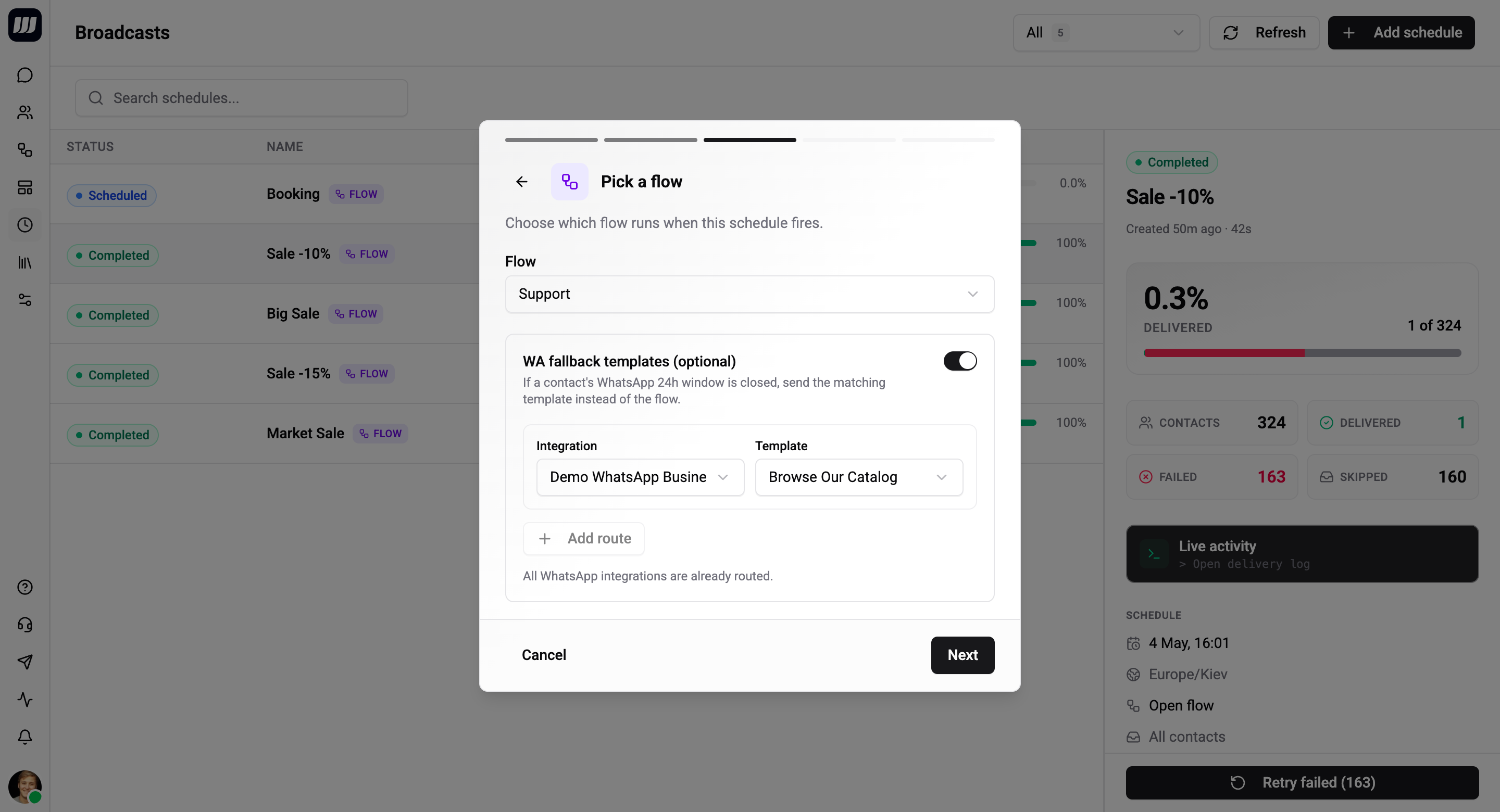
When you pick a flow, you can optionally attach a list of WhatsApp template fallbacks. Each fallback is a (template, integration) pair.
At dispatch time, for each contact:
- The dispatcher checks whether the flow can reach the contact through its primary channel.
- If it can't (typically because the contact's WhatsApp window is closed and the flow's first card isn't a template), the dispatcher looks at the configured fallback list.
- It picks the fallback whose integration matches the contact's WhatsApp chat and sends that template instead.
- The per-contact history row is marked as having used the fallback.
If you don't configure any fallbacks, contacts the flow can't reach are recorded as skipped - no fallback fires. So if your audience contains WhatsApp contacts and your flow's first card is freeform, you almost certainly want at least one fallback.
Per-contact decision
| Contact's chat | WA window | Flow's first card | Outcome |
|---|---|---|---|
| Open | Any | Run the flow | |
| Open | WA Template | Run the flow | |
| Closed | WA Template | Run the flow (template is window-safe) | |
| Closed | Any other card | Send a fallback template if one's configured for this WA integration; otherwise mark as skipped | |
| Telegram / SMS / Viber / etc. | n/a | Any | Run the flow |
Why a list of fallbacks?
If you have several WhatsApp numbers, a single fallback template won't work - templates exist per integration. By configuring a list of fallbacks, you can cover EU, US, and APAC WA numbers in one broadcast. The dispatcher picks the fallback whose integration matches each contact's chat.
If a contact's WA chat is on an integration not covered by any of your fallbacks, no fallback fires - the contact is skipped.
Template Mode - Template Routes
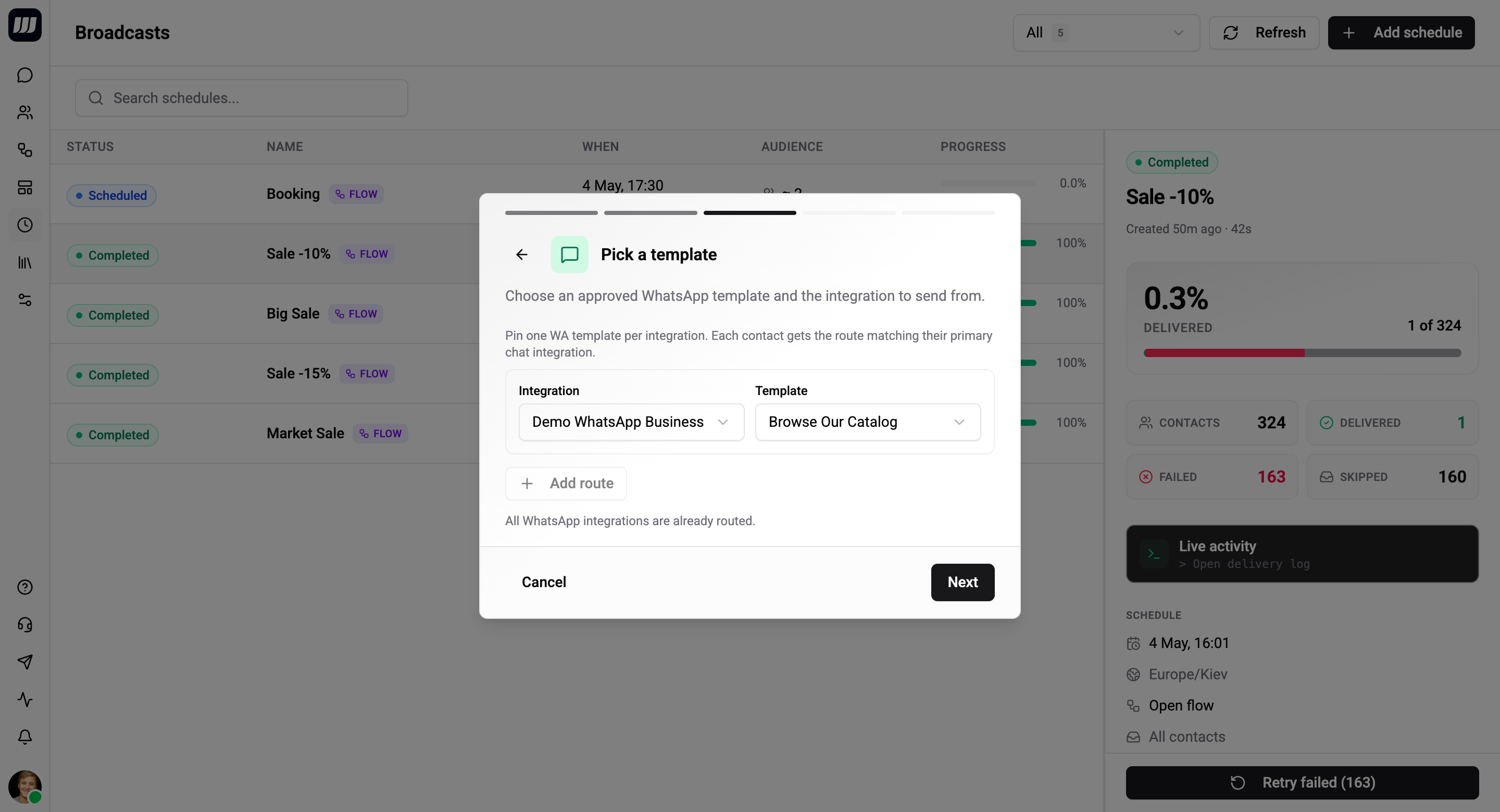
In template mode, you supply one or more template routes. Each route is a (template, integration) pair, the same shape as a flow-mode fallback - but routes are the primary delivery path for template mode, not a fallback.
At dispatch time, for each contact, the system picks the route whose integration matches the contact's chat and sends that template.
| Contact's chat | Matching route configured? | Outcome |
|---|---|---|
| Has a chat on a route integration | ✓ | Send that route's template |
| No chat on any route integration | - | Skipped |
Multi-region patterns
A single broadcast with multiple routes can cover several WhatsApp numbers without splitting into separate broadcasts:
- One route per region (EU template + EU number, US template + US number, APAC template + APAC number).
- One route per language (English template + English-only number, Spanish template + Spanish-only number).
- One route per use-case (transactional number for receipts, marketing number for promos - still in one broadcast if the audience spans both).
Each contact receives at most one template - the one routed to their chat's integration.
Why no flow-style fallback for template mode
Templates are already window-safe. There's nothing to fall back from - if a route matches, the template lands; if no route matches, the contact is skipped. The wizard hides any fallback-list field on template mode and the API rejects fallback config to prevent dead config.
Provider Breakdown
The Review step shows a per-provider count derived from your audience and (for template mode) your route integrations:
≈ 845 Telegram · 312 WhatsApp · 78 Instagram · 16 Viber
Use this for compliance ("this audience reaches 312 EU WhatsApp contacts under our DPA") and cost sanity-checks (template fees, Viber out-of-session pricing). It's recomputed any time you change Steps 1, 2, or 3.
Common Patterns
Conversational marketing flow with a safety net
- Step 2: Flow.
- Step 3: Pick the flow (starts with a text card asking a question). Add one fallback template per WhatsApp integration in your audience - the fallback announces the same campaign in template form.
- Result: in-window contacts get the conversational experience; out-of-window WA contacts get the announcement. Telegram contacts always get the flow.
Multi-region template announcement
- Step 2: Template.
- Step 3: Add one route per region:
(template_es, WA_Spain),(template_pt, WA_Portugal),(template_en, WA_UK). - Result: each contact receives the template for their region's WA number. Contacts whose most-recent chat isn't on any of these numbers are skipped.
One-channel-only flow
- Step 2: Flow.
- Step 3: Pick the flow. No fallbacks.
- Result: contacts the flow can reach get it; contacts it can't (closed-window WA) are skipped. Use this when you don't want to send anything to those contacts at all.
What Routing Doesn't Cover
- Flow-to-flow window routing. If you want a different flow (not just a fallback template) to run when the WA window is closed, that's not in v1. Use a flow-mode broadcast with template fallbacks instead.
- Cross-channel preference. If a contact has both Telegram and WhatsApp, you can't say "prefer Telegram for this broadcast" - the dispatcher uses the contact's most-recent chat.
- SMS / email channels. Broadcasts dispatch through whatever messaging integrations you've connected - Telegram, WhatsApp, Instagram, Viber. SMS and email are not first-class channels for broadcasts at this time.