Limits & Permissions
Plan gating, role gating, and the combined scheduled-work quota that broadcasts share with scheduled triggers
Broadcasts are gated three ways: by plan, by role, and by a combined quota that broadcasts share with scheduled triggers.
Plan Gating
| Plan | Broadcasts |
|---|---|
| Free | Locked. Upgrade prompt instead of the create button. |
| Standard | Locked. Upgrade prompt. |
| Pro | Available. Combined scheduled quota: 25. |
| Enterprise | Available. Unlimited. |
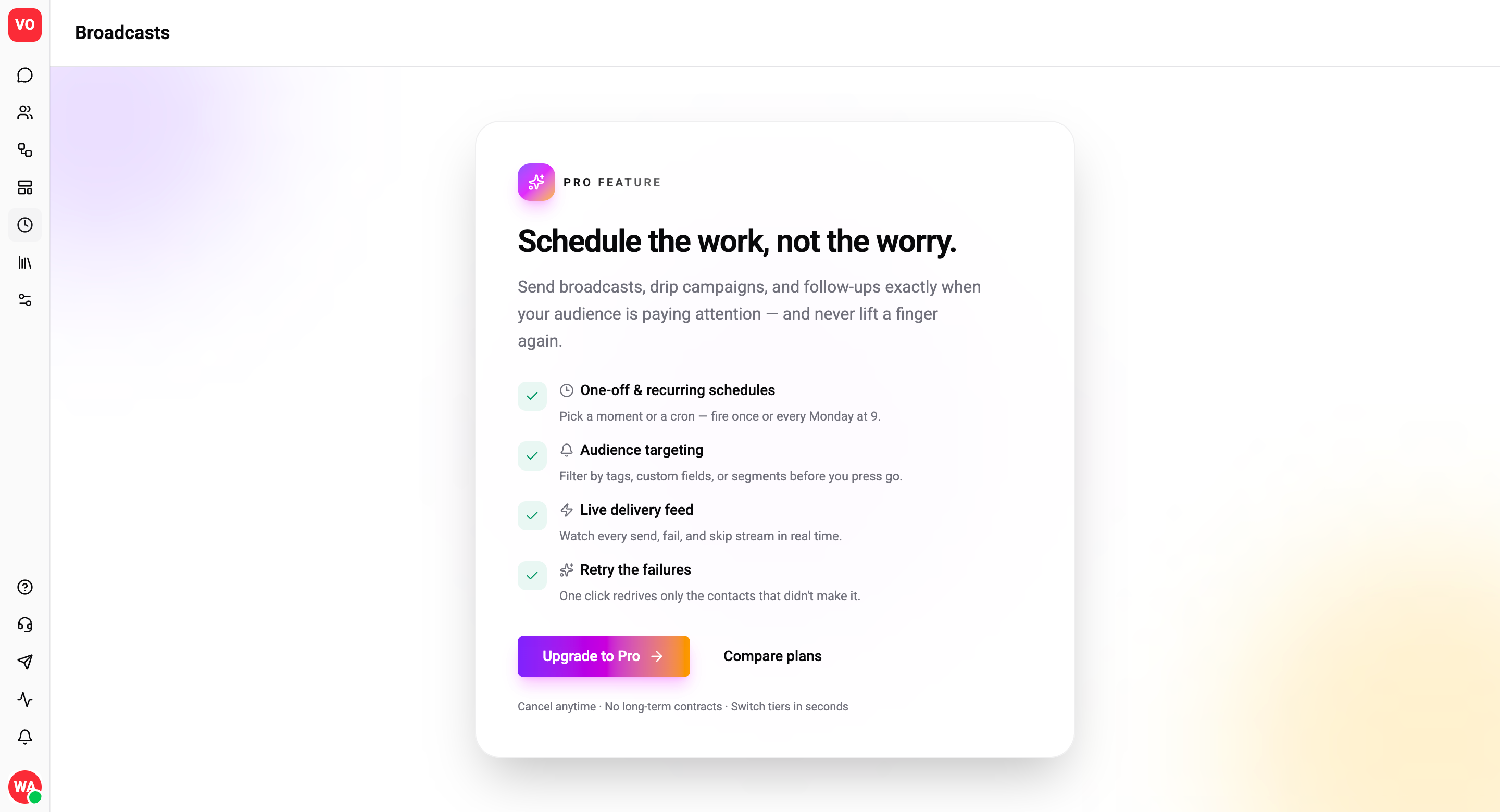
On Free / Standard, every broadcast operation (list, create, update, cancel, history, preview, subscriptions) returns a FORBIDDEN_RESOURCE error. The UI renders this as an upgrade gate, not a raw error - agents and admins on those plans see the broadcasts page with a "Pro feature - upgrade to unlock" overlay.
Role Gating (RBAC)
Within a Pro+ org, action is split by role:
| Role | Read | Create / Edit / Cancel / Retry |
|---|---|---|
| OWNER | ✓ | ✓ |
| ADMIN | ✓ | ✓ |
| EDITOR | ✓ | ✓ |
| AGENT | ✓ | - |
Agents can view broadcasts and the history table - useful for support context - but cannot create, edit, cancel, or retry. The mutation buttons are hidden in the UI for agents; the API also rejects with FORBIDDEN.
Master / system orgs bypass these checks via their global "manage all" grant.
Combined Quota
Broadcasts and SCHEDULED triggers share one cap because they're the two ways your org queues outbound work for the future. A single cap matches plan-tier intent - without it, an org could configure 25 broadcasts + 25 schedule triggers against the same operational budget.
| Plan | Combined cap (active broadcasts + active scheduled triggers) |
|---|---|
| Pro | 25 |
| Enterprise | Unlimited |
What counts toward the cap
| Item | Counts? |
|---|---|
Broadcasts with status = SCHEDULED | ✓ |
Broadcasts in SENDING / COMPLETED / CANCELLED / FAILED | - |
Scheduled triggers with RELATIVE mode | ✓ (always - re-evaluated against contacts every tick) |
Scheduled triggers with SPECIFIC cron + recurring | ✓ (always - ongoing recurrence) |
Scheduled triggers with SPECIFIC one-off, future scheduledAt | ✓ |
Scheduled triggers with SPECIFIC one-off, past scheduledAt | - (already fired or missed) |
| Scheduled triggers in draft flows (not yet published) | ✓ |
Drafts count so you get immediate feedback at create time, not a surprise failure when you try to publish the flow.
Counter on the UI
The broadcasts list and the trigger panel both show the live usage:
17 / 25 used
Once you hit the cap, the create button greys out and shows a tooltip: "You've reached the combined limit of 25 active broadcasts + scheduled triggers. Cancel one or upgrade to Enterprise."
The same number is enforced on the server - the API returns FORBIDDEN_RESOURCE with feature broadcasts (or scheduled_triggers) past the cap. The FE counter and the server-side gate read from the same source-of-truth, so they can never disagree.
How to free a slot
| Item | How to remove from cap |
|---|---|
| Broadcast | Cancel it (SCHEDULED → CANCELLED) or wait for it to fire. |
| Scheduled trigger (one-off, past) | Already not counted. |
| Scheduled trigger (one-off, future) | Delete the trigger or change to a non-scheduled type. |
| Scheduled trigger (recurring) | Delete the trigger or unpublish the flow. |
| Scheduled trigger (relative) | Same as recurring. |
Switching a trigger AWAY from SCHEDULE_TRIGGERED frees a slot - no quota check on the down-direction.
Audience Size Cap
There is no hard cap on audience size, but the wizard shows a soft warning over ~100k contacts:
"Your audience is very large. Consider tightening the filter - even at 100k+ this will dispatch fine, but the run will take longer."
The save still succeeds. The dispatch pipeline is designed to handle 100k+ contacts without blocking, but very large fan-outs (1M+) start to compete with regular flow execution for worker capacity. Reach out to support before scheduling those.
Other Limits
| Limit | Value |
|---|---|
| Minimum lead time | 2 minutes (scheduledAt must be at least 2 min in the future) |
| Late-fire grace window | 5 minutes (transitions to MISSED_WINDOW past that) |
| Per-contact dispatch row retention | 30 days |
| Aggregate counter retention | Forever |
| Broadcast row retention | Forever (no auto-archive) |
| Stuck-broadcast rescue timeout | 10 minutes (no progress in last 5 min) |
API Permissions Surface
The appPermissions GraphQL query exposes everything the FE needs to render the right UI:
| Field | Source | Use |
|---|---|---|
role.canManageBroadcasts | Role grant | Hide create / edit / cancel UI for agents. |
plan.canManageBroadcasts | Plan feature flag | Show upgrade prompt on Free/Standard. |
plan.maxScheduled | Plan quota (null = unlimited) | Render the cap. |
usage.scheduled | Live count | Render "17 / 25 used"; grey out create button at cap. |
These are the same numbers the server checks on every mutation, so what you see is what you can do.
Frequently Asked
Can I exceed the cap by scheduling broadcasts in advance? No. The cap counts active scheduled work regardless of fire time - 25 broadcasts scheduled across the next year is still 25 active items.
Does cancelling a SENDING broadcast immediately free the slot? Yes - once it transitions to CANCELLED, it's terminal and stops counting.
Are retries quota-counted separately? Each retry creates a new broadcast that counts the same as any other. Plan accordingly when chaining retries.
Can agents request a broadcast? Not via mutations. Workflow-wise, agents flag the need to an editor / admin who creates and confirms. The agent can view the result like any read-only user.