Triggers
Configure what starts your flow
Every flow begins with a trigger - an event that starts the flow execution. Triggers are configured directly on the trigger node in the flow canvas, through a multi-step modal that guides you from trigger type to the ready-to-save rule.
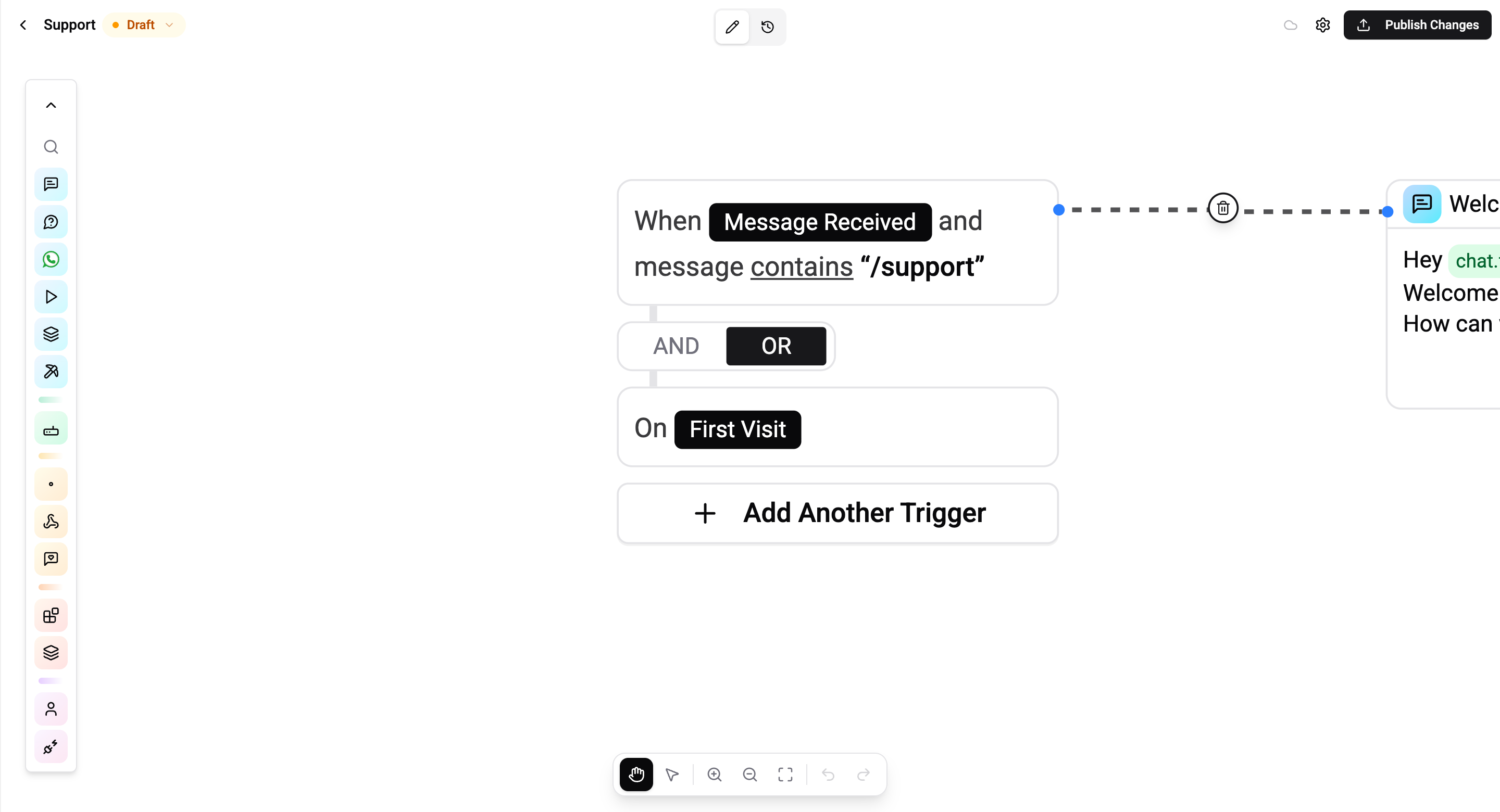
Trigger Categories
Triggers are grouped into three families. Each one solves a distinct starting condition.
Messaging
Fires when an incoming message arrives from a contact on a connected channel.
| Trigger | Fires when |
|---|---|
| Message Received | The incoming message matches a content rule (keyword, media type, command) |
| First Visit | A contact messages your bot for the very first time |
| Catch All | No other published flow matched the incoming message |
Audience
Fires based on who the contact is, or how long they've been away - not just what they typed.
| Trigger | Fires when |
|---|---|
| Returning User | A contact comes back after a configured period of inactivity |
| Website Login | A user signs in with the Telegram Login Widget on an external site |
To match on profile fields (language, tags, custom fields), use the profile-field refinement on Message Received for inbound messages, or the audience filter on Scheduled for broadcasts.
Automation
Proactive triggers - they fire without a user message.
| Trigger | Fires when |
|---|---|
| Scheduled Trigger | At a specific time, on a recurring cron schedule, or relative to a contact's date field |
| Webhook Received | An external system POSTs to a Wexio inbound webhook URL |
Social
| Trigger | Fires when |
|---|---|
| Comment Received | Someone comments on one of your connected social posts |
A Comment Received flow can answer the comment publicly with the Reply to Comment card, or open a private conversation with the commenter - the same two choices an operator has by hand in the Posts view.
This is the trigger to use for the questions that repeat under every post - delivery areas, opening hours, whether something is in stock - so nobody has to watch the Posts view all day.
Other Trigger Types
A few further trigger types exist that do not yet have a page of their own:
| Trigger | Fires when |
|---|---|
| Profile Match | A contact's profile fields match a rule you define |
| Web Visitor Visit | A website-widget visitor opens a page |
| Web Visitor Login | A widget visitor authenticates |
| Web Reaction Threshold | Reactions on a widget article or news post cross a threshold |
Multi-Step Trigger Setup
Adding a trigger opens a guided modal. The number of steps depends on the trigger type - simple triggers (First Visit, Catch All) are a single tap; rule-based triggers (Message Received, Scheduled) walk through condition builders.
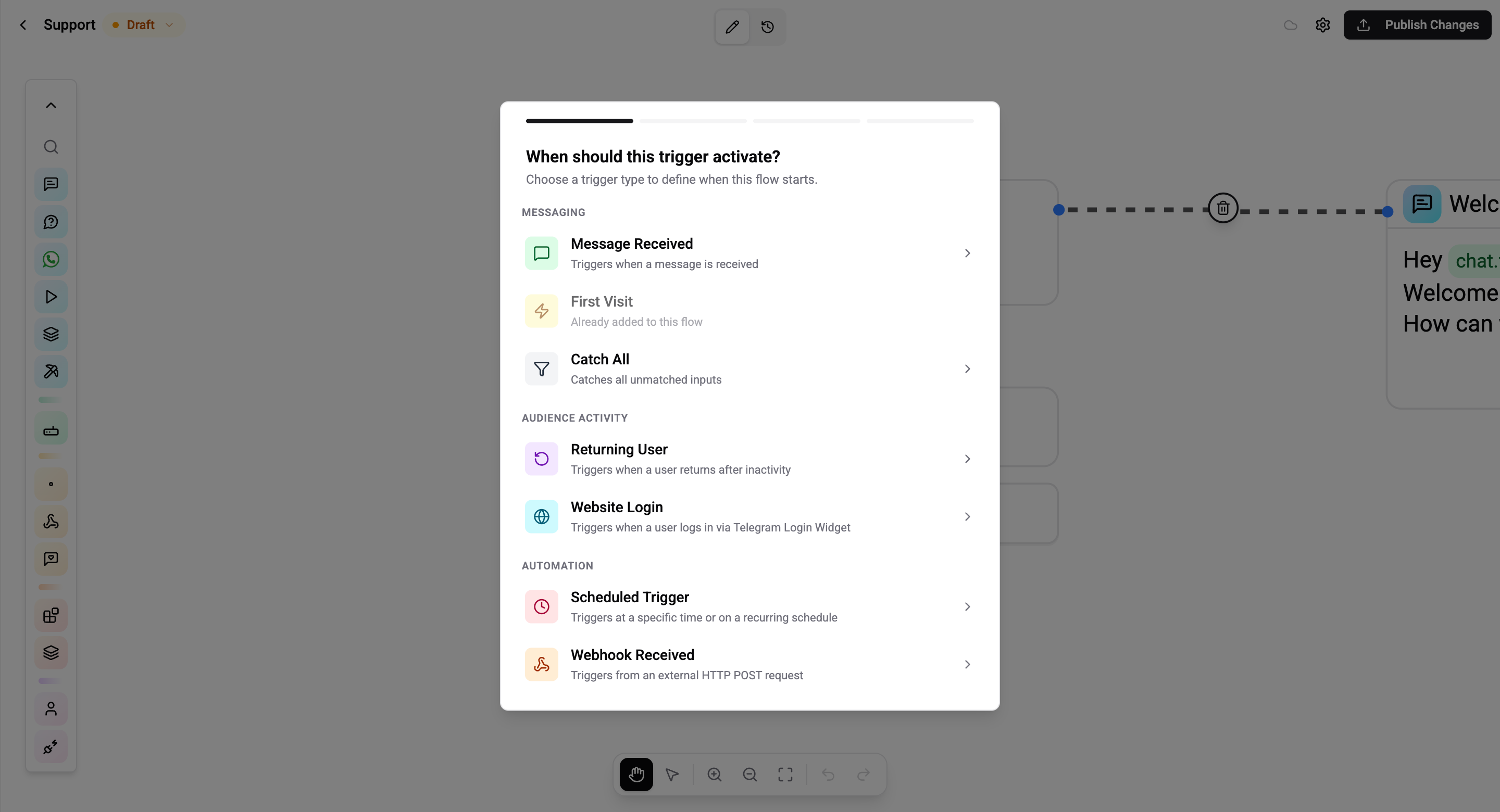
Step 1 - Select a trigger type. Pick a trigger from the Messaging, Audience Activity, or Automation sections. Already-added triggers are shown as disabled so you don't duplicate them.
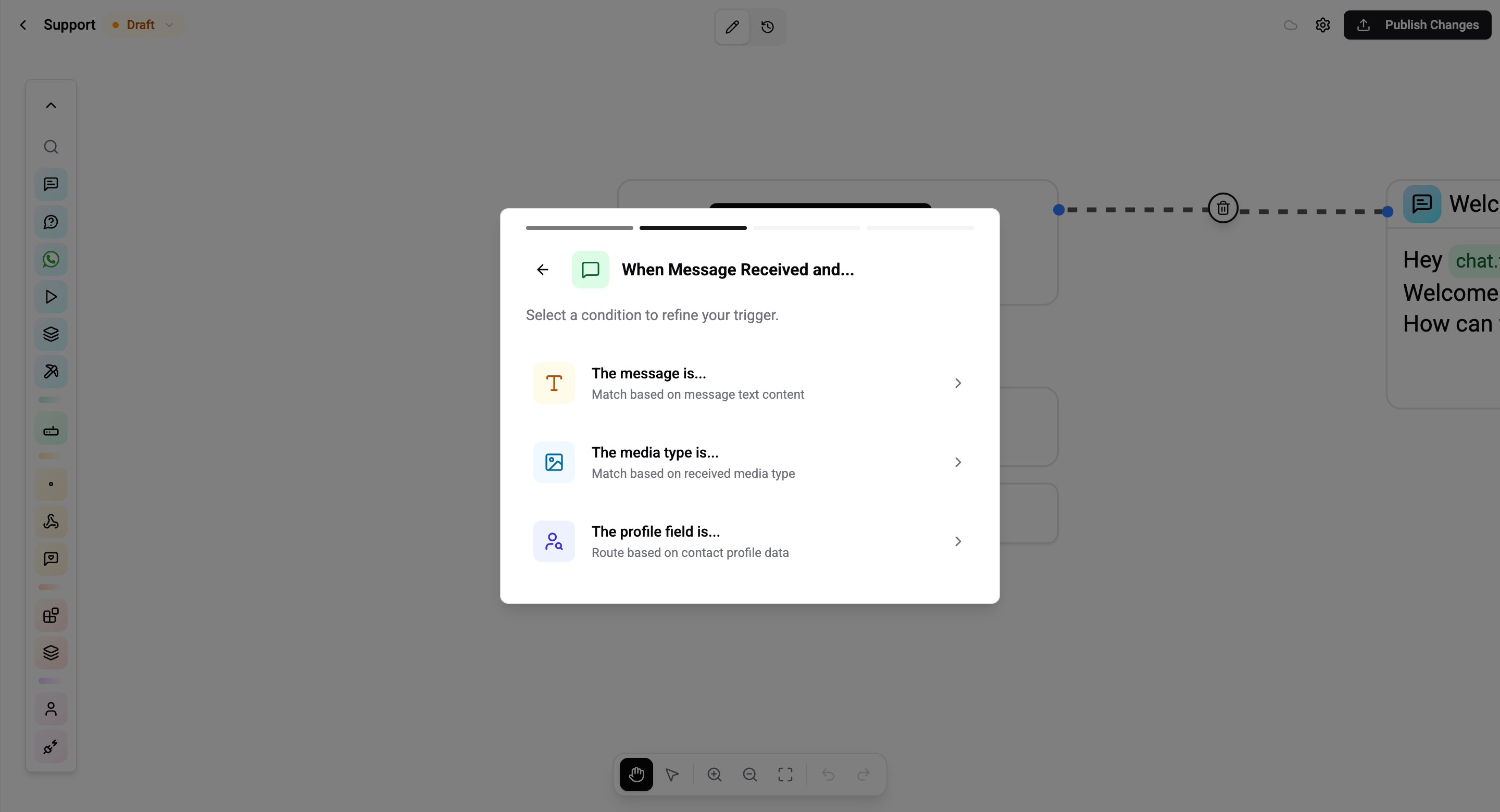
Step 2 - Refine the trigger. Triggers that support multiple matching modes (for example Message Received lets you match by text, media type, or profile field) ask you to pick the refinement first, then show the relevant rule editor.
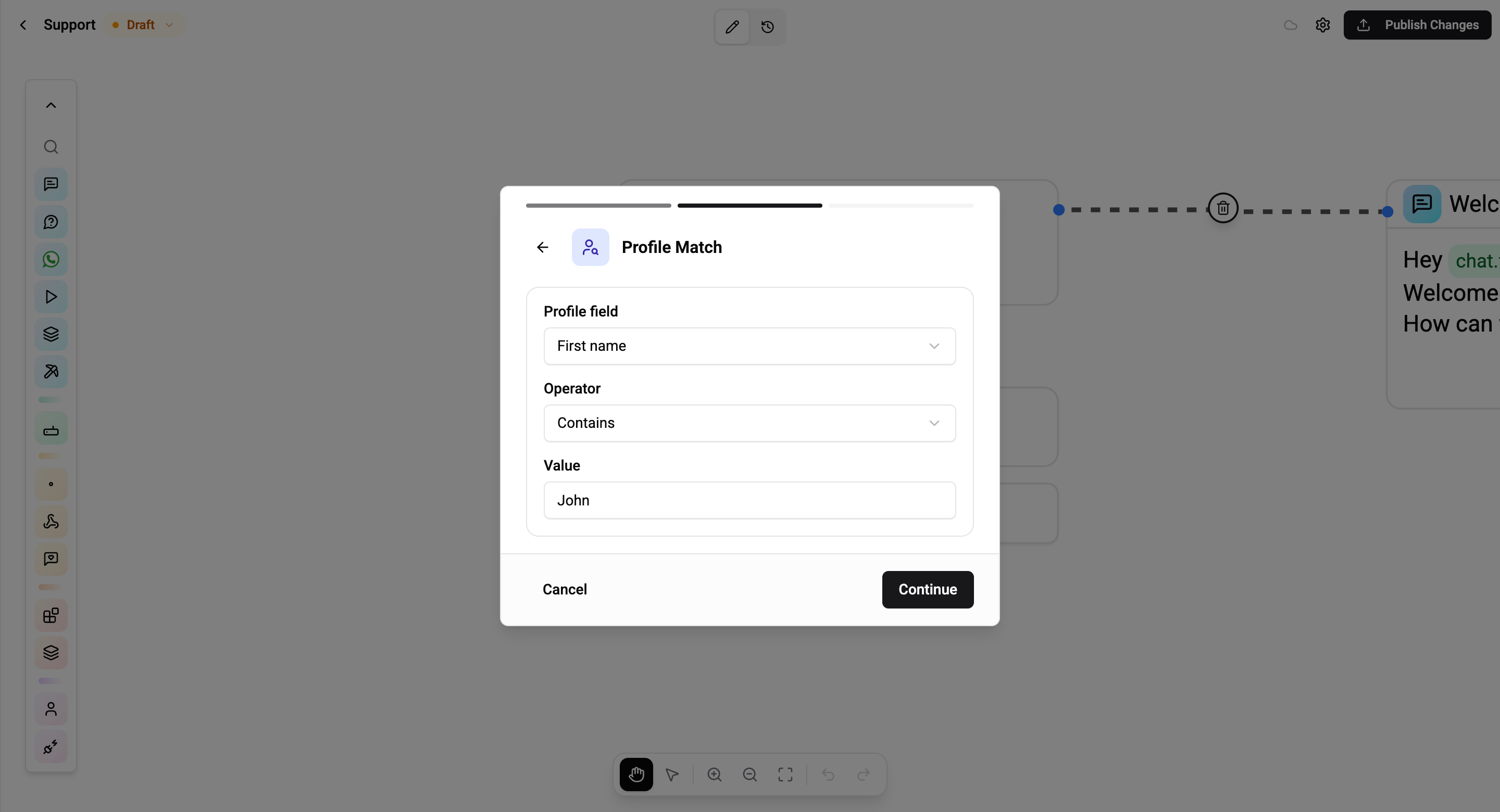
Step 3 - Fill in the rule. The rule editor is scoped to whatever you picked in step 2 - text operators for text matching, an enum picker for media type, a profile field picker for profile match, etc. See each trigger's page for the full operator list.
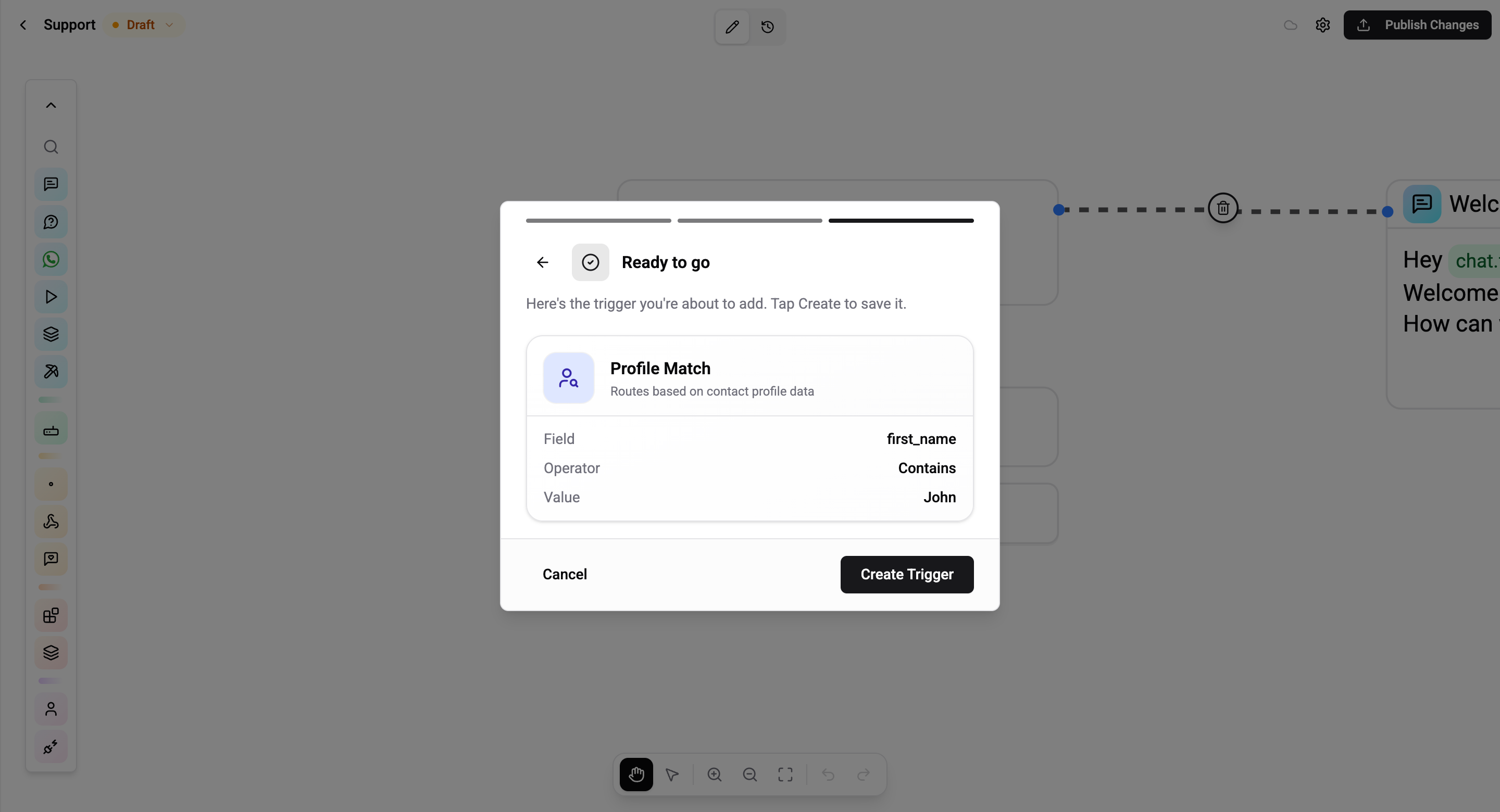
Final step - Review and create. A summary card shows the resolved trigger (type, field, operator, value). Tap Create Trigger to attach it to the flow, or use the back arrow to fix a value without starting over.
Simple triggers (First Visit, Catch All, Website Login) skip the refine and rule steps - they go straight from type selection to the review screen.
Multiple Triggers per Flow
A single flow can have multiple triggers chained by a connector. The connector is set on the trigger itself and defines how it combines with the next trigger in the list.
| Connector | Behavior |
|---|---|
| AND | Both triggers must match |
| OR | At least one of the two must match |
AND has higher precedence than OR - so A OR B AND C evaluates as A OR (B AND C).
Example - "contains /support OR first visit": runs for any user typing /support, and also for every brand-new contact on their first message.
Example - "profile language = en AND contains help": only routes English-speaking users asking for help - an English speaker who types hello is skipped by this flow, and a German speaker typing help is also skipped.
When several published flows all match the same event, the engine picks the one with the most specific match (the highest ratio of matched triggers to total triggers). Ties are broken by the most recently updated flow.
Integration Scope
Trigger scope is set at the flow level in flow settings, not per trigger:
- Run on all integrations - The flow triggers on any connected channel (default)
- Specific integrations - Select individual Telegram bots, WhatsApp numbers, etc.
Only one flow can use the First Visit trigger per integration. If multiple flows have this trigger, only the most recently published one fires.
Reactive vs Proactive
| Kind | Triggers | Messaging-window caveat |
|---|---|---|
| Reactive | Message Received, First Visit, Catch All, Returning User, Website Login | None - the user just sent a message, so the 24h window is open on every channel |
| Proactive | Scheduled, Webhook Received | On WhatsApp/Instagram the 24h window may be closed. Start the flow with a template message where required |
Proactive triggers fire without a user message, so channels that enforce messaging windows (WhatsApp 24h, Instagram 24h with a 7-day human-agent extension) may reject non-template content. Design proactive flows so the first card is a channel-allowed message type (for WhatsApp that means a pre-approved template).