Internal Note
Operator-authored note inside a chat thread - never sent to the customer
An Internal Note is a message authored by an operator and stored in the chat thread, but never dispatched to the messaging provider. It's the data shape behind Mentions & Internal Notes - every internal note you post is one of these, with optional @-mention chips attached.
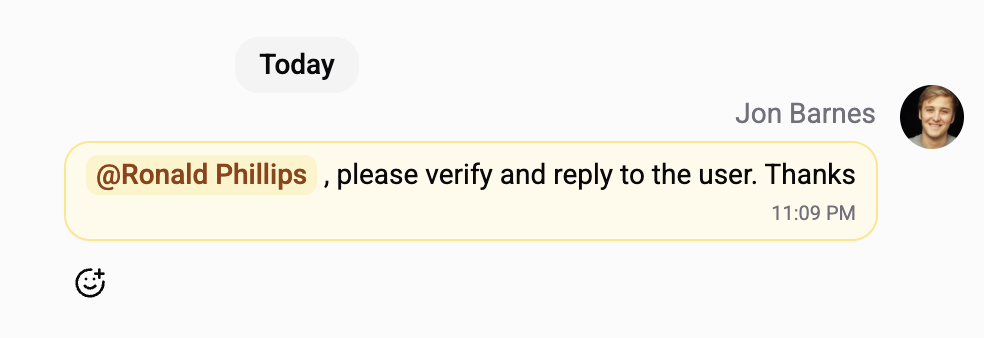
What It Looks Like
| Element | Detail |
|---|---|
| Background | Yellow / amber tint (distinct from operator-reply blue and customer-reply grey). |
| Label | An "INTERNAL NOTE" badge above the body. |
| Body | Free text with formatting (bold, italic, links). Rendered with mention chips inline (@Alice, @Bob). |
| Read indicator | Bottom-right of the bubble: ⏱ Awaiting reads / ✓ Read by N of M / ✓✓ Read by everyone. Hover for the per-recipient breakdown. |
| Mention chips | Coloured pills with each mentioned teammate's name; click opens their profile. |
The yellow tint and the "INTERNAL NOTE" label persist for the lifetime of the message, even if every chip is removed via edit - once a message starts as a note, it stays a note.
Where It Comes From
| Source | How |
|---|---|
| Composer in internal-note mode | Type @, pick a teammate, hit Send. The composer shifts to amber tint while at least one mention chip is in place. |
There's no other code path that creates internal notes - they always come from the composer with explicit operator intent.
What Makes It Different
| Property | Internal Note | Regular Operator Text Message |
|---|---|---|
| Stored in the chat thread | ✓ | ✓ |
| Dispatched to WhatsApp / Telegram / Instagram / Viber | - | ✓ |
| Triggers AI auto-reply | - | depends on AI rules |
| Triggers outbound webhooks | - | ✓ |
| Counts toward AI auto-reply / flow context | - | ✓ |
Eligible for @-mention chips | ✓ | - |
| Has per-recipient read receipts | ✓ | - (regular delivery status applies) |
| Editable by author | ✓ | ✓ |
Cannot be promoted to / from TEXT | - type is locked at send time | - |
The dispatch layer rejects any provider call for this message type at the service level, not via a flag - so even future code paths can't accidentally leak a note to the customer.
Lifecycle
| Event | Effect |
|---|---|
| Send | Note persisted; one read receipt per mentioned teammate (deduplicated, self-mention skipped). Notification fires per recipient. |
| Edit text | Body updates inline for everyone watching the chat. No new notifications unless mention chips also change. |
| Edit chips | Diff between old and new - added teammates get a fresh receipt + notification, removed teammates lose their receipt + notification. Re-adding someone creates a new receipt (read state from previous lifecycle does not carry over). |
| Soft-delete | Bubble shows the standard "Note deleted" tombstone. Receipts persist in audit history but are filtered out of the @Mentions feed and unread badge. |
Reply-To
A note can replyTo any message in the thread - a customer message, a previous operator reply, or another internal note. The reply context renders above the note body just like any other message. This is how internal threads form: an initial note that mentions someone, then follow-up notes that reply to it for ongoing discussion.
The mention chips and read receipts always belong to the note itself, not to the message it's replying to.
Visibility
Internal notes show up in:
- The chat thread (yellow-tinted, inline with customer/operator messages, visible to every operator who can read the chat).
- In-chat search results (when the search term matches the note body).
- The @Mentions sidebar tab (only for the operators who were mentioned).
- Exports and GDPR data dumps.
They never reach the customer's messaging app, never trigger an AI auto-reply, and never fire an outbound webhook.
Plan Availability
Available on every plan - Free, Standard, Pro, and Enterprise. The full feature surface (composer, sidebar tab, read receipts, email fallback) works identically across tiers.
Related
- Mentions & Internal Notes - the full feature guide: composer, sidebar tab, read indicators, email fallback, FAQ.
- System Messages - the other "platform-only" message type, for lifecycle events. System messages are platform-authored and immutable; internal notes are operator-authored and editable.
- Live Collaboration - the multi-operator editing surface;
@-mentions work on every plan, the live co-editor is Pro+.