InboxChatMessages
List Messages
Scrollable list menus for WhatsApp interactive messages
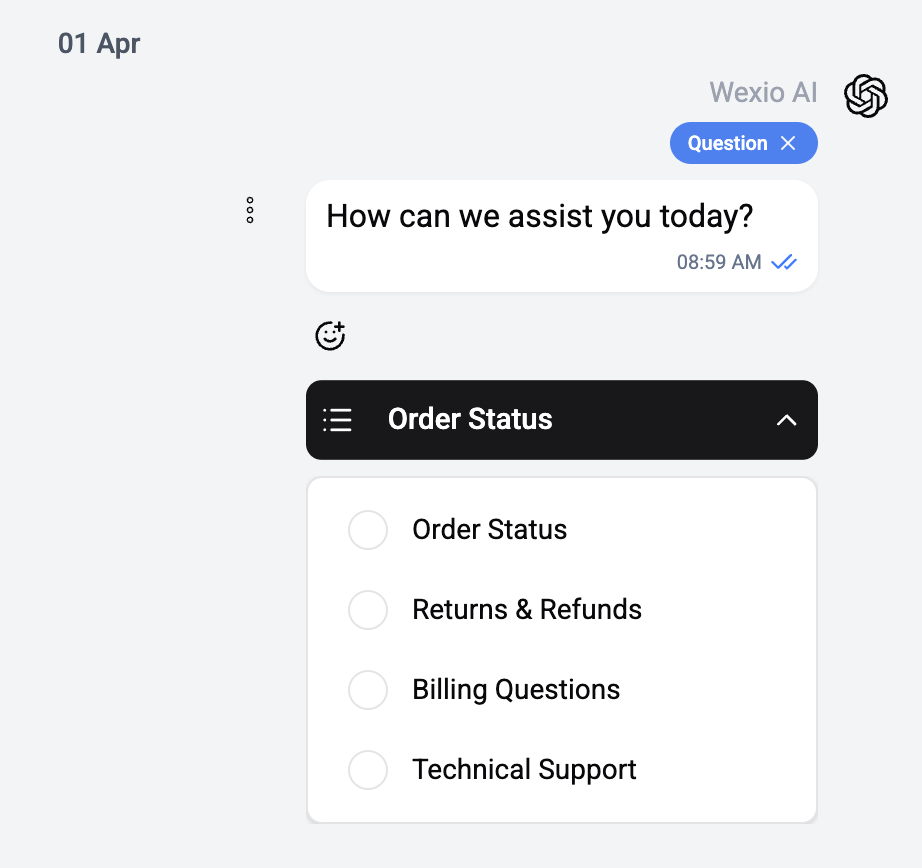
List messages present a menu of options in a scrollable list format. This is a WhatsApp-specific message type.
Overview
A list message consists of:
- Header text - Optional title at the top
- Body text - The main message content
- Footer text - Optional footer
- Button label - Text on the call-to-action button (e.g., "View Options")
- List sections - One or more sections, each containing items
Sections & Items
Each section can have:
- Section title - Header for the group of options
- Items - Up to 10 items per section, each with:
- Title (required)
- Description (optional)
- Row ID (for flow processing)
Interaction
- The contact sees the message with a button
- Tapping the button reveals the scrollable list
- The contact selects an item
- Their selection is sent as a reply and can be processed by a flow
Limits
| Limit | Value |
|---|---|
| Max sections | 10 |
| Max items per section | 10 |
| Max total items | 10 |
| Button label length | 20 characters |
| Item title length | 24 characters |
| Item description length | 72 characters |
List messages are only available on WhatsApp. For Telegram, use Button messages with callback buttons for similar functionality.