Delivery & Logs
Per-contact outcomes, the history table, and how the dispatcher paces sends so providers don't reject
Once a broadcast is SENDING (and forever after), every targeted contact has a row in the history table with one of three outcomes. The aggregate counters on the broadcast roll those up.
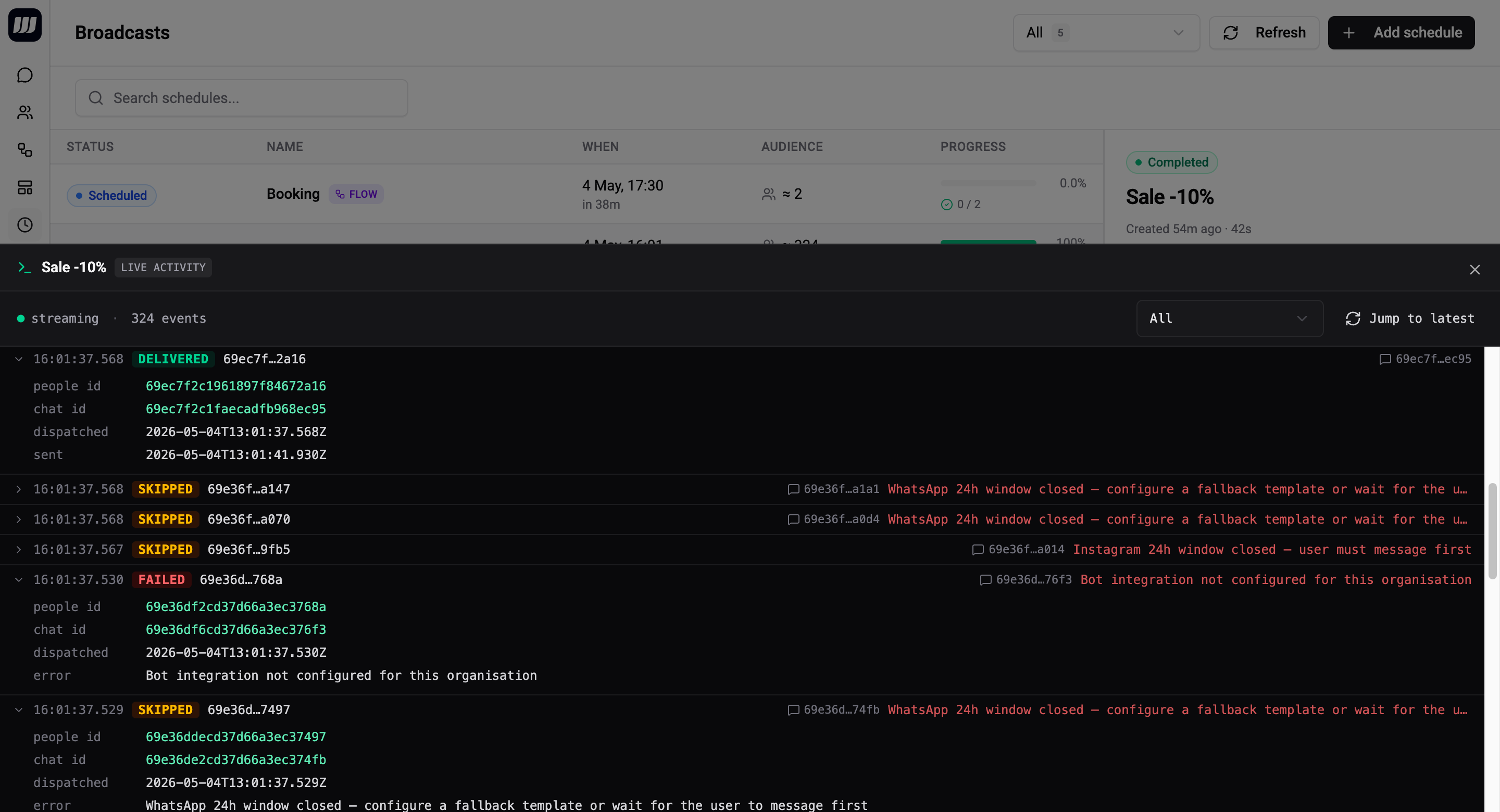
Per-Contact Outcomes
Every contact in the audience ends up in one of three states:
| Outcome | Meaning |
|---|---|
DELIVERED | The message or flow was successfully dispatched and the provider accepted it. |
FAILED | The dispatch was attempted but the provider returned an error (4xx, auth failure, blocked bot, etc.). |
SKIPPED | The contact was filtered out at dispatch time - no reachable channel, opted out, missing required field, no matching template route, or another pre-condition wasn't met. |
These three are what you see in the broadcast's history table and in the rolled-up counters on the detail page header.
Behind the scenes the dispatcher tracks finer-grained reasons for skips and dispatch-time failures (e.g. "no chat on any matching route integration" vs "duplicate dedup hit" vs "flow unpublished mid-run"). Those finer states are aggregated into the three operator-facing outcomes for the UI. If you need them at the row level, the GraphQL API exposes the underlying status string.
DELIVERED
The provider accepted the send. For Telegram, this is confirmed synchronously. For WhatsApp / Instagram / Viber, the provider's delivery callback is wired in a follow-up PR - until then, "delivered" effectively means "the dispatcher's send call returned without an inline error."
FAILED
The provider returned an error. Each row carries an errorReason string for context - typical examples:
| Error reason | Meaning |
|---|---|
telegram:403:blocked_by_user | The contact blocked your bot. Retry won't help. |
whatsapp:131047:re_engagement_message_required | The 24h window was closed and your flow's first card wasn't a template. Add a fallback template and retry. |
whatsapp:1:Unsupported message type | Template parameter or media format is wrong. Fix the template and create a new broadcast (don't retry). |
<integration>:auth_failed | Integration credentials are broken. Fix auth and retry. |
Transient 5xx from any provider | Provider blip. Retry usually clears it. |
FAILED rows are retryable - see Retry Failed Contacts.
SKIPPED
The contact was filtered at dispatch time. Common causes:
- No reachable channel - the contact has no chat record in your org.
- Channel mismatch - the contact's chat isn't on any of the configured template routes (template mode) or fallback integrations (flow mode with WA-window closed).
- Opted out / missing required field - flow logic or template parameter requirement failed pre-flight.
- Flow unpublished - the flow was unpublished between scheduling and firing.
- Cancelled - the broadcast was cancelled before this contact's turn.
Skipped contacts are not retryable - re-running with the same config produces the same skips. Address the underlying cause (add a fallback, expand the template routes, republish the flow) and create a new broadcast.
Aggregate Counters
The broadcast detail page shows live-updating counters:
| Counter | What it counts |
|---|---|
audienceSizeEstimate | The count when you saved the wizard (snapshot). |
audienceSizeActual | The count at fire time, after the filter was re-resolved. |
delivered | Contacts whose row ended in DELIVERED. |
failed | Contacts whose row ended in FAILED. |
skipped | Contacts whose row ended in SKIPPED. |
startedAt / finishedAt | Wall-clock duration of the run. |
Derived metrics shown on the detail page:
- Delivery rate =
delivered / audienceSizeActual. - Drop rate =
(failed + skipped) / audienceSizeActual.
History Table
The detail page's history table shows one row per contact:
| Column | Detail |
|---|---|
| Contact | Name + avatar; click to open the contact in People. |
| Channel | Which integration the dispatch went through (or would have). |
| Status | DELIVERED, FAILED, or SKIPPED chip. |
| Error reason | Provider error code, only shown when FAILED. |
| Used fallback | Marker if a flow-mode contact received a WA fallback template instead of the primary flow. |
| Sent at / Delivered at | Timestamps. Delivered at may lag for async providers. |
The table is paginated, searchable, and filterable by status. CSV export is available for ops investigations.
Rows live for 30 days, after which they age out. Aggregate counters on the broadcast itself never expire.
Live updates
While the broadcast is SENDING, new rows prepend to the table in real time via a GraphQL subscription. You don't have to refresh - keep the detail page open during the run.
Used Fallback Marker
For flow-mode broadcasts with template fallbacks, each row records whether the dispatcher fired the primary flow or a fallback template:
- Primary - most rows. The contact was reachable through the configured flow.
- Fallback - a marker on the row indicates a fallback template was sent instead.
If the fallback marker fires often, your audience has a lot of dormant WhatsApp contacts and the broadcast effectively reduces to "send the fallback template" for those - worth knowing for cost and copywriting purposes.
Rate Limiting
Broadcasts never blast the whole audience at once. The dispatcher paces sends so providers don't reject and the worker stays healthy under load.
How pacing works
| Stage | What happens |
|---|---|
| Audience streaming | The audience is streamed in pages (default 500 contacts per page) instead of materialised in memory. A 100k-contact audience uses no more memory than a 500-contact one. |
| Batched dispatch | Each page is broken into smaller batches (default 50 contacts per batch) and enqueued onto the message dispatch queue. |
| Concurrent batches | Multiple batches process in parallel per worker (default 10), with bounded per-contact concurrency inside each batch (default 5 in flight). This keeps memory and DB connections steady regardless of audience size. |
| Per-provider throttling | When the provider returns a rate-limit response (429), the unfinished tail of the batch is automatically re-enqueued with exponential backoff. The broadcast stays in SENDING until the queue drains. |
You don't configure any of this - the pacing is automatic and tuned for typical Wexio org sizes.
What this looks like in practice
- A 1 000-contact broadcast typically completes in <1 minute (Telegram) to a few minutes (WhatsApp template).
- A 10 000-contact broadcast typically completes in 5–15 minutes depending on provider and template complexity.
- A 100k+ broadcast can take hours - that's expected. The provider rate-limits us, we back off, the queue drains. The broadcast stays
SENDINGand you can watch the counters tick up live.
If a run takes much longer than expected, check the integration's status in Settings → Integrations - a degraded provider shows degraded send rates.
What rate-limit retries are not
- Not visible to operators. Rate-limit retries happen inside the dispatcher; they don't show up as
FAILEDrows or count against retry limits. The contact ends up inDELIVEREDonce the retry succeeds. - Not unbounded. Each batch has an internal retry budget. If a provider is fully down, batches eventually exhaust the budget and contacts in those batches end up
FAILEDwith<provider>:rate_limit_exhaustedreasons. - Not the same as
retryFailedContacts. That's an operator-triggered redrive ofFAILEDrows into a new broadcast - see Retry Failed Contacts.
Reading the Numbers
A few common patterns and what they mean:
"100% delivered, 0% failed, 0% skipped"
Healthy run. Everyone got the message and the provider confirmed.
"60% delivered, 0% failed, 40% skipped"
Either:
- Audience drift - 40% of your audience had no reachable chat, was opted out, or had its filter-matching field change between save and fire. Tighten the filter (e.g. require
lastSeenAt IS_NOT_EMPTY) and re-create. - Channel mismatch (template mode) - 40% of contacts have no chat on any of the configured route integrations. Add more routes or restrict the audience filter to match the routes.
"85% delivered, 15% failed with whatsapp:131047"
15% of your WhatsApp contacts had a closed 24h window and your flow's first card wasn't a template. Configure a WhatsApp fallback and use Retry Failed Contacts to redrive.
"0% delivered, 100% skipped"
The flow was unpublished between scheduling and firing, or the audience was empty by fire time. Republish and re-create - Retry won't work because skipped rows aren't retryable.