Spam Protection
Protect your inbox from message abuse - inbound spam and outbound loops
Spam protection safeguards both your team and your contacts from message abuse. It handles two directions:
- Inbound - Prevents users from flooding your bots with spam messages
- Outbound - Prevents misconfigured flows from sending excessive messages to users
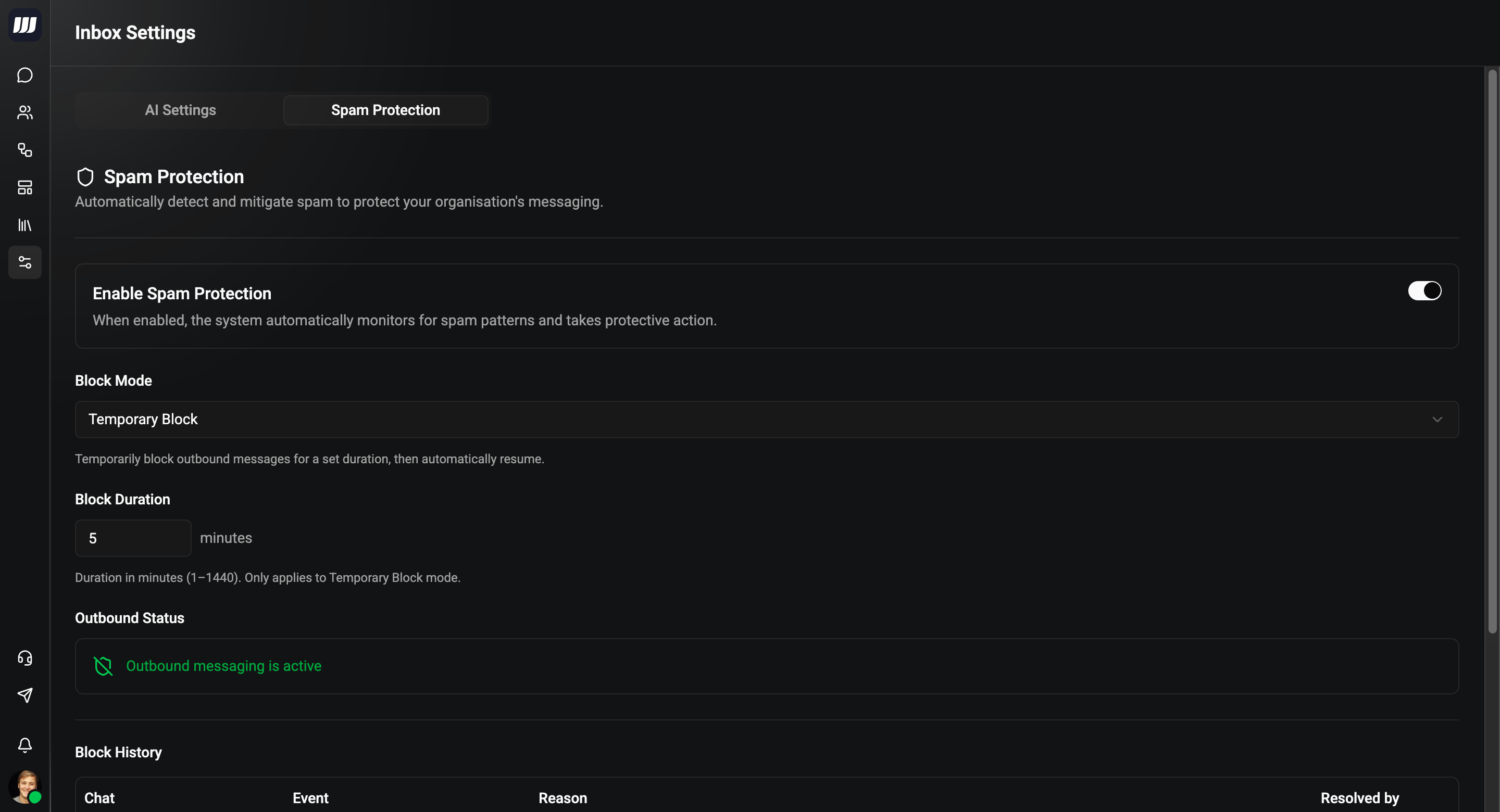
Configuration
- Go to Settings → Inbox → Spam Protection
- Toggle spam protection on or off
- Choose your block mode for inbound spammers
- Set the block duration (if using temporary blocks)
Enable Spam Protection
When enabled, the system automatically monitors for spam patterns and takes protective action.
Block Mode
| Mode | Behaviour |
|---|---|
| Throttle Only | Never block the user - just silently skip processing their spam messages |
| Temporary Block | Temporarily block outbound messages for a set duration, then automatically resume |
| Permanent Block | Block until an operator manually unblocks the user from the chat |
Block Duration
Duration in minutes (1–1440). Only applies to Temporary Block mode. Default: 5 minutes.
Outbound Status
Shows the current status of outbound messaging for your organisation:
- Outbound messaging is active - everything is working normally
- Outbound messaging is paused - outbound was temporarily blocked due to spam protection triggers. It will automatically resume after the block expires
Block History
A log of all spam protection events, showing:
| Column | Description |
|---|---|
| Chat | The contact name and when the event occurred |
| Event | The action taken - User Blocked or User Unblocked |
| Reason | Why the block/unblock happened (e.g. manually blocked by operator, rate limit exceeded) |
| Resolved by | The operator who performed the action |
Inbound Protection (User → Bot)
Prevents users from spamming your bots with rapid-fire or duplicate messages. All protection happens automatically - no configuration needed beyond the settings above.
How It Works
When a user sends messages to your bot, spam protection checks three layers:
- Rate Limiting - Detects message bursts and sustained flooding
- Message Dedup - If a user sends the same trigger multiple times rapidly, only the latest message is processed ("latest wins")
- Spam Actions - Escalating responses based on how many times the user hits rate limits
Rate Limits
| Window | Max Messages | Purpose |
|---|---|---|
| 5 seconds | 20 | Burst protection (spam clicking) |
| 60 seconds | 60 | Sustained flood protection |
Messages are always saved to the chat history regardless of spam status. Only processing (flows, AI) is skipped for spam messages.
Escalation
When a user repeatedly hits rate limits, the system escalates automatically:
| Violations (per hour) | Action |
|---|---|
| 1–2 | Throttle - silently skip processing |
| 3–5 | Warn - send a system message: "Please slow down, messages are being throttled" |
| 6+ | Block - block the user based on your block mode setting |
When a user is blocked:
- Their messages are still saved (audit trail preserved)
- All processing is skipped (flows, AI, keyboards)
- A system message appears in the chat (visible to operators)
- Operators can unblock manually via chat actions at any time
Outbound Protection (Bot → User)
Prevents misconfigured flows from sending excessive messages to your contacts. This protects your users from being flooded if a flow has a loop or sends too many messages.
How It Works
Outbound protection works on a per-chat first principle - a problem in one chat only affects that one chat. If problems occur across multiple chats simultaneously, it escalates to an organisation-level block.
Per-Chat Protection
| Check | Threshold | Action |
|---|---|---|
| Flow loop | Same flow card visited 5+ times in one execution | Flow cancelled with error message |
| Flow message flood | 50+ messages sent by a single flow execution | Flow cancelled with error message |
| Chat rate limit | 30+ outbound messages to one chat within 40 seconds | Outbound paused for that chat for 60 seconds |
When any of these triggers, a system message appears in the affected chat explaining what happened (e.g. "Flow cancelled: loop detected on card 'Welcome'").
Organisation-Level Escalation
If 3 or more different chats trigger outbound violations within 5 minutes, Wexio pauses all outbound messages for your entire organisation for 5 minutes:
- All outbound sending is paused (flows, AI responses, API sends)
- All active flows across the organisation are cancelled
- Inbound messages continue to arrive - no data is lost
- Operators can still view chats and read messages
- All online team members receive a notification explaining the pause
- After 5 minutes, outbound automatically resumes
A single buggy flow in one chat will not block your entire organisation - only that specific chat is affected. Organisation-level blocks only trigger when the same problem occurs across 3+ chats simultaneously.
Why This Design?
| Scenario | What happens |
|---|---|
| One chat has a flow loop | That chat's flow is cancelled. Organisation is not affected |
| Two chats have issues | Each chat is handled individually. Warning logged |
| 3+ chats have issues within 5 minutes | Organisation outbound paused for 5 minutes - this indicates a systematic problem |
Blocked Users
When a user is blocked by spam protection (or manually by an operator):
- A system message appears in the chat indicating the user was blocked
- Operators can unblock the user from the chat actions menu
- Temporarily blocked users are automatically unblocked after the configured duration
- Permanently blocked users remain blocked until an operator unblocks them