Variables
Dynamic values for personalizing flow messages and passing data between cards
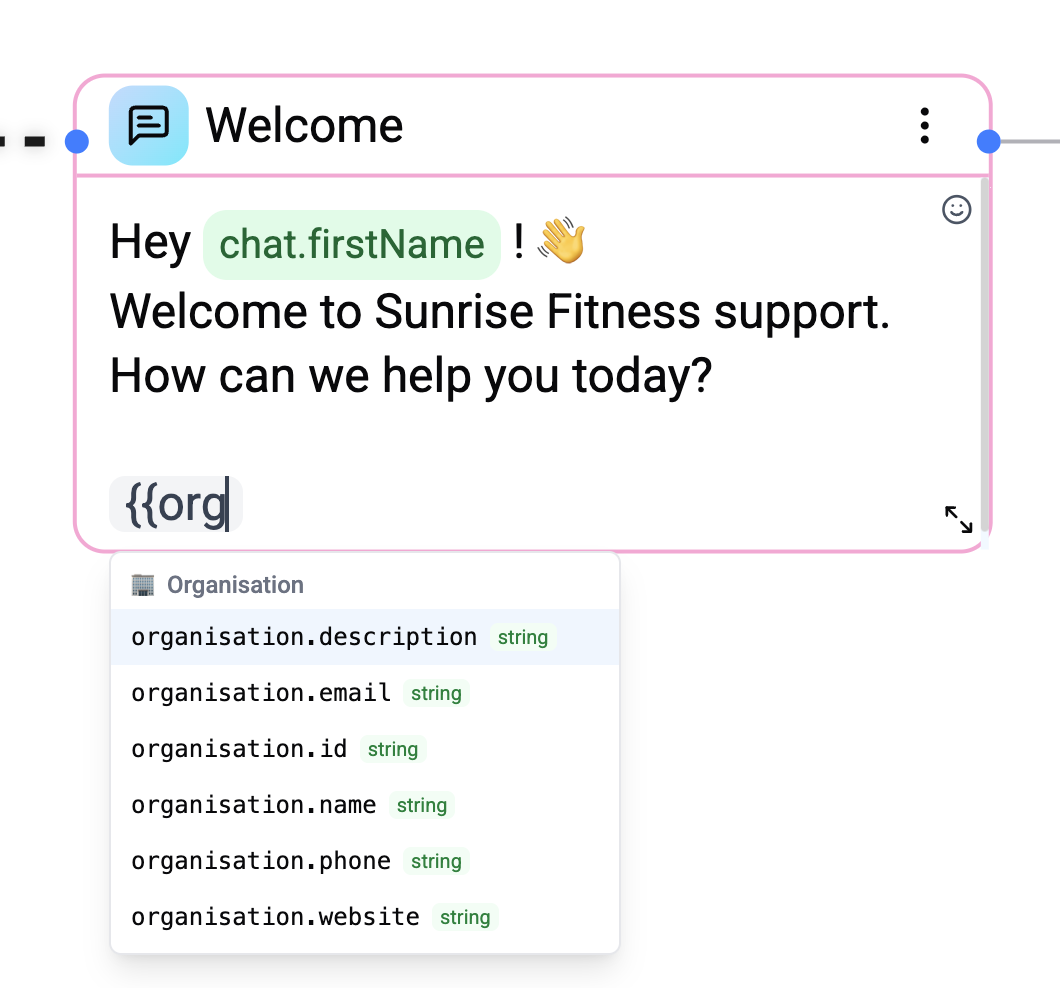
Variables let you insert dynamic content into flow cards, personalize messages, and pass data between nodes in your flow.
Syntax
Use double curly braces to reference variables:
Hello {{user.firstName}}, welcome to our support!Variables follow a namespace.field pattern.
Variable Namespaces
The execution engine uses 6 separate namespaces:
| Namespace | Purpose | Scope | Example |
|---|---|---|---|
user.* | Contact profile data | Session | {{user.firstName}}, {{user.email}} |
chat.* | Current conversation context | Session | {{chat.firstName}}, {{chat.integrationId}} |
organisation.* | Organisation data | Global | {{organisation.name}} |
system.* | Date, time, locale | Global | {{system.currentDate}}, {{system.timezone}} |
lastMessage.* | Last message data | Session | {{lastMessage.text}} |
flow.* | Card output results | Flow | {{flow.cardId}}, {{flow.cardId.fieldName}} |
Contact Variables (user.*)
Core fields from the People entity, plus all custom fields defined in your workspace:
| Variable | Type | Description |
|---|---|---|
{{user.id}} | string | Contact ID |
{{user.whatsappId}} | string | WhatsApp user ID |
{{user.telegramId}} | number | Telegram user ID |
{{user.username}} | string | Channel-specific username |
{{user.firstName}} | string | First name |
{{user.lastName}} | string | Last name |
{{user.language}} | string | Language code |
Any custom field defined in Settings → People Fields is also available as {{user.fieldKey}} (e.g. {{user.email}}, {{user.phone}}, {{user.company}}). The input type adapts to the field definition (string, number, boolean, date, etc.).
Chat Variables (chat.*)
| Variable | Type | Description |
|---|---|---|
{{chat.id}} | string | Chat document ID |
{{chat.chatId}} | string | Chat ID (same as id) |
{{chat.integrationId}} | string | Integration ID for this chat |
{{chat.firstName}} | string | Chat first name |
{{chat.lastName}} | string | Chat last name |
{{chat.username}} | string | Chat username |
{{chat.title}} | string | Chat title |
{{chat.unreadCount}} | number | Unread message count |
Organisation Variables (organisation.*)
| Variable | Type | Description |
|---|---|---|
{{organisation.id}} | string | Organisation ID |
{{organisation.name}} | string | Organisation name |
{{organisation.website}} | string | Website URL |
{{organisation.phone}} | string | Phone number |
{{organisation.email}} | string | Email address |
{{organisation.description}} | string | Description |
System Variables (system.*)
Automatically computed at flow start:
| Variable | Type | Example | Description |
|---|---|---|---|
{{system.currentDate}} | date | 2025-11-26 | Current date (YYYY-MM-DD) |
{{system.currentTime}} | string | 15:27:07 | Current time (HH:MM:SS) |
{{system.currentDateTime}} | date | 2025-11-26T13:27:07.831Z | ISO timestamp |
{{system.timestamp}} | number | 1732627627831 | Millisecond timestamp |
{{system.unixTimestamp}} | number | 1732627627 | Unix timestamp (seconds) |
{{system.currentYear}} | number | 2025 | Year |
{{system.currentMonth}} | number | 11 | Month (1–12) |
{{system.currentDay}} | number | 26 | Day of month |
{{system.currentHour}} | number | 15 | Hour (0–23) |
{{system.currentMinute}} | number | 27 | Minute |
{{system.currentSecond}} | number | 7 | Second |
{{system.timezone}} | string | Europe/Athens | Server timezone |
{{system.weekday}} | string | Wednesday | Day name (English) |
{{system.monthName}} | string | November | Month name (English) |
{{system.isoWeek}} | number | 48 | ISO week number |
{{system.quarterYear}} | number | 4 | Quarter (1–4) |
Last Message Variables (lastMessage.*)
| Variable | Type | Description |
|---|---|---|
{{lastMessage.text}} | string | Text of the last message |
{{lastMessage.deliveryStatus}} | string | Delivery status |
Flow Variables (flow.*)
When an interactive card executes, its result is stored under the flow namespace using the card's ID:
{{flow.674000000000000001}}                → user response from that card
{{flow.674000000000000001.variableName}}   → named field (fetch card response mapping)
Which cards create flow variables
| Card Type | Variable | Description |
|---|---|---|
| Question | flow.{cardId} | The user's text reply |
| Button (and variants) | flow.{cardId} | The selected button label/value |
| AI Agent | flow.{cardId} | Agent conversation result |
| HTTP Request | flow.{cardId}.{variableName} | Each response mapping field creates its own variable |
For HTTP Request cards, variables are created from the Response Mapping configuration - each mapping entry (variableName + jsonPath) creates a separate flow.{cardId}.{variableName}.
Variable availability
Flow variables only become available after the card has executed. The engine tracks the execution path from the trigger to the current card and only exposes variables from cards that are reachable before the current card in the execution path.
Variable Editor
When editing a card's text content, the editor provides:
- Autocomplete - Type
{{to see available variables from all namespaces. - Validation - Invalid variable references are highlighted.
Variable Scope
- Global variables (
organisation.*,system.*) are loaded at flow start and available everywhere. - Session variables (
user.*,chat.*,lastMessage.*) are loaded from the current conversation context. - Flow variables (
flow.*) are created during execution and persist for the remainder of the flow run.