Attachments
Upload and manage file attachments in messages
The message editor supports attaching files to your messages, including images, videos, audio, and documents.
Uploading Files
There are three ways to attach files:
- Click the attachment button (📎) in the editor actions menu
- Drag and drop files directly onto the editor area
- Keyboard shortcut -
Cmd+Uto open the file picker
Supported File Types
| Category | Examples |
|---|---|
| Images | JPG, PNG, GIF, WebP |
| Videos | MP4, MOV, AVI |
| Audio | MP3, OGG, WAV, M4A |
| Documents | PDF, DOC, XLSX, ZIP, CSV |
Attachment Grid
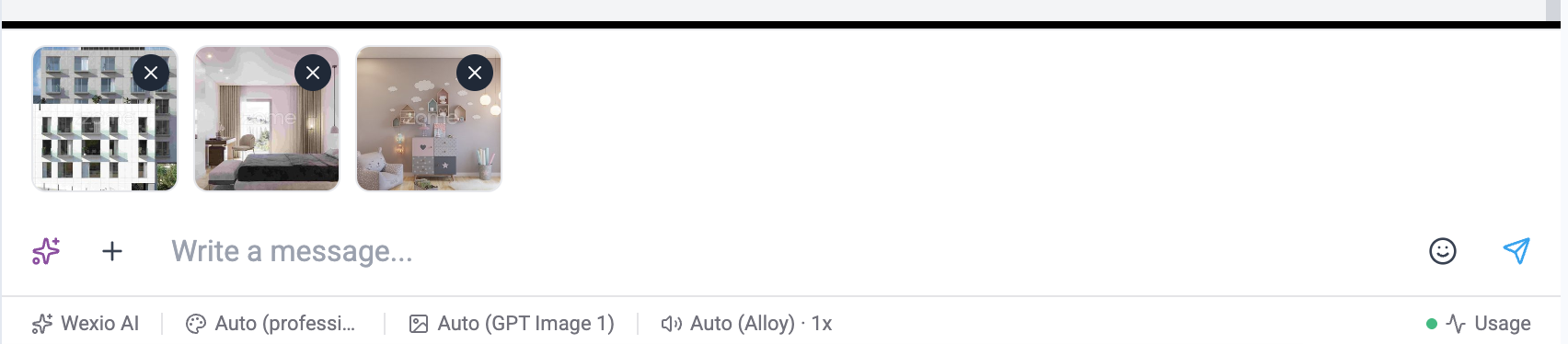
Attached files appear in a grid above the text editor:
- Type-based icons - Each file type shows an appropriate icon
- File name and size - Displayed below the thumbnail
- Remove button - Click × to remove an attachment
- Loading states - Progress indicator during upload
- Image preview - Images show a thumbnail preview
Attachment Type Grouping
Only files of the same type group can be attached together in a single message:
| Group | Allowed together |
|---|---|
| Media | Images + Videos |
| Audio | Audio files only |
| Documents | Document files only |
You cannot mix groups - for example, attaching an image and a document, or a video and an audio file, in the same message. To send different types, send them as separate messages.
Multi-File Attachments
The number of files you can attach per message depends on the channel:
| Channel | Max files per message |
|---|---|
| Telegram | 10 (sent as media group/album) |
| 1 | |
| 1 | |
| Viber | 1 |
On channels that only support 1 file per message, additional attachments are sent as separate messages automatically.
Upload Validation
Before sending, files are validated for:
- File type - Must be a supported format for the current channel
- File size - Maximum size varies by channel and file type
- Max files - Maximum number of attachments per message (channel-dependent)
Upload Progress
Each file shows upload progress while being sent to the server. Files are queued and uploaded sequentially to prevent overloading.
File size limits and supported types vary by messaging channel. WhatsApp has stricter limits than Telegram, for example.