Wait Card
Insert a wall-clock pause between two cards for natural pacing — no user input, no retries
The Wait card adds a fixed wall-clock pause between any two cards in your flow. Drop it in, pick a duration between 5 seconds and 30 minutes, and the run holds for that long before continuing. The customer experiences natural pacing instead of a spam burst of three messages in a row.
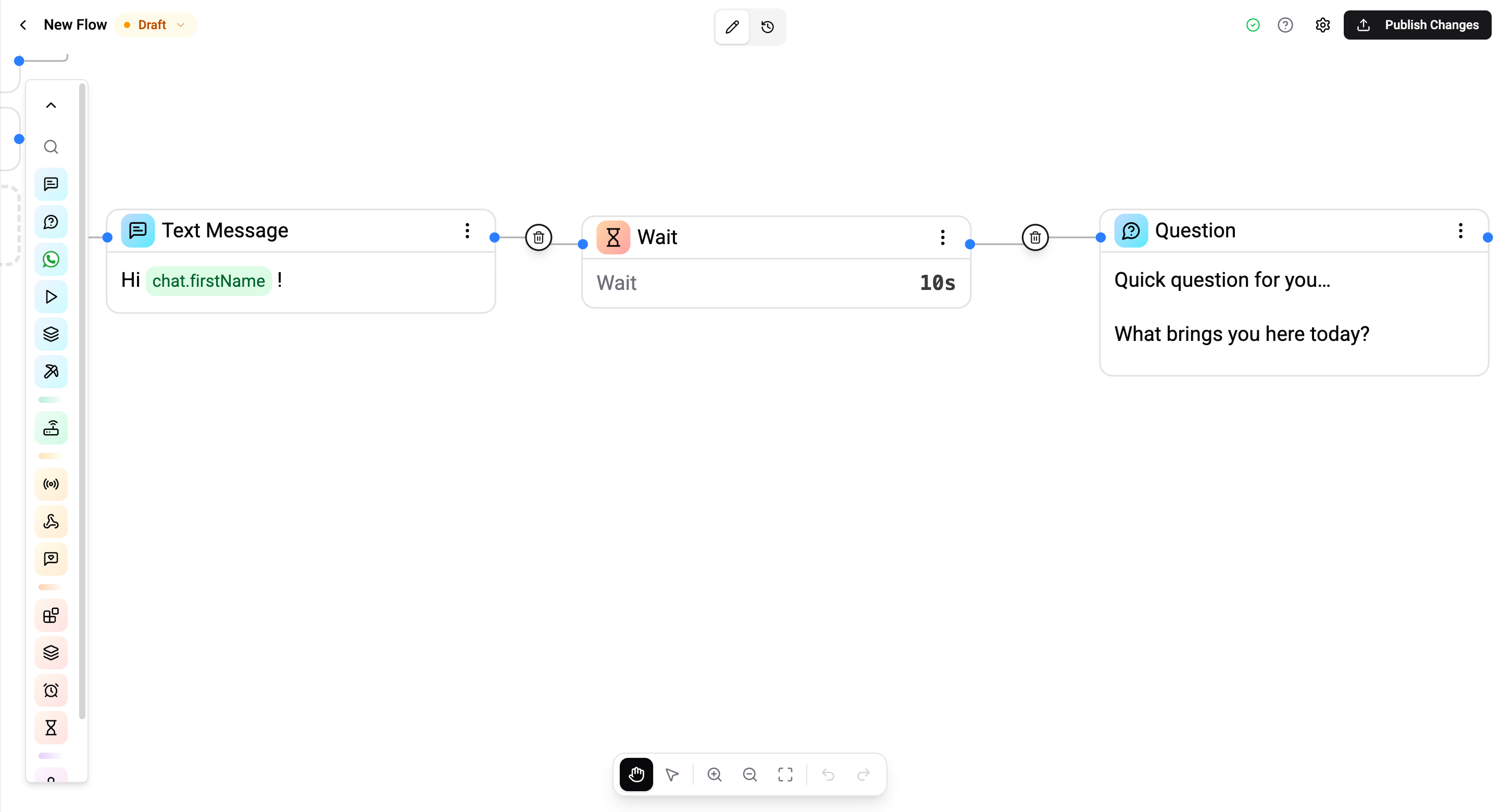
That's it. No user input cancels it. No retries, no nudges. A pure pause.
This card is available on Standard, Pro, and Enterprise plans. Free orgs see it greyed out in the palette with an upgrade hint.
Where It Lives
- Logic category in the card palette, next to Wait Timeout.
- Hourglass icon.
- Can be placed anywhere between two cards — no constraint on what comes before or after (with two small exceptions, see Connection Rules).
Wait vs Wait Timeout
The two cards have similar palette icons but solve completely different problems.
| Wait | Wait Timeout | |
|---|---|---|
| What it does | Static pause between two of your own messages | Reply deadline on a question / button / list card |
| Cancelled by user input? | No — wall-clock only | Yes — incoming message cancels the deadline |
| Duration range | 5 s – 30 min | 60 s – 30 days |
| Retries / nudges? | No | Yes — re-send the prompt or a custom nudge |
| Where it goes in the flow | Anywhere, between any two cards | Must follow an input-accepting card |
| Plan tier | Standard, Pro, Enterprise | Pro, Enterprise |
If you're trying to make the bot feel less spammy → Wait. If you're trying to escalate when a customer goes silent → Wait Timeout.
Configuration
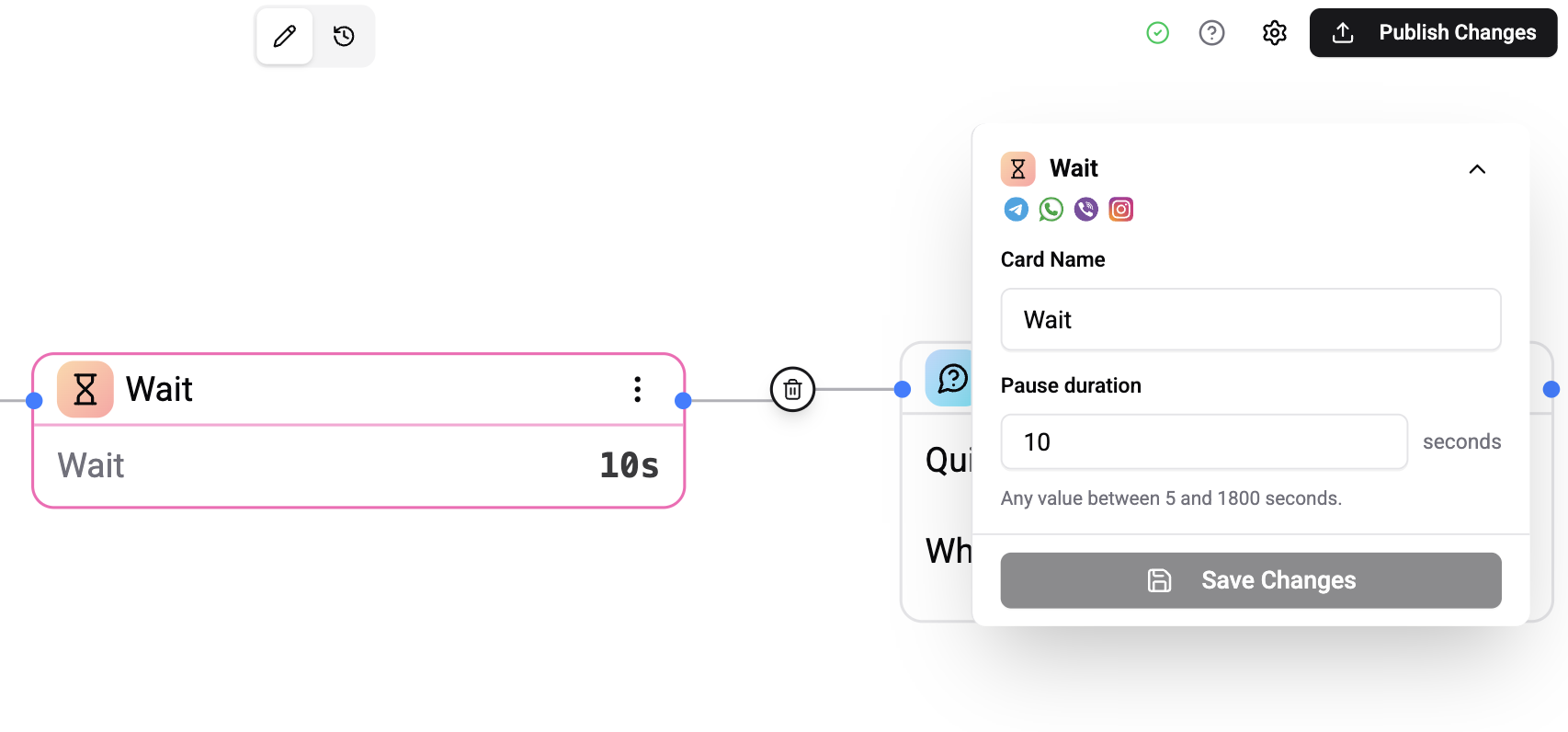
The Wait card has a single setting: how long to pause.
| Setting | Description |
|---|---|
| Duration | Preset dropdown: 5 s / 10 s / 30 s / 1 min / 5 min / 15 min / 30 min / Custom. Picking Custom… swaps in a numeric seconds input clamped to 5 s – 1 800 s (30 min). |
The default for a freshly dropped card is 10 seconds.
Canvas footer
The canvas card shows the configured duration in its footer:
┌────────────────────┐
│ ⏱  Wait            │
│ ────────────────── │
│ Duration     10s   │
└────────────────────┘
The footer reads 5s, 1m 30s, 15m, etc. — whatever's most compact for the value you set.
Connections
The Wait card has one input and one output:
- Input — the card that should fire before the pause.
- Output — the card that should fire after the pause.
Wire any two cards through it. The Wait card itself sends nothing to the contact — it just holds the run.
Text — "Hi {{contact.firstName}}!"
   │
   ▼
Wait — 5 s
   │
   ▼
Text — "Quick question for you…"
   │
   ▼
Question — "What brings you here today?"
Connection Rules
Two wirings are blocked by the publish validator. Both show an inline warning in the canvas before you publish, so you can't accidentally ship them.
| Pattern | Why it's blocked |
|---|---|
| Wait → Wait | Meaningless. Combine the two into one longer pause — the canvas suggests this on hover of the warning. |
| Wait → Wait Timeout | Wait Timeout requires an input-accepting predecessor (Question, Buttons, AI Classification, etc.) so it has something to deadline. A Wait card produces no input, so a Wait Timeout placed after it has nothing to wait on. Put a real input card between them, or remove the Wait. |
The reverse direction — Wait Timeout → Wait — is allowed on both the reply path and the timeout path. Useful when the deadline branch needs to pace its fallback messages.
Common Patterns
Natural pacing between messages
Don't dump three messages in one burst — let each one breathe.
Text  "Welcome to Wexio 👋"
  → Wait (5 s)
  → Text  "I'm here to help you set things up."
  → Wait (5 s)
  → Text  "Want to get started, or just look around?"
  → Buttons  [Get started] [Look around]
Each message lands with breathing room. The whole intro feels welcoming instead of a wall of text.
Beat after AI before follow-up
Send the AI's answer, then give the contact a moment to read it before the next message lands.
AI Text  (generates a thoughtful answer)
  → Wait (5 s)
  → Text  "Anything else I can help with?"
Without the wait, the follow-up clobbers the AI reply before the customer has had a moment to read it.
Queue throttle before operator handoff
Let the bot greet them, sit for 10 s so the on-shift team isn't slammed all at once, then hand off.
Text  "Let me connect you with someone…"
  → Wait (10 s)
  → Assign Operator
Per-branch pacing after Buttons
Different beat per branch — match the tone of the response.
Buttons — "Still interested?" [Yes] [No]
   │
   ├─ Yes ─▶ Wait (5 s)  ─▶ Text "Great! Let me show you."
   │
   └─ No  ─▶ Wait (10 s) ─▶ Text "No problem, catch you later."
The Wait card sits on each branch independently — no special wiring required.
Picking a Duration
Practical numbers:
| Duration | Feels like |
|---|---|
| 5 s | Minimum — a real person catching their breath between messages |
| 5–10 s | "They're thinking" — good after a complex question |
| 10–15 s | Queue throttle, AI generation cover |
| 30 s | Customer rereads the previous message, no rush |
| 1–5 min | Pacing inside a longer onboarding sequence |
| 30 min | Maximum — for slow drips that span a coffee break |
For pauses longer than 30 minutes, use a Broadcast or a Scheduled Trigger instead — those tools are built for delays measured in hours and days.
What the Customer Experiences
Nothing visible during the wait. The chat is quiet for the duration you set, then the next message lands as normal. No "typing…" indicator, no system row, no spinner. Pacing only.
If the customer sends a message during a Wait, the wait still fires — it's wall-clock. Their message arrives in the chat normally and gets handled by whatever's listening downstream (operator, AI, the next trigger run).
Validation
The card surfaces these errors via a red warning icon in the title bar:
| Trigger | Message |
|---|---|
| Duration is blank or < 5 s | Wait must be at least 5 seconds. |
| Duration > 1 800 s (30 min) | Wait can't exceed 30 minutes. |
| Predecessor is another Wait card | Two Wait cards can't follow each other. Combine into one longer pause. |
| Successor is a Wait Timeout card | Wait Timeout must follow an input-receiving card. Remove the Wait or put a Question / Buttons / etc. between them. |
| Total wait window exceeds the flow's execute timeout | The waits on this path total N min, but the flow times out after M min — bump the flow's execute timeout or shorten the waits. |
What Survives a Crash or Republish
| Event | Effect |
|---|---|
| Worker crash mid-pause | Pause survives. Each armed wait is persisted; the next worker picks it up within ~60 s and fires on schedule. |
| Flow republished | All pending waits for that flow are cleared cleanly. In-flight runs end naturally; new runs use the new flow definition. |
| Flow execute timeout | If the wait would push the run past the flow's execute timeout, the run ends at the cap. No stray dispatches. The publish validator warns about this combination before you save. |
Operations Cost
The Wait card itself is a transparent waypoint — running through it costs 0 operations. It doesn't send a message; it just holds the run.
The card that fires after the pause costs whatever that card normally costs (1 op for a Text, 2 ops for a Condition, variable for an AI card, etc.). There's no extra surcharge for going through a Wait.
Limits
| Limit | Value |
|---|---|
| Minimum duration | 5 seconds |
| Maximum duration | 30 minutes (1 800 seconds) |
| Late-fire grace window | 5 minutes (worker downtime / deploy) |
| Per-org inflight cap | 10 000 active waits (soft limit) |
Common Use Cases
- Slow-drip onboarding — pace a multi-message welcome so each line lands with breathing room.
- AI generation cover — let the AI reply land, then take a beat before the follow-up so the contact has time to read.
- Queue throttle — pause before Assign Operator so spikes don't slam the on-shift team.
- Per-branch pacing — different beats on different branches of a Buttons or Condition card.
- Fallback pacing — after a Wait Timeout fires its timeout branch, drop in a Wait so the escalation isn't instant.
FAQ
Can I set 0 seconds for a no-op? No — the minimum is 5 s. If you need an unconditional jump between cards, just connect them directly. No Wait card needed.
Does the customer see a "typing…" indicator during the wait? No. We deliberately don't fake a typing indicator. Some channels support it natively (Telegram does, WhatsApp doesn't), and we don't want to lock the card's behaviour to a single channel. If you want a real typing indicator on Telegram, the platform sends it automatically while an AI generates — use that.
Can I chain Wait cards for an hour-long pause? You can't put two Wait cards directly back-to-back (the validator blocks it), but you can put any other card between them — a Note, a Text, an Update Contact — and the cumulative delay works. For genuinely long delays, use a Scheduled Trigger or a Broadcast.
Does a Wait inside a Branch (if/else) work? Yes. Each branch can have its own Wait downstream — they're independent. Common for "Yes → wait 5 s → reply" vs "No → wait 10 s → ask why".
Does the Wait card use up an Operation each time it fires? No. Operations are billed when a message goes out (or when an AI generation runs). The Wait card doesn't send anything; it just holds the run.
What if a customer sends a message during the wait? The wait still fires when its timer elapses — it's wall-clock, not input-triggered. Their inbound message routes through whatever's listening (operator, AI auto-reply, another trigger). If you want the inbound to short-circuit the wait, you want a Wait Timeout instead.
Related
- Wait Timeout — the sibling card for reply deadlines (60 s – 30 days, with retries and nudges).
- Broadcasts — for delays measured in hours and days, or one-off sends at a specific time.
- Scheduled Trigger — fire a flow on a cron schedule or relative to a contact date field.
- Flow Editor — palette, connections, publishing.