Wait Timeout Card
Add a reply deadline to an input-receiving card with optional retries and a timeout escalation path
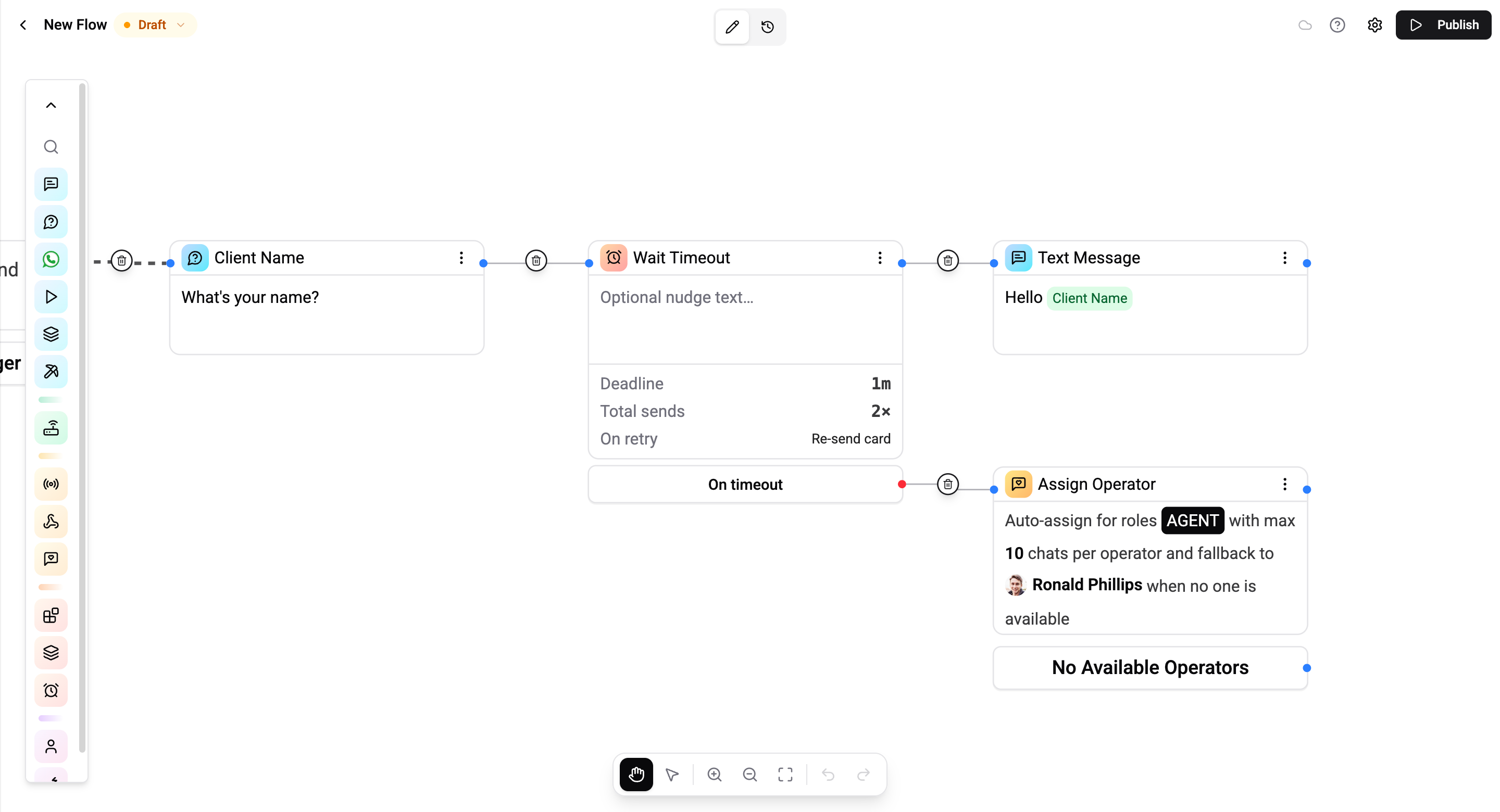
The Wait Timeout card adds a reply deadline to the input card that comes before it (Question, Buttons, AI Classification, etc.). Without it, an input card pauses the run forever - the contact gets a question, walks away, and the flow sits there. With Wait Timeout, the run automatically takes a different path after a configurable wait, optionally nudging or re-sending the prompt first.
It's the answer to "what happens if the contact doesn't reply?"
This card is available on Pro and Enterprise plans. Lower tiers do not show it in the card palette.
Where It Lives
- Logic category in the card palette, next to Sub-flow.
- Hourglass icon.
- Always placed immediately after an input-receiving card. It cannot be the first card in a flow and cannot follow a non-input card.
Configuration
The card splits its configuration between the canvas card body and the settings panel on the right. The canvas card body is the primary edit surface - the settings panel only carries the timing fields.
Settings panel - timing
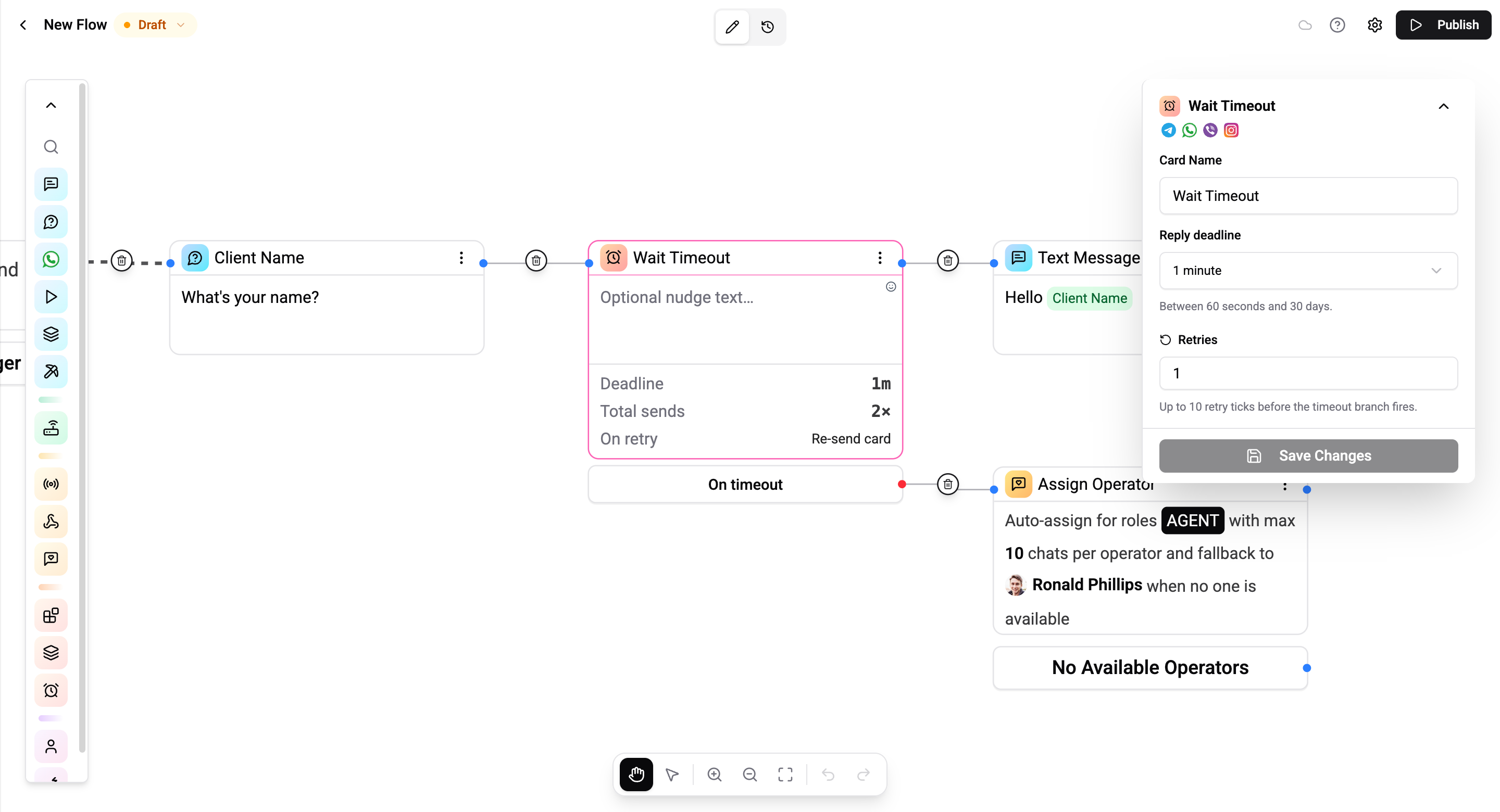
| Setting | Description |
|---|---|
| Reply deadline | Preset dropdown: 1 min / 5 min / 15 min / 1 hour / 1 day / 7 days / Custom. Picking Custom… swaps in a numeric seconds input clamped to 60 s – 30 days. |
| Retries | Integer 0–10. Default 0 (first timeout is final). When > 0, the card re-engages the contact that many extra times before the final timeout fires. |
Canvas card body - retry behavior
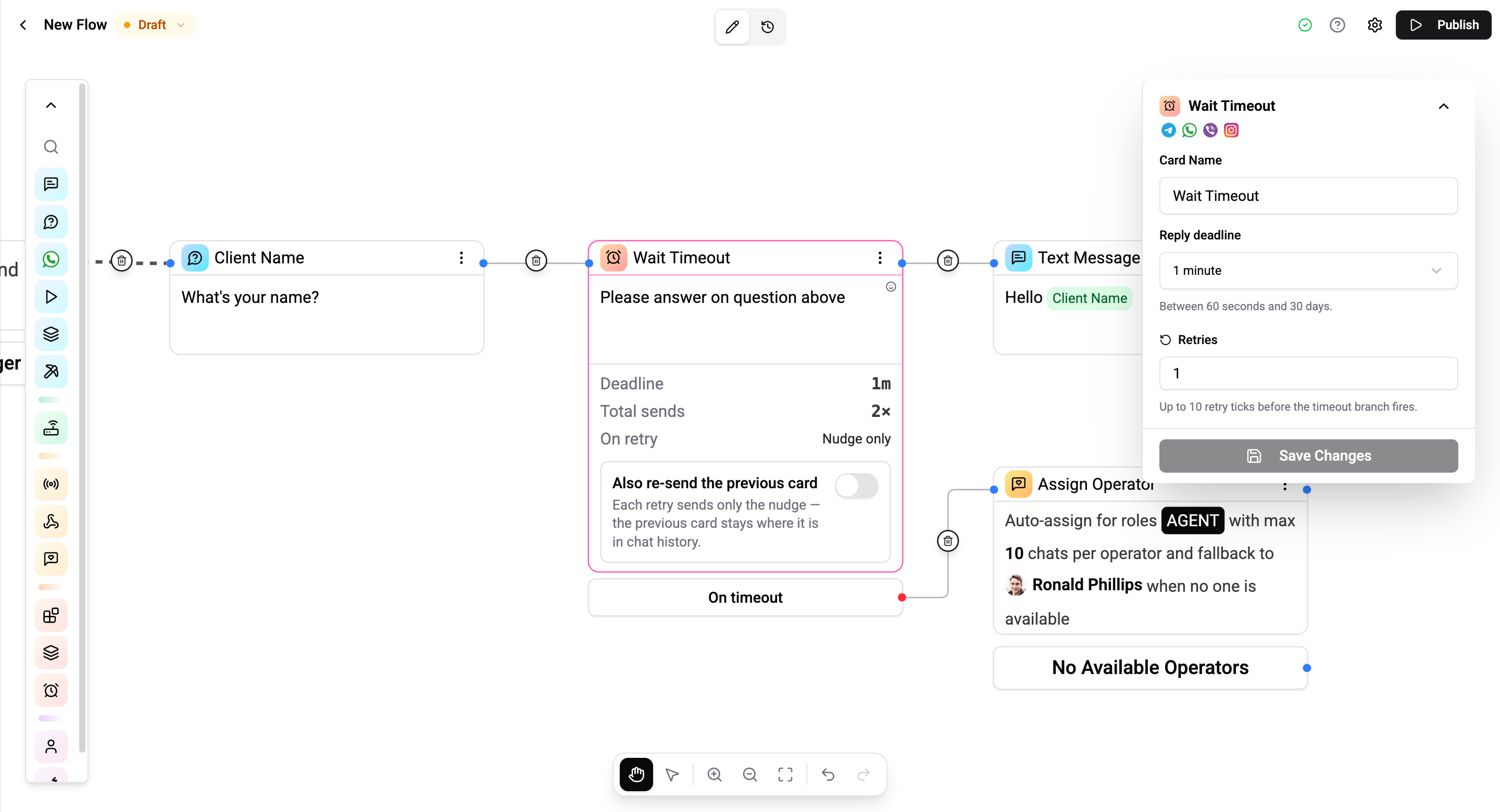
The card body is a Tiptap editor (the same editor Question and Text cards use). What you type here is the nudge text sent on each retry tick. Variables like {{user.firstName}} are interpolated.
| State | Retry tick behavior |
|---|---|
| Editor empty | Re-send the previous card verbatim. |
| Editor filled | Send the nudge text only. |
| Editor filled + "Also re-send the previous card" switch on | Send the nudge text first, then re-send the previous card (so the nudge lands above the re-sent prompt in the chat scroll). |
The "Also re-send the previous card" switch only appears when retries > 0 and the nudge editor has content.
Stats footer
A small footer on the canvas card surfaces the current configuration at a glance:
| Row | Meaning |
|---|---|
| Deadline | Humanised duration: 1m, 10m, 1h, 1d, 30d. |
| Total sends | Shown only when retries > 0. Reads as 1 + retries (initial send + retry ticks). |
| On retry | What fires per retry tick: Re-send card, Nudge only, or Nudge + re-send card. |
When the predecessor uses per-input branching (Buttons, AI Classification, WA List, AI Agent, etc.), an italic line replaces the row-of-config: "Reply handled by the previous card's branches" - a reminder that the card's reply-branch handle is unreachable for that predecessor (see Per-Predecessor Behavior).
Connections
The card has two output handles:
- Reply branch (right edge of the card body) - taken when the contact responds in time. Only meaningful for Question-style predecessors that don't have their own per-input routing.
- On timeout (red footer block under the card) - taken once all retries have been exhausted with no reply. Connect this to whatever should happen when the contact has gone silent: an Assign Operator card, a "we'll try later" Text card, an end-of-flow, etc.
┌────────────────────┐      ┌────────────────────┐      ┌──────────────┐
│   Question card    │ ───▶ │  Wait Timeout      │ ───▶ │  Text card   │  (reply branch)
│   "What's your     │      │  10 min × 0 retry  │      │  "Thanks!"   │
│    name?"          │      └────────────────────┘      └──────────────┘
└────────────────────┘                │
                                      └─ On timeout ─▶  ┌──────────────┐
                                                        │ Assign       │
                                                        │ Operator     │
                                                        └──────────────┘
Per-Predecessor Behavior
Different input cards interact with the Wait Timeout differently - particularly around whether the reply branch is reachable and whether retries are allowed.
| Predecessor | Reply branch | Timeout branch | Retries allowed |
|---|---|---|---|
| Question | ✓ | ✓ | ✓ |
| Buttons (and media variants) | - (unreachable) | ✓ | ✓ |
| AI Classification | - (unreachable) | ✓ | ✓ |
| AI Agent | - (unreachable) | ✓ | - |
| WA List Message | - (unreachable) | ✓ | ✓ |
| WA Template (with quick-reply buttons) | ✓ (via template) | ✓ | ✓ |
| WA Catalog / Product / Products | - (unreachable) | ✓ | - |
Why some reply branches are unreachable. Cards like Buttons, AI Classification, and WA List have their own per-input branches - clicking a specific button or matching a specific class routes the reply through that branch directly. The Wait Timeout's reply handle is only consumed when the predecessor has a single, undifferentiated "got a reply" path (Question), so for the rest, only the timeout branch is meaningful.
Why retries are blocked on AI Agent / WA Catalog / Product / Products.
- AI Agent already has its own multi-turn dialogue loop - re-sending its prompt would conflict with the agent's own dynamic re-prompting. (The deadline still works - it just resets each agent turn instead of counting down to a re-send.)
- WA Catalog / Product / Products can't be re-blasted without risking WhatsApp policy issues and looking spammy. The card's own interaction branch handles the engagement path; the timeout handles the silence.
When you pick a predecessor where retries are disallowed, the Retries input auto-locks to 0 in the settings panel.
Validation
The card surfaces these errors via a red warning icon in the title bar (hover for the full list):
| Trigger | Message |
|---|---|
| Reply deadline is blank or 0 | Set a reply deadline. |
| Reply deadline < 60 seconds | Wait must be at least 60 seconds. |
| Reply deadline > 30 days | Wait can't exceed 30 days. |
| Retries is negative or non-integer | Retries must be a whole number ≥ 0. |
| Retries > 10 | Retries can't exceed 10. |
| Retries > 0 with a disallowed predecessor | Retries aren't allowed for this predecessor - re-blasting its payload isn't supported. |
| Predecessor is another Wait Timeout | Two Wait Timeout cards can't follow each other. |
| Predecessor isn't input-receiving | Wait Timeout must follow an input-receiving card (Question, Buttons, AI Classification, etc.). |
| Total wait window exceeds the flow's execute timeout | This wait can take up to N min, but the flow times out after M min - bump the flow's execute timeout or shorten the wait. |
A bare Wait Timeout with no predecessor doesn't error - the editor treats that as in-progress wiring so you can place the card before connecting it.
Edge Warnings
Some connections save fine but the runtime will never traverse them. The editor renders these as dashed red edges with a red-bordered trash button at the midpoint and a tooltip explaining why. Click the trash to delete.
| Pattern | Why it's dead |
|---|---|
| Wait Timeout's reply branch when predecessor uses per-input branching | The button click / class / row routes the reply via its own branches; the Wait Timeout's reply path is bypassed. |
| Per-input branching card's default next handle pointing anywhere except a Wait Timeout | The card's default next path is only consumed by a Wait Timeout - pointed elsewhere it's dropped at runtime. |
| A specific button / row / branch handle terminating on a Wait Timeout | The wait deadlines the preceding card's reply, not the destination of a specific click. Connect the source card itself instead. |
The editor re-runs detection every time the graph changes, so fixing the wiring (e.g. flipping the predecessor to a Question card) clears the warning automatically.
Default Values
A freshly dropped Wait Timeout card starts with:
- Reply deadline - 10 minutes.
- Retries - 0 (first timeout is final).
- Nudge text - empty (retries re-send the previous card verbatim).
- Also re-send the previous card - off (only relevant when nudge text is set).
10 minutes covers the 80% case (give the contact a coffee break to reply); pick a different preset if you need shorter or longer.
Examples
Question with deadline (no retries)
Give the contact 10 minutes to answer. If they reply, continue. If they don't, end the run.
Question - "What's your name?"
   │
   ▼
Wait Timeout - 10 min × 0 retries
   │
   ├─ reply ───▶ Text - "Thanks!"
   │
   └─ on timeout ──▶ (end)
Question with retries and escalation
Ask the contact. If they don't answer in 10 minutes, ask again - up to 2 retries. If they still don't answer after 3 total prompts, send a "we'll try later" message.
Question - "What's your name?"
   │
   ▼
Wait Timeout - 10 min × 2 retries
   │
   ├─ reply ───▶ Text - "Thanks!"
   │
   └─ on timeout ──▶ Text - "We'll try again later."
What the contact sees:
| t (min) | Event |
|---|---|
| 0 | Question sent |
| 10 | First retry - Question re-sent |
| 20 | Second retry - Question re-sent |
| 30 | Final timeout - "We'll try again later." |
If the contact replies at any point, the deadline is cleared and the reply branch fires.
Buttons with timeout escalation
Buttons handle their own click routing. Use Wait Timeout only for the silence path.
Buttons - "Are you still interested?" [Yes] [No]
   │
   ├─ Yes click ──▶ Text - "Great, here's the deal."
   ├─ No click  ──▶ Text - "No worries, talk soon."
   │
   ▼  (default "next" handle on the Buttons card)
Wait Timeout - 5 min × 0 retries
   │
   └─ on timeout ──▶ Assign Operator - escalate
The reply branch is unreachable here - clicks route through the Buttons' per-button branches before reaching the Wait Timeout. Only the timeout branch matters, and it fires when the contact ignores the buttons entirely.
Re-engagement nudge
Send a question, wait 10 minutes, then send a friendly nudge ("Still there? 👋"). Up to 2 nudges. Final timeout escalates.
- Nudge editor:
Still there? 👋 - Retries:
2 - Also re-send the previous card: off
What the contact sees:
| t (min) | Message sent |
|---|---|
| 0 | "What's your name?" |
| 10 | "Still there? 👋" |
| 20 | "Still there? 👋" |
| 30 | Final-timeout branch fires |
If you turn on Also re-send the previous card, each retry sends the nudge first, then re-sends the original prompt - useful when the contact may have lost context.
End-of-flow wait
A Wait Timeout with no on-timeout connection ends the run silently when the deadline fires. Useful for "save whatever they typed within 24h, then close the conversation."
Strict Mode Interaction
When the parent flow has Strict Mode enabled and the contact sends the wrong type of input (e.g. a text reply to a Buttons card), the card responds with the strict-mode error message and the wait stays armed. The contact hasn't actually replied to the prompt, so the deadline keeps ticking and doesn't burn a retry. Only valid input - a button click, a list selection, a properly classified text - counts as a reply for the purposes of the wait.
In non-strict mode (default), any inbound message cancels the wait.
Republish Behavior
When you republish the parent flow, all active Wait Timeouts on prior versions of that flow are invalidated. Pending runs that were waiting end naturally - no surprise messages from a flow version that no longer exists.
This matches how scheduled triggers behave on republish: the published version is the single source of truth, and stale waits don't leak across edits.
Operations Cost
The Wait Timeout card itself is a transparent waypoint - running through it costs 0 operations.
Each scheduler-fired event on top of the wait costs 1 operation:
- A retry tick (re-send / nudge / nudge + re-send) - 1 op.
- The final-timeout fire (dispatching the on-timeout target) - 1 op.
So a 10 min × 2 retries wait that ends with a final timeout costs 3 ops for the scheduler events themselves, plus whatever the cards on the timeout branch cost.
A wait that's cancelled by a reply is 0 ops - the cancellation hook clears the row before any tick fires.
Common Use Cases
- Re-engagement loops - Question → Wait Timeout (10 min × 2 retries with nudge) → Assign Operator. Catches contacts who walked away mid-flow.
- Time-bounded support - Buttons → Wait Timeout (5 min × 0 retries) → Assign Operator. If the contact doesn't pick a self-serve option, escalate to a human fast.
- Survey deadlines - Question → Wait Timeout (24h × 0 retries) → end. Capture answers within a day, otherwise close the conversation.
- Multi-step booking - chain several Question + Wait Timeout pairs to walk a contact through a multi-step form with per-step deadlines.
- AI Agent guard - AI Agent → Wait Timeout (15 min) → Text ("session ended"). If the contact stops replying mid-conversation, exit the agent gracefully.
Limits
| Limit | Value |
|---|---|
| Minimum reply deadline | 60 seconds |
| Maximum reply deadline | 30 days (2 592 000 s) |
| Maximum retries | 10 |
| Late-fire grace window | 5 minutes (worker downtime / deploy) |
| Maximum total wait | Bounded by the parent flow's execute timeout - deadline × (1 + retries) must fit within it |
| Per-org inflight cap | 10 000 active waits (soft limit - re-arms exempt) |
Related
- Wait - the sibling card for static pauses (5 s - 30 min) between any two cards. Different problem: pacing your own messages, not deadlining a customer reply.
- Question, Button, AI Classification, WA List - the input-receiving predecessors most often paired with Wait Timeout.
- Assign Operator - typical timeout escalation target.
- Sub-flow - for runtime pauses tied to a child flow's lifetime instead of a clock.