Referral
Invite other organisations to Wexio and earn discounts on your own subscription
Share your invite link with other businesses. When they pay for their first invoice, you earn a discount on your own subscription, and they get a free month.
Open Referral in the lower group of the sidebar, above Support, or go to Settings, then Billing, then Referral. Anyone in the organisation can open the page and invite. Only the Owner applies a reward.
Your Invite Link
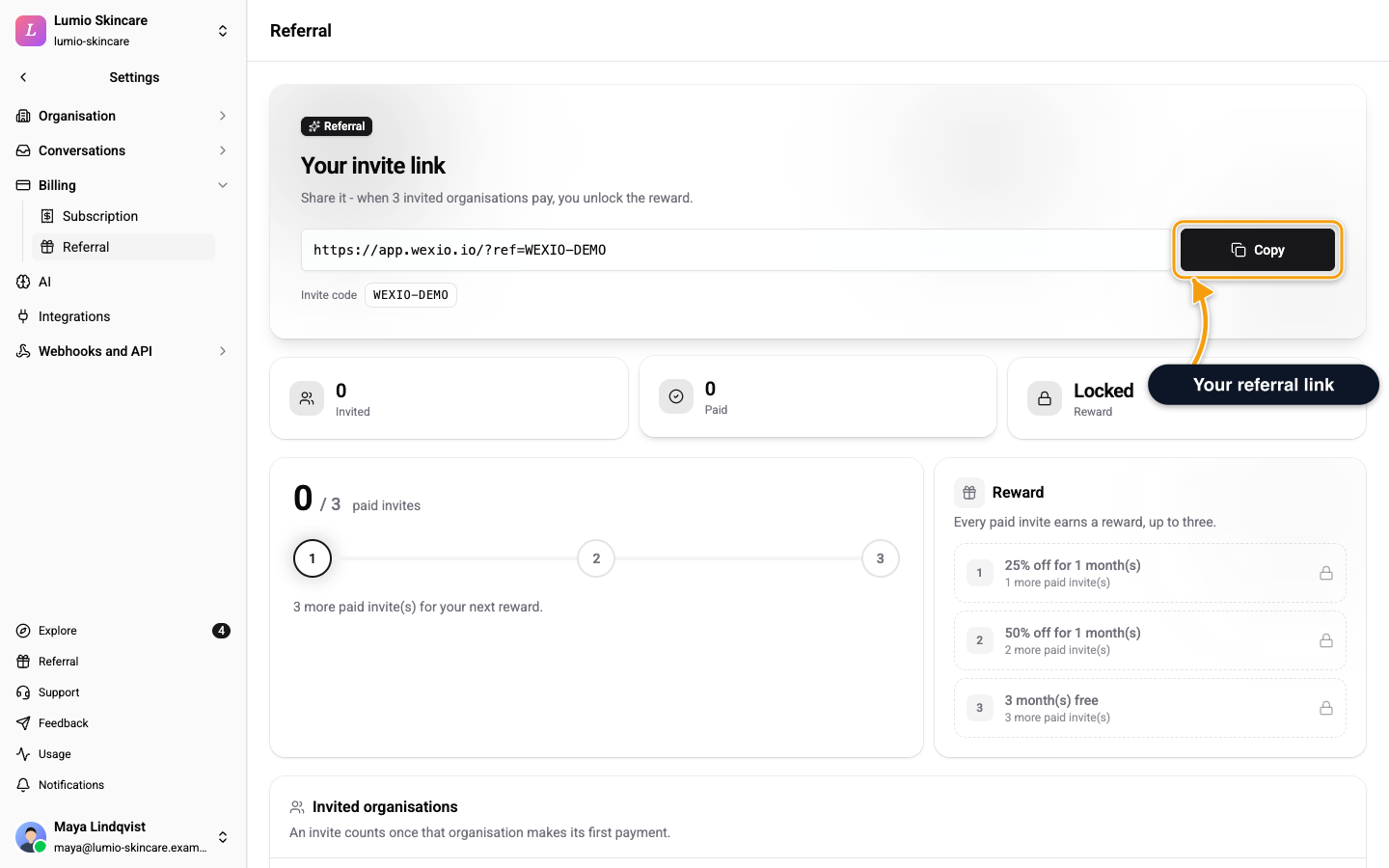
The top of the page shows Your invite link and your Invite code. Click Copy to copy the link. A person who opens it lands on sign-up with your code already filled in.
If someone signs up without the link, they can enter your code in the Have a referral code? field when they create their organisation.
If you see Your invite link is being prepared. Refresh in a moment., reload the page.
What Counts as a Paid Invite
An invited organisation counts once it makes its first payment. A free trial does not count, because nothing is charged yet.
The page shows three numbers: Invited, Paid and Reward. The reward reads Locked until your first paid invite, then Ready. Invited organisations lists each one with the status Waiting or Paid.
Rewards
Each of your first three paid invites earns one reward. A fourth and later invites earn nothing.
| Paid invite | Reward |
|---|---|
| 1st | 1 month at 25% off |
| 2nd | 1 month at 50% off |
| 3rd | 3 months free |
When you earn a reward, Wexio emails you a code and shows it on the page. Each code works once, only for your organisation.
Apply a Reward
- Open Referral.
- Find the reward under Reward and click Apply.
Apply it by the date shown. A code is valid for 180 days from the day you earn it.
Wexio works out the discount from the plan you are on when you apply the code. On a monthly plan it comes off your next invoice, or off each of the next invoices for a 3-month reward. On a yearly plan the whole reward comes off your single yearly invoice.
You may see one of these messages:
- You do not have permission to apply this code. Only the person who manages billing, the Owner, can apply a reward. See Plan & Billing.
- A discount is already active on your subscription. Apply the code after the current discount ends.
- Choose a plan. You need a paid plan before a reward has a price to come off.
- Could not apply this code. Try again, and contact support if it keeps failing.
The Welcome Gift
An organisation that signs up with a referral code gets 1 month free on any plan. The card on the page reads You have 1 month free. Click Redeem on billing and apply the code on the plan you choose. The card shows the date to apply it by.
Who Cannot Use Referral
An organisation managed by a tech provider earns no rewards. For a tech provider and its client organisations the Referral page redirects to billing, because there is no subscription for a reward to discount.