Calendar Integrations
Connect Google Calendar, Cal.com or Calendly so an AI assistant can offer free times and book meetings
Connect a calendar so an assistant can find free times, book meetings and cancel them for your customers. The assistant uses the calendar through a skill, so connecting the calendar is the first step and the skill is the second.
Plans and Roles
| Calendar | Plan |
|---|---|
| Google Calendar | Standard, Pro, Enterprise |
| Cal.com, Calendly | Pro, Enterprise |
On a lower plan the Connect button shows Upgrade your plan to Standard or higher to connect this integration. (or Pro for Cal.com and Calendly). Only Owners and Admins can connect, update, pause or disconnect integrations. Editors can pick the default Cal.com event type. See Integrations.
Connect a Calendar
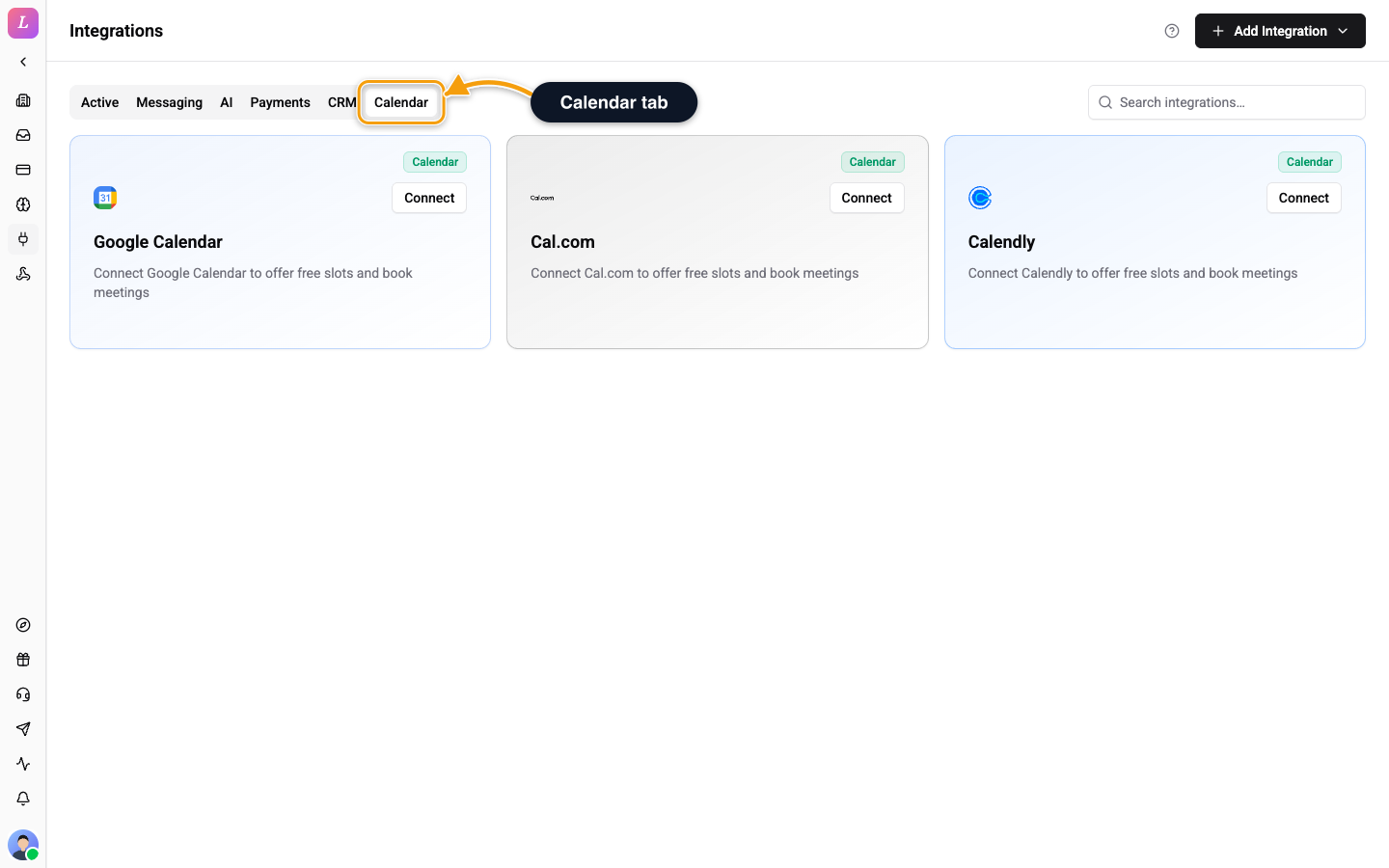
- Go to Settings → Integrations and open the Calendar tab.
- Click Add Integration, then pick your calendar in the Calendar group. You can also click Connect on the calendar's card.
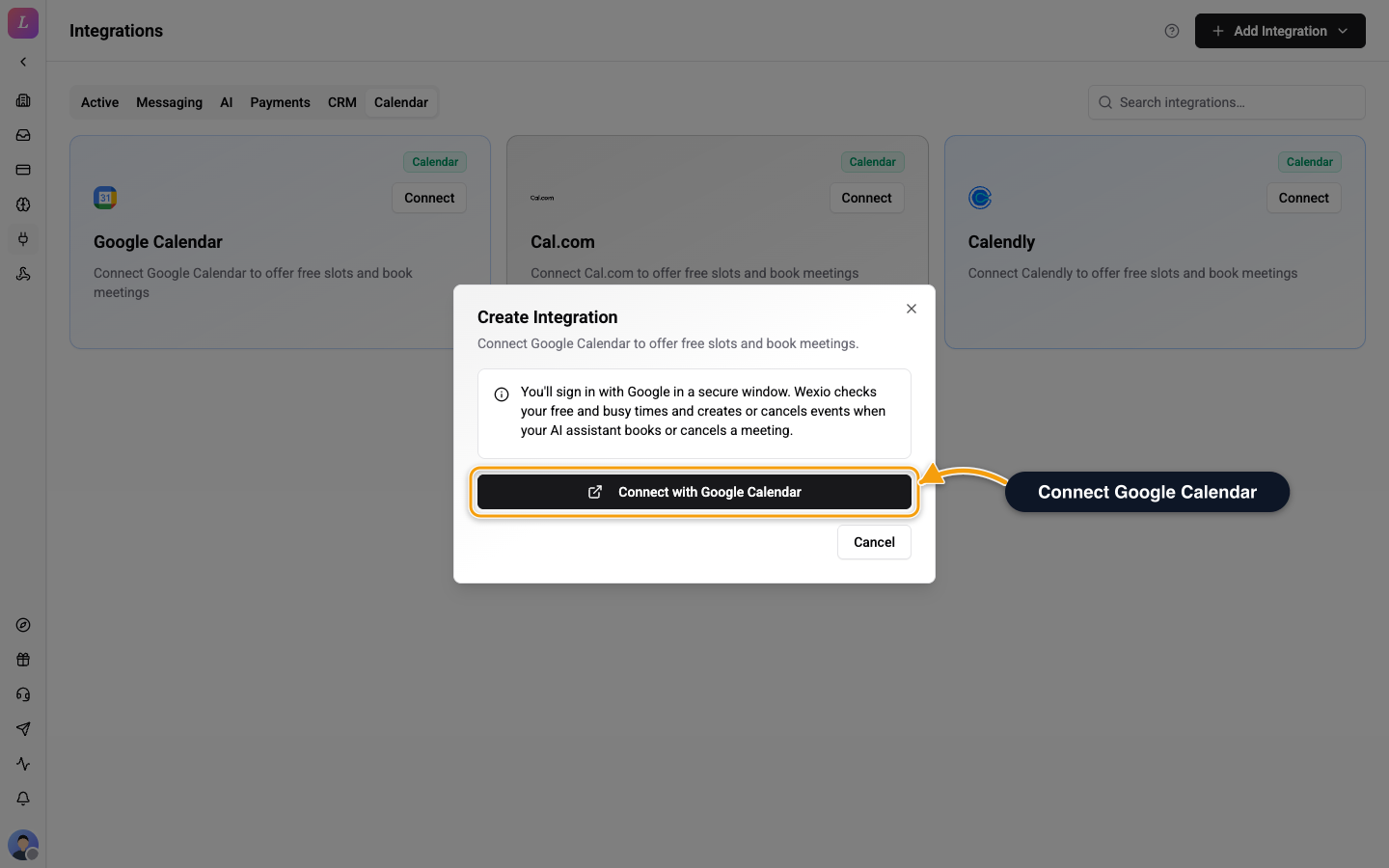
- Click Connect with Google Calendar, Connect with Cal.com or Connect with Calendly.
- Sign in and allow access in the secure window that opens.
Connecting starts only from the dashboard and only for Owners and Admins. Editors and Agents see Only owners and admins can connect integrations. instead of the button. Old direct connect links no longer work, so open Settings → Integrations and connect from there. If the connection fails, Wexio shows a message such as The connection link expired. Start again. or Access was denied. Allow access to connect. Start the connection again from the card.
The card shows the status Connected when the sign-in is done. All three calendars use the same sign-in flow. They differ in what happens next.
What Differs by Calendar
| Google Calendar | Cal.com | Calendly | |
|---|---|---|---|
| Free times come from | Your free and busy times and your organisation's business hours | The event type you pick | Your first active event type |
| Extra setup | Set business hours | Pick a default event type | None |
| Booking | The assistant creates the event | The assistant creates the booking | The assistant sends the customer a link, and the customer confirms in Calendly |
Google Calendar
Wexio checks your free and busy times and creates or cancels events when your AI assistant books or cancels a meeting. It offers slots inside your organisation's Business hours in Settings → General. When no hours are set, it offers Monday to Friday, 09:00 to 17:00.
Cal.com
After you connect, the card shows Pick an event type to enable AI booking. Click it, choose an event type in the Default event type dialog and click Save. The assistant offers and books only this event type. Until you pick one, the assistant cannot book.
If the dialog says Cal.com connection expired - reconnect to load your event types., click Reconnect Cal.com.
Calendly
Calendly does not let an integration book on a customer's behalf. The assistant offers free times, then shares a Calendly link and the customer confirms the time there. The booking stays pending until they do.
Wexio uses your first active event type. You cannot choose another one.
What the Assistant Can Do
| Action | What it does |
|---|---|
| Find calendar slots | Lists free times, in the customer's time zone when the assistant knows it. |
| Book a meeting | Books the time the customer asks for, or offers the nearest free times. |
| List bookings | Finds the customer's upcoming bookings by email. |
| Cancel a booking | Cancels one booking. If the customer has several, the assistant asks which. |
There is no separate reschedule action. To reschedule, the assistant cancels the old booking and books a new time. If you connect more than one calendar, free times are merged from all of them unless you pick one on the skill.
Disconnect a Calendar
Click the disconnect icon on the card and confirm Disconnect Integration. Wexio clears the stored credentials and keeps the associated data. Until you reconnect, a skill that needs a calendar shows No Calendar integration connected. and the assistant cannot offer or book times.
Disconnecting a calendar stops AI booking at once. Customers who ask for a meeting get no free times until you reconnect.
Related
- Skills - the skill that books meetings with your calendar.
- General Settings - the business hours Google Calendar slots follow.
- Stripe - let the assistant look up payments and refund them.