Product and Order Messages
WhatsApp product cards and customer orders in the thread
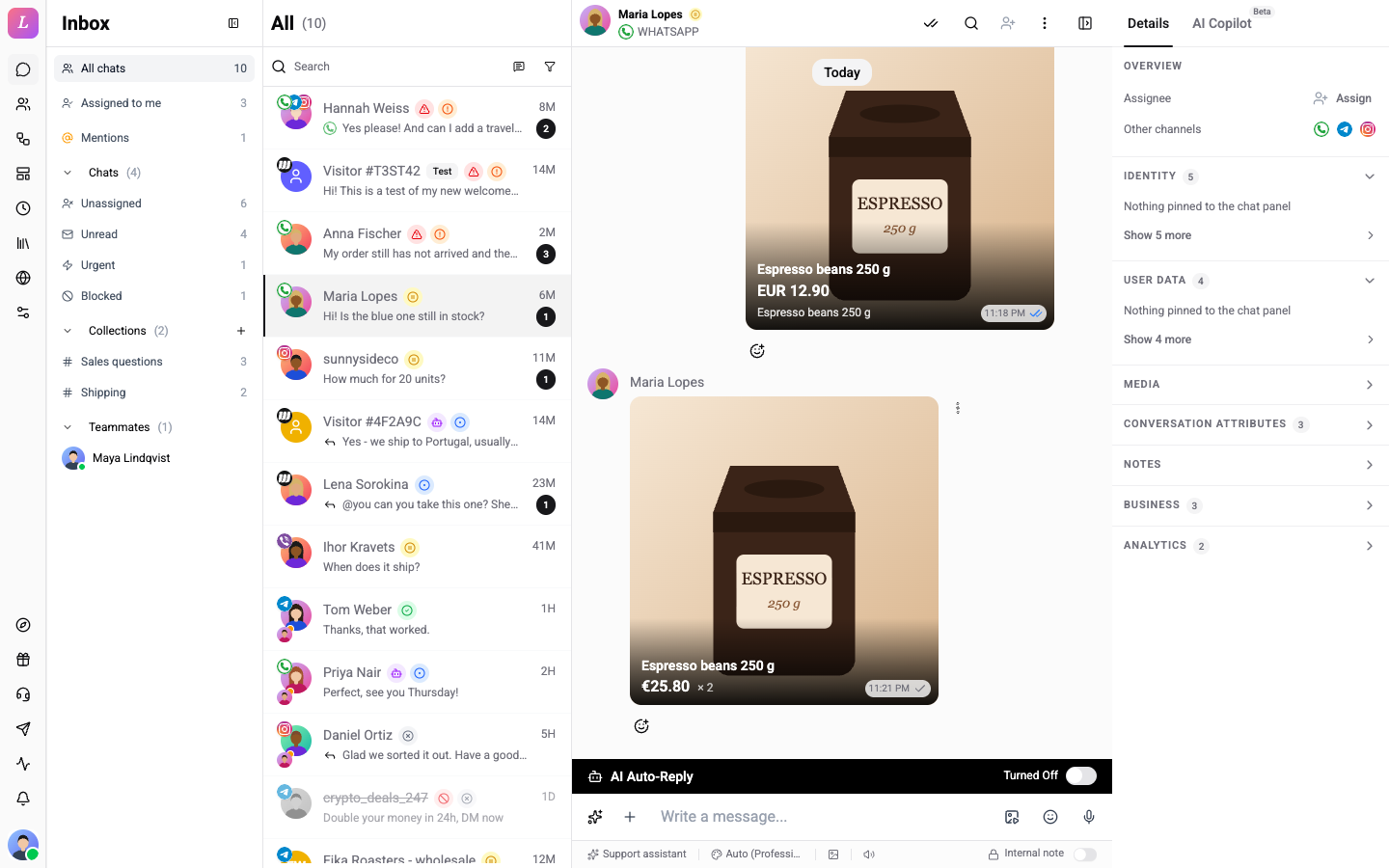
A product message shows a product from your WhatsApp catalog. An order message shows what a customer put in their cart and sent to you. Both come with the WhatsApp catalog connection. WhatsApp catalogs are not available yet. They open after Meta approves them, so you will not see these messages until then.
What You See
Each product is a card the size of a photo, with the image, the name and the price across the bottom. If a message holds several products, the cards stack like a deck. Swipe or use the arrows labelled Previous product and Next product to go through them.
Click a card to open the product images (Open product images) with the product details.
| Message | What it shows |
|---|---|
| Product | The products you sent or the customer asked about, with the message text. |
| Order | The products a customer ordered, each with Quantity. Several products show a Total. |
A product that the catalog no longer knows reads Unknown product. A bare catalog link reads Catalog.
In the chat list, the last-message preview names the type.
Send Products
You send product cards from a flow or a catalog template, not from the editor text field. Orders arrive from the customer. A flow can react to them.
Related
- Message Types - every message the thread can show.
- WhatsApp Products Card - send product cards in a flow.
- WhatsApp Templates - templates with product headers and buttons.