Booking Emails and Calendar Files
The emails your customers get when a booking is confirmed, moved or cancelled, with a calendar file and Add to calendar buttons
When a booking is made, moved or cancelled, Wexio emails the customer. Confirmed and moved bookings come with a calendar file and buttons to add the booking to Google Calendar or Outlook. The email is in the customer's language.
When an Email Is Sent
| Event | Email heading |
|---|---|
| Booking confirmed | Your booking is confirmed |
| Booking moved to a new time | Your booking was rescheduled |
| Booking cancelled | Your booking was cancelled |
The subject reads Booking confirmed: {service} at {business}, Booking rescheduled: {service} at {business} or Booking cancelled: {service} at {business}. With hidden details on, the subject is for example Your appointment at {business} on {when} (see below).
An email goes out only when:
- The booking is in the built-in Wexio calendar. Bookings in Google Calendar, Cal.com or Calendly are mailed by those services, not by Wexio.
- The booking has a guest email. Without an address no email is sent, and the booking itself still works. When you book for a customer in The Calendar Page, fill in Guest email (optional). The hint reads Optional. Wexio sends the guest a confirmation email with a calendar file.
To protect your customers from spam, Wexio sends at most 10 booking emails a day to one address and 500 a day for your whole organisation.
What the Customer Sees
- Service and time as a start and end, in the booking's time zone.
- With, Price and Where rows when they apply. Price is shown only. Nothing is charged. People shows for a group booking.
- Online with a Join the meeting button, or Join Google Meet for a Google Meet link, when the booking has a meeting link.
- Previously, on a moved booking, with the old time.
- Questions or changes? Just reply to this email. Replies go to your organisation's email, when you have set one.
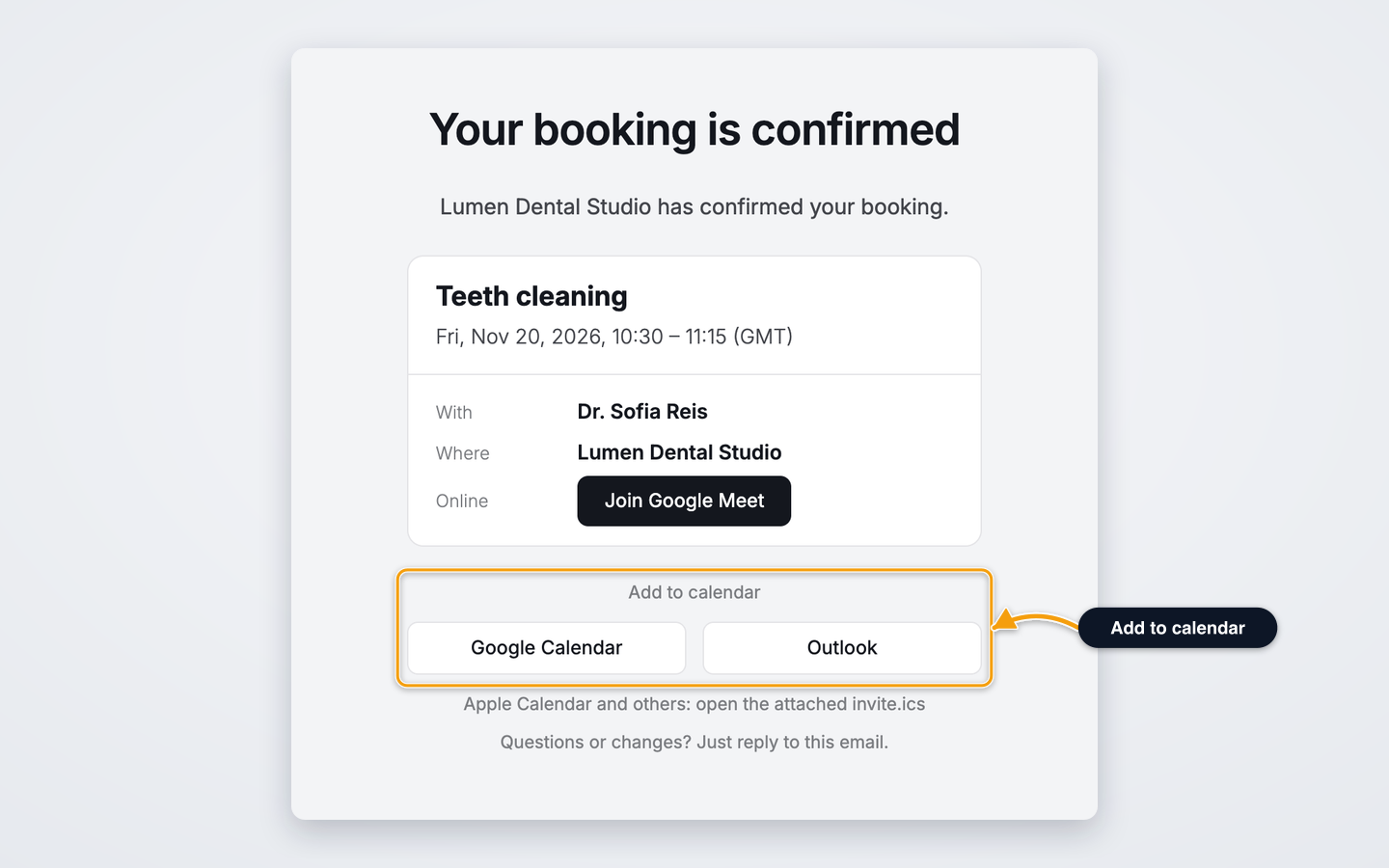
Calendar File and Buttons
Every email has a calendar file, invite.ics, attached. Confirmed and moved emails also show Add to calendar with two buttons, Google Calendar and Outlook. For Apple Calendar and other apps, the email says to open the attached invite.ics.
A moved booking updates the same event in the customer's calendar instead of adding a second one. The cancelled email carries the cancellation in its file.
Languages
Emails are sent in English, Deutsch, Italiano, Polski, Português or Українська, in the language saved on the contact. Without a saved language, the email is in English.
Hide the Service Name
For healthcare or other private services, you can keep the service out of the email.
- Open Settings, then Availability.
- Find the Closed dates card and switch on Hide service details in booking emails. The hint reads Booking emails then show only the time, not the service name. Useful for healthcare.
The switch saves at once and you see Email setting saved. You do not need Save closed dates. Only the Owner can change it.
The email then says, for example, Your appointment at and your business name with the time, and the calendar file is titled Appointment at and your business name. The service, price and place are left out. The name of the person who performs it still shows.